LOCAL = @__DIR__
using Pkg
Pkg.activate(dirname(LOCAL))
Deep Learning for Covariate Modelling in NLME Models
1 Introduction
The first unit of the AI for Drug Development course presented the fundamentals of machine learning (ML). With the current tutorial, we move on to the second unit: “Neural Networks and SciML”. Deep learning is the subfield of ML focused on neural networks, which we will explore in this tutorial, alongside regularization, training approaches and other topics. The tutorial supposes familiarity with the concepts from the previous tutorial, and is organized as follows:
- Read in and pre-process the data
- Perform some exploratory data analysis
- Represent covariates in form suitable for MLJ models (
inputs) - Fit a PK model to obtain empirical Bayes estimates (EBEs) (
outputs) - Perform ordinary linear regression to related
outputstoinputs - Compare with LASSO and Ridge regression
- Discuss neural network building blocks
- Try a basic neural network model
- Add early stopping and learning rate shrinkage
- Apply some explanatory AI tools and derive feature importance rankings
- Repeat our analyses using a synthetic version of the data
Furthermore, as in the previous tutorial, a study in pharmacometrics will be used as a source of context, data and discussions. This time, “Pharmacokinetics of Quinidine in Male Patients” (Verme et al. 1992) was chosen. The authors analyzed data from 139 adult hospitalized men receiving oral therapy of quinidine, an antiarrhythmic drug. In previous works, quinidine has shown considerable intersubject variability in pharmacokinetic (PK) parameters, prompting the search by the authors after predictive covariates, specially for clearance. We will use the resulting data to several train linear models and a neural network to map baseline covariates to empirical bayes estimates.
While ultimately we will fail to extract any predictive value in the covariates for PK parameters, the same analysis is useful in the modeling of other drugs, and it might help in the case of a larger Quinidine clinical trial. A proof-of-concept is included in this case study by repeating our analysis using a synthetic data set.
2 Setup
Moving on to environment setup, if necessary, edit the following line, so LOCAL is the directory containing this tutorial:
Depending on how this tutorial is run, the packages may need to be installed first (only required once).
Pkg.add(
    [
        Pkg.PackageSpec(name = "CSV", version = v"0.10.16"),
        Pkg.PackageSpec(name = "PharmaDatasets", version = v"0.13.1"),
        Pkg.PackageSpec(name = "DataFrames", version = v"1.8.1"),
        Pkg.PackageSpec(name = "CategoricalArrays", version = v"1.1.0"),
        Pkg.PackageSpec(name = "DataFramesMeta", version = v"0.15.6"),
        Pkg.PackageSpec(name = "Flux", version = v"0.16.9"),
        Pkg.PackageSpec(name = "MLJFlux", version = v"0.6.7"),
        Pkg.PackageSpec(name = "ShapML", version = v"0.3.2"),
        Pkg.PackageSpec(name = "Optimisers", version = v"0.4.7"),
        Pkg.PackageSpec(name = "MLJMultivariateStatsInterface", version = v"0.5.4"),
    ];
    preserve = Pkg.PRESERVE_ALL,
)
Next we the load libraries we need. A seed for the random number generator is also set for consistency across runs.
using Pumas,
    CSV,
    DataFrames,
    DataFramesMeta,
    LinearAlgebra,
    MLJTuning,
    MLJIteration,
    StatisticalMeasures
using Random,
    MLJFlux,
    CategoricalArrays,
    ShapML,
    MLJBase,
    MLJModels,
    IterationControl,
    StableRNGs,
    CairoMakie
import Flux
import Flux: Chain, Dense, relu, σ, glorot_uniform
import MLJFlux: @builder
import DataFrames: select
import Pumas: fit
using Optimisers: Adam
CairoMakie.activate!(type = "svg")
const SEED = 378
Random.seed!(SEED)
Now the models are loaded.
# Load model types
MultitargetNeuralNetworkRegressor =
    MLJModels.@load MultitargetNeuralNetworkRegressor pkg = MLJFlux
LinearRegressor = MLJModels.@load MultitargetLinearRegressor pkg = MultivariateStats
ContinuousEncoder = MLJModels.@load ContinuousEncoder pkg = MLJTransforms
Standardizer = MLJModels.@load Standardizer pkg = MLJTransforms
3 Data processing
As usual in ML projects, we begin by getting the data. The dataset has great impact of the model’s performance, and should be fully understood to consider industry practices, such as the US Federal Drug Administration’s “Risk-Based Credibility Assessment Framework” (FDA 2025). The data can be downloaded from Kaggle, an online platform and community for sharing datasets and trained models. Alternatively, the data may be obtained from the RDatasets.jl package, which makes available to Julia many datasets already in the R programming language. Right from the start, we take the opportunity for a bit of processing by removing the first column, which just counts lines. Also, this dataset represents missing values with the string “NA”, so we indicate that in the call to CSV.read().
datafile = joinpath(LOCAL, "Quinidine.csv")
df = CSV.read(datafile, DataFrame; missingstring = ["NA"])[:, 2:end]
describe(df)[:, Not(7)] |> println;
14×6 DataFrame Row │ variable mean min median max nmissing │ Symbol Union… Any Union… Any Int64 ─────┼───────────────────────────────────────────────────────── 1 │ Subject 73.9266 1 74.0 223 0 2 │ time 373.252 0.0 60.0 8095.5 0 3 │ conc 2.45429 0.4 2.3 9.4 1110 4 │ dose 225.302 83 201.0 603 443 5 │ interval 7.10843 4 6.0 12 1222 6 │ Age 66.7322 42 66.0 92 0 7 │ Height 69.1931 60 69.0 79 0 8 │ Weight 79.6608 41 78.0 119 0 9 │ Race Black Latin 0 10 │ Smoke no yes 0 11 │ Ethanol current none 0 12 │ Heart Moderate Severe 0 13 │ Creatinine < 50 >= 50 0 14 │ glyco 1.28168 0.39 1.23 3.16 0
3.1 Recoding
As can be seen by the dataset summary printed previously, some preprocessing is still necessary. First, some columns include categories as strings, which will be encoded as integers. Also, two new columns are necessary for future steps, namely the compartment (cmt) to which the drug is administered and evid indicating dosing events.
@chain df begin
    # Encode string categories as integers
    @transform! :Smoke = recode(:Smoke, "no" => 0, "yes" => 1)
    @transform! :Heart = recode(:Heart, "No/Mild" => 1, "Moderate" => 2, "Severe" => 3)
    @transform! :Creatinine = recode(:Creatinine, ">= 50" => 0, "< 50" => 1)
    @transform! :Race = recode(:Race, "Caucasian" => 1, "Latin" => 2, "Black" => 3)
    @transform! :Ethanol = recode(:Ethanol, "none" => 1, "former" => 2, "current" => 3)
    # Fields for pumas_read()
    @transform! :cmt = 1
    @rtransform! :evid = ismissing(:dose) ? 0 : 1
end
describe(df)[:, Not(7)] |> println;
16×6 DataFrame Row │ variable mean min median max nmissing │ Symbol Float64 Real Float64 Real Int64 ─────┼─────────────────────────────────────────────────────────── 1 │ Subject 73.9266 1 74.0 223 0 2 │ time 373.252 0.0 60.0 8095.5 0 3 │ conc 2.45429 0.4 2.3 9.4 1110 4 │ dose 225.302 83 201.0 603 443 5 │ interval 7.10843 4 6.0 12 1222 6 │ Age 66.7322 42 66.0 92 0 7 │ Height 69.1931 60 69.0 79 0 8 │ Weight 79.6608 41 78.0 119 0 9 │ Race 1.42284 1 1.0 3 0 10 │ Smoke 0.303875 0 0.0 1 0 11 │ Ethanol 1.45615 1 1.0 3 0 12 │ Heart 1.93202 1 2.0 3 0 13 │ Creatinine 0.28416 0 0.0 1 0 14 │ glyco 1.28168 0.39 1.23 3.16 0 15 │ cmt 1.0 1 1.0 1 0 16 │ evid 0.698844 0 1.0 1 0
3.2 Exploration
Since familiarizing with the data we are using can be useful for future troubleshooting, we’ll do a bit of exploration. In the code below, the dataset is first sorted by subject IDs. Then the number of unique values per column is determined and listed.
sort!(df, :Subject)
uniqs =
    LittleDict([Symbol(name) => unique(col) for (name, col) in zip(names(df), eachcol(df))])

# Display results:
println(
    DataFrame(; variable = collect(keys(uniqs)), n_unique_values = length.(values(uniqs))),
)
16×2 DataFrame Row │ variable n_unique_values │ Symbol Int64 ─────┼───────────────────────────── 1 │ Subject 136 2 │ time 728 3 │ conc 57 4 │ dose 16 5 │ interval 5 6 │ Age 38 7 │ Height 20 8 │ Weight 58 9 │ Race 3 10 │ Smoke 2 11 │ Ethanol 3 12 │ Heart 3 13 │ Creatinine 2 14 │ glyco 145 15 │ cmt 1 16 │ evid 2
And to get a better idea of the distributions of variables, the histograms below show all columns.
fig = Figure()
for (title, index) in zip(names(df), CartesianIndices((4, 4)))
    ax = Axis(fig[index.I...]; title)
    hist!(ax, df[!, title] |> skipmissing |> collect)
end
fig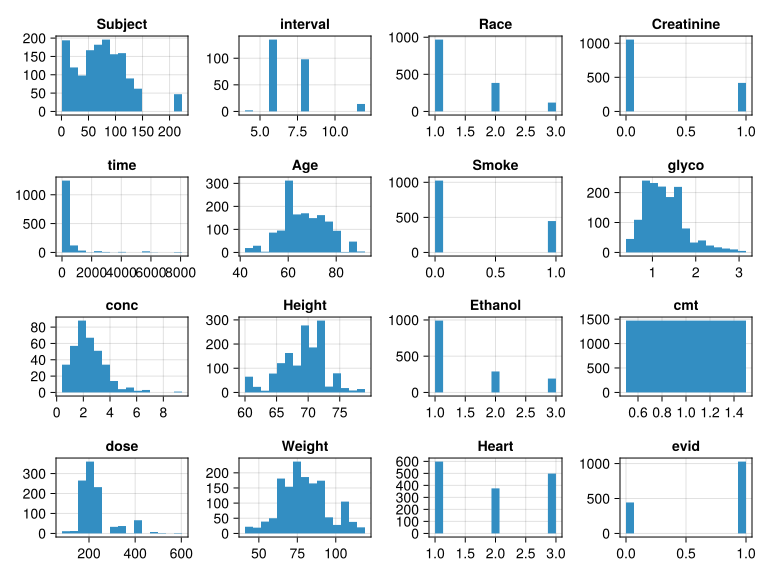
We can also check how each patient in the dataset looks. In the following block, columns associated with pharmacokinetics are set aside, and printed by subject.
pk_df = select(df, ["Subject", "time", "dose", "conc", "evid"])
pd_subdfs = groupby(pk_df, :Subject) # Group by subject

# Print rows from random subjects
for subdf in sample(collect(pd_subdfs), 3; replace = false)
    println(subdf)
end
3×5 SubDataFrame Row │ Subject time dose conc evid │ Int64 Float64 Int64? Float64? Int64 ─────┼───────────────────────────────────────────── 1 │ 16 0.0 249 missing 1 2 │ 16 8047.0 249 missing 1 3 │ 16 8047.67 missing 1.6 0 15×5 SubDataFrame Row │ Subject time dose conc evid │ Int64 Float64 Int64? Float64? Int64 ─────┼───────────────────────────────────────────── 1 │ 139 0.0 301 missing 1 2 │ 139 6.0 201 missing 1 3 │ 139 36.0 301 missing 1 4 │ 139 42.0 301 missing 1 5 │ 139 48.0 301 missing 1 6 │ 139 54.0 301 missing 1 7 │ 139 60.0 301 missing 1 8 │ 139 66.0 301 missing 1 9 │ 139 73.5 missing 3.3 0 10 │ 139 114.0 301 missing 1 11 │ 139 126.0 301 missing 1 12 │ 139 140.0 missing missing 0 13 │ 139 144.28 missing 3.2 0 14 │ 139 160.0 301 missing 1 15 │ 139 169.55 missing 2.1 0 6×5 SubDataFrame Row │ Subject time dose conc evid │ Int64 Float64 Int64? Float64? Int64 ─────┼───────────────────────────────────────────── 1 │ 22 0.0 125 missing 1 2 │ 22 6.0 125 missing 1 3 │ 22 12.0 125 missing 1 4 │ 22 17.0 125 missing 1 5 │ 22 23.0 125 missing 1 6 │ 22 25.0 missing 1.7 0
The same is done to the covariate columns in the code below to check how they look.
covariates = [:Smoke, :Heart, :Creatinine, :Age, :Race, :Height, :glyco, :Ethanol, :Weight]

# New DataFrame with covariates and subject column
covariate_df = select(df, [:Subject, covariates...])
covariate_subdfs = groupby(covariate_df, :Subject) # Group by subjects

# Print rows from random subjects
for subgroup in sample(collect(covariate_subdfs), 3; replace = false)
    show(subgroup; allcols = true)
end
12×10 SubDataFrame Row │ Subject Smoke Heart Creatinine Age Race Height glyco Ethanol Weight │ Int64 Int64 Int64 Int64 Int64 Int64 Int64 Float64 Int64 Int64 ─────┼─────────────────────────────────────────────────────────────────────────────────── 1 │ 45 1 2 0 66 1 68 0.72 1 55 2 │ 45 1 2 0 66 1 68 0.72 1 55 3 │ 45 1 2 0 66 1 68 0.78 1 55 4 │ 45 1 2 0 66 1 68 0.78 1 55 5 │ 45 1 2 0 66 1 68 0.78 1 55 6 │ 45 1 2 0 66 1 68 0.78 1 55 7 │ 45 1 2 0 66 1 68 0.78 1 55 8 │ 45 1 2 0 66 1 68 0.78 1 55 9 │ 45 1 2 0 66 1 68 0.78 1 55 10 │ 45 1 2 0 66 1 68 0.86 1 45 11 │ 45 1 2 0 66 1 68 0.86 1 45 12 │ 45 1 2 0 66 1 68 0.86 1 458×10 SubDataFrame Row │ Subject Smoke Heart Creatinine Age Race Height glyco Ethanol Weight │ Int64 Int64 Int64 Int64 Int64 Int64 Int64 Float64 Int64 Int64 ─────┼─────────────────────────────────────────────────────────────────────────────────── 1 │ 80 1 1 0 69 3 77 1.77 2 77 2 │ 80 1 1 0 69 3 77 1.77 2 77 3 │ 80 1 1 0 69 3 77 1.77 2 77 4 │ 80 1 1 0 69 3 77 1.77 2 77 5 │ 80 1 1 0 69 3 77 1.77 2 77 6 │ 80 1 1 0 69 3 77 1.69 2 73 7 │ 80 1 1 0 69 3 77 1.69 2 73 8 │ 80 1 1 0 69 3 77 1.69 2 739×10 SubDataFrame Row │ Subject Smoke Heart Creatinine Age Race Height glyco Ethanol Weight │ Int64 Int64 Int64 Int64 Int64 Int64 Int64 Float64 Int64 Int64 ─────┼─────────────────────────────────────────────────────────────────────────────────── 1 │ 46 0 3 0 73 2 66 1.09 2 91 2 │ 46 0 3 0 73 2 66 1.09 2 91 3 │ 46 0 3 0 73 2 66 1.09 2 91 4 │ 46 0 3 0 73 2 66 1.12 2 91 5 │ 46 0 3 0 73 2 66 1.12 2 90 6 │ 46 0 3 0 73 2 66 1.12 2 90 7 │ 46 0 3 0 73 2 66 1.12 2 90 8 │ 46 0 3 1 73 2 66 0.93 2 87 9 │ 46 0 3 1 73 2 66 0.93 2 87
NoteWhat does “…” mean in Julia code?
By now you may have noticed here and in other tutorials the appearance of ellipsis, “…” in Julia code. In Julia one uses ellipses in function definitions to handle an unknown number of arguments, as shown in this example:
# function *definition*:
f(numbers...) = numbers

f(6, 4, 1)
(6, 4, 1)This is called slurping: we say the numbers 6, 4, 1 are slurped into the tuple (6, 4, 1).
We can use ellipsis when calling a function to reverse this process:
triple = (6, 4, 1)

# function *call*:
f(triple...)
(6, 4, 1)This is called splatting: we say the triple (6, 4, 1) is splatted into the multiple arguments 6, 4, 1 that f is defined to handle. Many built-in Julia functions can handle an unspecified number of arguments. Here are a couple of examples:
min(10, 3, 4, 6)3vcat(1:3, 4:6, 7:10)10-element Vector{Int64}:
1
2
3
4
5
6
7
8
9
10min(triple...)1Semantically, the constructor [...] for vectors also amounts to variable argument function, and so we can do this
[7, 8, 9, triple...]6-element Vector{Int64}:
7
8
9
6
4
1For more on slurping and splatting refer to the Julia FAQ.
3.3 Input setup
Now, let’s actually prepare the data for the models. We begin by getting the number of subjects and creating a placeholder DataFrame with the first row of each subject and the columns listed in the variable covariates. Then, using the covariate DataFrame grouped by subjects (covariate_subdfs), we fill the values in the placeholder (raw_inputs).
nsubjects = length(uniqs[:Subject]) # Number of subjects
raw_inputs = deepcopy(covariate_df)[1:nsubjects, Not(1)] # Placeholder

# Populate `raw_inputs` DataFrame
for (i, subgroup) in enumerate(covariate_subdfs)
    raw_inputs[i, :] = deepcopy(subgroup[1, Not(1)])
end
Next, similar to the previous tutorial, a few common data preprocessing steps are applied. First, as required by MLJ.jl, the columns are coerced to the appropriate scientific data types. Specifically, they are all coerced into Continuous, except the column Race, which is one-hot encoded, since it is categorical and without order, i.e. nominal. The drop_last = true keyword argument for ContinuousEncoder was used here, resulting in a encoding different from usual: only the binary columns Race_1 and Race_2 are created, and Race_3 is implicitly encoded by both Race_1 and Race_2 being 0.
Some models will require us to standardize our inputs. We can see they vary on very different scales, by inspecting the earlier data summaries. For example, glyco (\(\alpha_1\)-acid glycoprotein) is in the [0.39, 3.16] mg/100 dL range, while weight is in [41, 119] kg. However, following good data hygiene practices, we will implement standardization by replacing our models with a pipeline that includes the standardization, together with a wrapper to handle standardization of the outputs. See the with_standardization(model) function defined in Section 4.2.
# Type-coercion pipeline:
coerce_to_ordered_factor = input -> coerce(input, Symbol("Race") => OrderedFactor)
coerce_to_continuous = ContinuousEncoder(; one_hot_ordered_factors = true, drop_last = true)
pipe = coerce_to_ordered_factor |> coerce_to_continuous

# Apply transformations in pipeline
mach = machine(pipe, raw_inputs)
fit!(mach, verbosity = 0)
# Use Float32 features to match Flux's Float32 network parameters
inputs = mapcols(x -> Float32.(x), MLJBase.transform(mach, raw_inputs))

# Check results
schema(inputs)
┌────────────┬────────────┬─────────┐ │ names │ scitypes │ types │ ├────────────┼────────────┼─────────┤ │ Smoke │ Continuous │ Float32 │ │ Heart │ Continuous │ Float32 │ │ Creatinine │ Continuous │ Float32 │ │ Age │ Continuous │ Float32 │ │ Race__1 │ Continuous │ Float32 │ │ Race__2 │ Continuous │ Float32 │ │ Height │ Continuous │ Float32 │ │ glyco │ Continuous │ Float32 │ │ Ethanol │ Continuous │ Float32 │ │ Weight │ Continuous │ Float32 │ └────────────┴────────────┴─────────┘
The heatmap below shows the correlation matrix of our inputs (and for this purpose we have standardized the data). The correlations are very weak: the only pairs with an absolute value larger than 0.3 are creatinine–age, race_2–height, and creatinine–weight.
# standardize the inputs:
mach = fit!(machine(Standardizer(), inputs); verbosity = 0)
whitened_inputs = MLJBase.transform(mach, inputs);
fig = Figure(; size = (680, 520), fontsize = 14)
ax = Axis(
    fig[1, 1];
    title = "Correlations",
    xticks = (1:10, names(whitened_inputs)),
    yticks = (10:-1:1, names(whitened_inputs)),
)
covariance = (whitened_inputs |> Matrix |> cov)
hm = heatmap!(ax, 1:10, 10:-1:1, covariance)
Colorbar(fig[1, 2], hm)
fig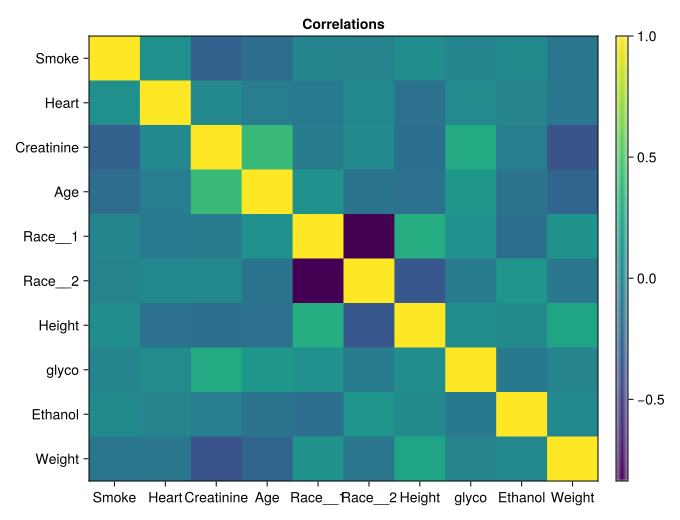
3.4 Outputs
Moving on to the outputs, to get the empirical bayes estimates for clearance, central volume and absorption rate, some PK steps are necessary. Based on (Verme et al. 1992), below is the definition for a Pumas PK model with one compartment, first-order absorption and elimination, 3 fixed parameters (clearance tvcl, central volume tvvc, and absorption constant tvka), their random effects, and an additive residual error term (\(\sigma\)). Additionally, reference parameters extracted from (Pinheiro and Bates 2000) are also defined.
pumas_model = @model begin
    @param begin
        tvcl ∈ RealDomain(; lower = 0)
        tvvc ∈ RealDomain(; lower = 0)
        tvka ∈ RealDomain(; lower = 0)
        Ω ∈ PSDDomain(3)
        σ ∈ RealDomain(; lower = 0)
    end
    @random η ~ MvNormal(Ω)
    @pre begin
        CL = tvcl * exp(η[1])
        Vc = tvvc * exp(η[2])
        Ka = tvka * exp(η[3])
    end
    @dynamics Depots1Central1
    @derived conc ~ @. Normal(Central / Vc, σ)
end

# Parameters for initialization:
params = (;
    tvcl = ℯ^2.5, # 12.18
    tvvc = ℯ^5.4, # 221
    tvka = ℯ^-0.21, # 0.81
    Ω = [0.056 0.0 0.0; 0.0 0.03 0.0; 0.0 0.0 0.01],
    σ = 0.0123,
)
And the Population required by such model can be prepared in one step using the read_pumas function. In the beginning, we created the columns cmt and evid because this function requires them.
population = read_pumas(
    df;
    id = :Subject,
    time = :time,
    amt = :dose,
    cmt = :cmt,
    evid = :evid,
    covariates = covariates,
    observations = [:conc],
)
Population
Subjects: 136
Covariates: Smoke, Heart, Creatinine, Age, Race, Height, glyco, Ethanol, Weight (heterogenous)
Observations: conc (heterogenous)
Note
A Population is a vector of Subjects. To learn more about Subject and read_pumas, enter ?Subject and ?read_pumas in the Julia REPL (command line).
With the population ready, the PK model is fitted.
fitted_pumas_model =
    fit(pumas_model, population, params, FOCE(); optim_options = (show_trace = false,))
[ Info: Checking the initial parameter values. [ Info: The initial negative log likelihood and its gradient are finite. Check passed.
FittedPumasModel

Dynamical system type:                 Closed form

Number of subjects:                            136

Observation records:         Active        Missing
    conc:                       361             82
    Total:                      361             82

Number of parameters:      Constant      Optimized
                                  0             10

Likelihood approximation:                     FOCE
Likelihood optimizer:                         BFGS

Termination Reason:                      NoXChange
Log-likelihood value:                   -611.21547

-----------------
       Estimate
-----------------
tvcl    9.5556
tvvc   35.467
tvka    0.42799
Ω₁,₁    0.09674
Ω₂,₁   -0.099655
Ω₃,₁   -0.17095
Ω₂,₂    0.18456
Ω₃,₂    0.1447
Ω₃,₃    0.32621
σ       1.1189
-----------------
And the empirical bayes estimates are extracted and reorganized into a DataFrame for the outputs.
ebe = only.(empirical_bayes(fitted_pumas_model, population))
ebe_matrix = permutedims(reduce(hcat, ebe)) # Reshape into 136x3 matrix
outputs = DataFrame(ebe_matrix, [:cl, :vc, :ka]) # Wrap in DataFrame
describe(outputs)[:, Not(7)] |> println;
3×6 DataFrame Row │ variable mean min median max nmissing │ Symbol Float64 Float64 Float64 Float64 Int64 ─────┼──────────────────────────────────────────────────────────────────── 1 │ cl -0.0145753 -0.687295 -0.0182438 0.558038 0 2 │ vc 0.000559858 -0.794945 -0.00243347 0.911257 0 3 │ ka 0.0322281 -1.03891 0.0313174 1.17878 0
4 Models
4.1 Linear regression
Now that inputs and outputs are in the desired formats, the ML models can be fitted. The first one is linear regression, which makes a prediction \(\hat{y}\) by adding a bias term \(b\) to the result of weighing the inputs \(x\) by multiplying them by a weight matrix \(W\):
\[ \hat{y} = Wx + b \tag{1}\]
It’s worth pointing out that our output, the empirical bayes estimates, are represented as a vector of 3 elements. Therefore, this is technically a multitarget regression problem, instead of the usual prediction of a single scalar value per data point. Fitting a linear regression model means optimizing the parameters \(W\) and \(b\) to minimize the prediction error. The implementation used here applies the “least squares” algorithm, minimizing the loss \(L\) defined by sum of squares of residuals (deviation between prediction \(\hat{y}\) and label \(y\)):
\[ L = \sum_{data} |\hat{y} - y|^2 \]
In the next code block (not needed in the sequel), the model is setup, fitted and then evaluated using 6-fold cross-validation. When there are many covariates, regularization is recommended, but we still want to showcase basic linear regression.
# Linear regression
linear_regressor = LinearRegressor()
mach = machine(linear_regressor, inputs, outputs)
evaluate!(mach; measure = multitarget_l2, verbosity = 0)
PerformanceEvaluation object with these fields: model, measure, operation, measurement, per_fold, per_observation, fitted_params_per_fold, report_per_fold, train_test_rows, resampling, repeats Extract: ┌────────────────────┬───────────┬─────────────┐ │ measure │ operation │ measurement │ ├────────────────────┼───────────┼─────────────┤ │ MultitargetLPLoss( │ predict │ 0.0705 │ │ p = 2) │ │ │ └────────────────────┴───────────┴─────────────┘ ┌────────────────────────────────────────────────┬─────────┐ │ per_fold │ 1.96*SE │ ├────────────────────────────────────────────────┼─────────┤ │ [0.0365, 0.0301, 0.108, 0.0985, 0.109, 0.0421] │ 0.0332 │ └────────────────────────────────────────────────┴─────────┘
The next code block includes the algebraic steps necessary for the linear regression model to process a batch of 50 subjects. After getting the inputs, the parameters are extracted from the trained model. Then, they are manually used for the batched linear algebra operations, as in equation Equation 1. Afterwards, the trained MLJ model makes predictions based on the same inputs, and both manual and automatic results are compared.
input_batch = inputs[1:50, :] # Input batch with 50 data points
coefficient_matrix = fitted_params(mach)[1]
bias = fitted_params(mach)[2]

# Use coefficients and biases manually
manually_computed_output =
    mapslices(d -> d + bias, Matrix(input_batch) * coefficient_matrix; dims = 2)
model_prediction = MLJBase.predict(mach, input_batch) |> Matrix
manually_computed_output == model_prediction # check results
true
Note
mapslices(f, A; dims) applies the function f to the array A along the dimensions dims. In the previous code block, we used mapslices(d -> d + bias, Matrix(input_batch) * coefficient_matrix; dims = 2) to add the bias to each column of the matrix that results from Matrix(input_batch) * coefficient_matrix. A simpler use case is the following: a function calculation processes each row in matrix A. mapslices can be applied to arrays of many dimensions.
julia> A = reshape(1:9, (3, 3))
3×3 Matrix{Int64}:
 1  4  7
 2  5  8
 3  6  9

julia> calculation(x) = x[1] + x[2] / x[3]

julia> mapslices(calculation, A; dims = 2)
3×1 Matrix{Float64}:
 1.57 # 1 + 4/7
 2.63 # 2 + 5/8
 3.67 # 3 + 6/9
4.2 Regularization
As mentioned in the previous tutorial in the course, overfitting is adjusting the model too tightly to the data distribution. And it should be avoided so the model’s performance doesn’t drop too much from the training set to new unseen cases. And tied to overfitting is the notion of model capacity: the diversity of input-label mappings it can represent (Ian Goodfellow 2016). Approaches to purposely restrict capacity to avoid overfitting are called regularization.
Two such techniques for linear regression are LASSO (least absolute shrinkage and selection operator) and ridge (Tikhonov) regression. As with many regularization methods, they can be described as including a penalty term in the objective function to be minimized during optimization, as if giving the optimizer a second goal other than only minimizing the cost/loss. Equation 2 and Equation 3 include the new expressions for the LASSO and Ridge losses, respectively.
\[ \sum_{data} |\hat{y} - y|^2 + \lambda \sum_{coefficients} |w| \tag{2}\]
\[ \sum_{data} |\hat{y} - y|^2 + \lambda \sum_{coefficients} w^2 \tag{3}\]
Where \(w\) are the coefficients in the weight matrix \(W\) from Equation 1; and \(\lambda\) is the Lagrangian multiplier, a weight defining the strength of the regularization. Higher values make the optimiser prioritize constraining the model parameters.
We implement LASSO using a single layer neural network. Neural networks, discussed in the next section, include linear models as a very special case. Additionally, we wrap our model in input/output standardization:
# Wrapper for input and output standardization
with_standardization(model) =
    Standardizer() |> TransformedTargetModel(model, transformer = Standardizer)

lasso = with_standardization(
    MultitargetNeuralNetworkRegressor(
        builder = MLJFlux.Linear(σ = identity),
        alpha = 1,
        lambda = 0.1,
        epochs = 50,
        rng = StableRNG(SEED), # seed
        optimiser_changes_trigger_retraining = true,
    ),
)
show(lasso, 3) # display nested hyper-parameters
DeterministicPipeline(
standardizer = Standardizer(
features = Symbol[],
ignore = false,
ordered_factor = false,
count = false),
transformed_target_model_deterministic = TransformedTargetModelDeterministic(
model = MultitargetNeuralNetworkRegressor(
builder = Linear(
σ = identity),
optimiser = Adam(eta=0.001, beta=(0.9, 0.999), epsilon=1.0e-8),
loss = Flux.Losses.mse,
epochs = 50,
batch_size = 1,
lambda = 0.1,
alpha = 1.0,
rng = StableRNGs.LehmerRNG(state=0x000000000000000000000000000002f5),
optimiser_changes_trigger_retraining = true,
acceleration = CPU1{Nothing}(nothing),
embedding_dims = Dict{Symbol, Real}()),
transformer = Standardizer(
features = Symbol[],
ignore = false,
ordered_factor = false,
count = false),
inverse = nothing,
cache = true),
cache = true)Notes:
The setting
builder = MLJFlux.Linear(σ=identity)is where we make the neural network a linear model.The setting
alpha=1means pure L1-regularization (LASSO). Settingalpha=0will make this pure L2 (ridge regression).lambdais the regularization strength (\(\lambda\) above).epochsis the neural network iteration parameter.
The ridge regression and multilayer perceptron models considered later can be implemented with the same general structure; only the hyper-parameters builder and alpha will be different.
MLJ also provides the MultiTaskLassoRegressor model for our data, but it uses the MLJScikitLearnInterface.jl package as the backend, an interface for a Python package, requiring a more cumbersome installation process. Our neural network implementation will be mathematically equivalent, although training will be a lot slower because we miss out on some optimizations specific to linear models.
When training a non-vector target, you will want to use the linear models provided by GLM.jl or MLJLinearModels.jl (regularized), which have MLJ interfaces.
To get a rough idea of the number of iterations we need, let’s generate an MLJ learning curve.
nested_epochs = :(transformed_target_model_deterministic.model.epochs)
_, _, epochs, losses = learning_curve(
    lasso,
    inputs,
    outputs;
    range = range(lasso, nested_epochs, lower = 1, upper = 100),
    measure = multitarget_l2,
    verbosity = 0,
);
One then plots loss against epochs, as shown in the plot below.
fig = Figure()
axis = Axis(
    fig[1, 1],
    title = "Varying epochs in LASSO regression",
    xlabel = "Epochs",
    ylabel = "l2 loss",
    limits = ((0, 100), (0.065, 0.085)),
)
scatter!(axis, epochs, losses)
fig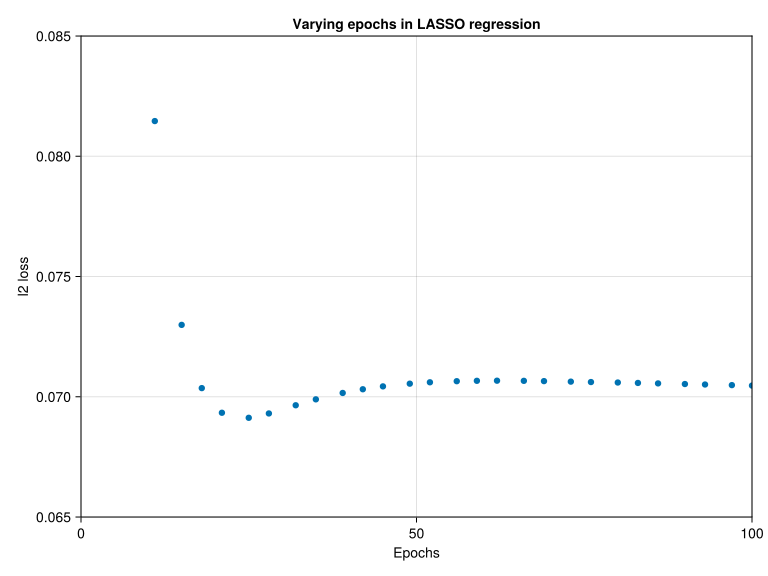
By default, learning_curve estimates an out-of-sample loss (using the Holdout() resampling strategy) and here we see a slight regularization effect by stopping early (after around 25 epochs the loss begins to deteriorate). However, as we are interested here in L1 regularization, we will want to iterate this model close to convergence of the training loss. So we add the resampling=InSample() option to our learning curve to get the in-sample loss trace:
nested_epochs = :(transformed_target_model_deterministic.model.epochs)
_, _, epochs, losses = learning_curve(
    lasso,
    inputs,
    outputs;
    range = range(lasso, nested_epochs, lower = 1, upper = 100),
    measure = multitarget_l2,
    resampling = InSample(),
    verbosity = 0,
);
fig = Figure()
axis = Axis(
fig[1, 1],
title = "Varying epochs in LASSO regression (in-sample loss)",
xlabel = "Epochs",
ylabel = "l2 loss",
limits = ((0, 100), (0.050, 0.085)),
)
scatter!(axis, epochs, losses)
fig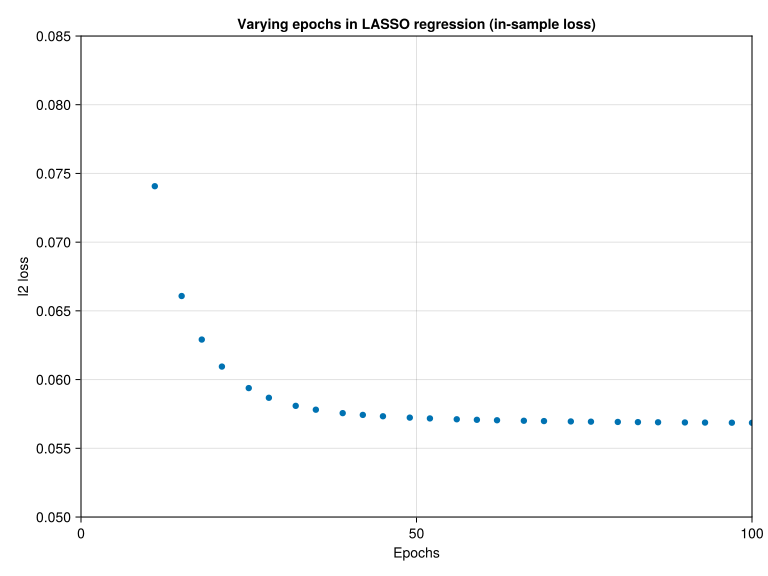
Looks like about 70 iterations is close enough.
Similarly, we’ve generated learning curves to get an idea of an appropriate tuning range for lambda. Here is the curve for the range we decided on:
nested_lambda = :(transformed_target_model_deterministic.model.lambda)
_, _, lambdas, losses = learning_curve(
    lasso,
    inputs,
    outputs;
    range = range(lasso, nested_lambda, lower = 1, upper = 100, scale = :log10),
    measure = multitarget_l2,
);
fig = Figure()
axis = Axis(
fig[1, 1],
title = "Varying `lambda` in LASSO",
xlabel = "lambda",
xscale = log10,
ylabel = "l2 loss",
)
scatter!(axis, lambdas, losses)
fig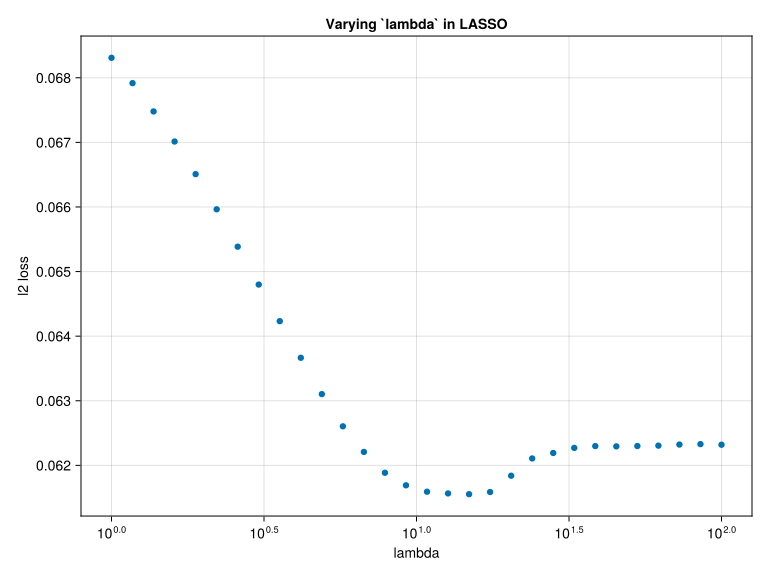
Here we see a marked regularization effect, although quite strong regularization (lambda > 10) is needed. This suggest that the covariates are not strongly informative.
Putting this disappointing outcome aside for now, we proceed to try other models. First, to define our neural network implementation of the (untuned) ridge regressor, we need only change the alpha hyper-parameter:
ridge = with_standardization(
    MultitargetNeuralNetworkRegressor(
        builder = MLJFlux.Linear(σ = identity),
        alpha = 0,
        lambda = 0.1,
        epochs = 50,
        rng = StableRNG(SEED), # seed
        optimiser_changes_trigger_retraining = true,
    ),
);
Next, we define a function tune(model) to wrap lasso and ridge in hyper-parameter tuning. In addition to tuning lambda, we will tune the learning rate of the Adam optimiser (Adaptive moment estimation) (Kingma and Ba 2017) we will use to update the learned parameters, so as to minimize the loss (given by Equation 2 or Equation 3). The Adam optimization algorithm is a variation on stochastic gradient descent that is very popular in machine learning. A larger learning rate helps the model to escape big plateaus in the parameter space faster, but causes the optimizer to overshoot minima. And a lower learning rate avoids overshooting, but slows down the optimization.
Note “optimizer” is spelled with an “s” in the name of the hyper-parameter.
# Adam instances with different learning rates
optimizers = [Adam(10^i) for i = -6.0:0.0]
nested_optimiser = :(transformed_target_model_deterministic.model.optimiser)
tuned(model) = TunedModel(
    model,
    resampling = CV(),
    tuning = Grid(),
    range = [
        range(model, nested_optimiser, values = optimizers),
        range(model, nested_lambda, lower = 1, upper = 100, scale = :log),
    ],
    measure = multitarget_l2,
)
Our protocol for evaluating the performance of our self-tuning models, based on an L2 multi-target loss function (measure), will be to apply Monte Carlo cross-validation, with two folds, repeated five times, giving us a total of ten estimates on which to base a 95% confidence interval \([a, b]\) (applying the standard fiction of independence and normality). We repeat this process three times, with different RNG seeds for the Monte Carlo, and report the confidence interval \([\min_i a_i, \max_i b_i]\).
While we should compare the wrapped, self-tuning models directly, this will trigger nested resampling (as discussed in the MLJ lecture). To save run-time in our illustration, we will take a pragmatic approach and extract the best model from the tuning process, and estimate it’s performance instead (effectively “freezing” the hyper-parameters that would be otherwise learned on each CV training fold).
Here are the seed-dependent options we need to pass to evaluate to realize the Monte Carlo cross-validation using a sum-of-squares measure:
monte_carlo_cv(seed) = (
    repeats = 5,
    resampling = CV(nfolds = 2, rng = seed), # shuffling is implied when `rng` is specified
    measure = multitarget_l2,
)
And here’s the function that creates the performances estimates themselves:
nseeds = 3 # 4 or more would be better

# Here `named_models` is one or more pairs of the form, "model name" => model:
function compare(named_models, inputs, outputs; verbosity = 0)
    df =
        map(named_models) do (name, model)
            verbosity > 0 && @info "Evaluating $name..."

            # initialize CI endpoints
            a = Inf
            b = -Inf

            foreach(rand(StableRNG(SEED), UInt64, nseeds)) do seed
                # for self-tuning models, replace `model` with best model:
                if model isa MLJTuning.DeterministicTunedModel
                    old_flag = model.train_best
                    model.train_best = false  # to save some extra runtime
                    mach = machine(model, inputs, outputs)
                    fit!(mach, verbosity = 0)
                    model.train_best = old_flag # return model to original state
                    model = report(mach).best_model
                end
                e = evaluate(
                    model,
                    inputs,
                    outputs;
                    verbosity = 0,
                    monte_carlo_cv(seed)...,
                )
                cv_estimates = e.per_fold[1]
                μ = e.measurement[1]
                δ = 1.96 * std(cv_estimates) / sqrt(length(cv_estimates) - 1)
                a = min(a, μ - δ)
                b = max(b, μ + δ)
            end
            if verbosity > 0
                ar = round(a, sigdigits = 3)
                br = round(b, sigdigits = 3)
                @info "\t$ar ≤ loss  ≤ $br"
            end
            (; name, loss_lower = a, loss_upper = b, midpoint = mean([a, b]), model)
        end |> DataFrame
    sort!(df, :midpoint)
end
We now compare the performance of ridge and LASSO regressors, with ordinary linear regression. We’ll also include, as a baseline, a regressor that just predicts the mean value of the training target (outputs):
comparisons = compare(
    [
        "linear regression" => linear_regressor,
        "LASSO (untuned)" => lasso,
        "LASSO" => tuned(lasso),
        "ridge (untuned)" => ridge,
        "ridge" => tuned(ridge),
        "constant predictor" => DeterministicConstantRegressor(),
    ],
    inputs,
    outputs,
)
println(comparisons[:, 1:4]);
6×4 DataFrame Row │ name loss_lower loss_upper midpoint │ String Float64 Float64 Float64 ─────┼─────────────────────────────────────────────────────── 1 │ ridge 0.0557354 0.0725974 0.0641664 2 │ LASSO 0.0561484 0.0737926 0.0649705 3 │ constant predictor 0.058995 0.0766205 0.0678078 4 │ LASSO (untuned) 0.0618515 0.0777719 0.0698117 5 │ ridge (untuned) 0.0620038 0.0779462 0.069975 6 │ linear regression 0.062251 0.0851204 0.0736857
The tuned ridge and LASSO regressors score only slightly better than the constant predictor, and from the informal confidence intervals, it’s clear the benefits are not statistically significant. This confirms our earlier suspicion that the covariates are poor predictors of the PK parameters.
To get some insight into the hyper-parameter optimization, let us examine the contour plot below, which shows the loss function in the case of tuning the ridge regressor.
model = tuned(ridge)
mach = fit!(machine(model, inputs, outputs); verbosity = 0)
plotting = report(mach).plotting
x = map(plotting.parameter_values[:, 1]) do optimizer
    log10(optimizer.eta)
end;
y = log10.(plotting.parameter_values[:, 2])
z = plotting.measurements

# find local min:
j = argmin(z)
min_loss = z[j]
X, Y = x[j], y[j]

# to clip the contours
mask = z .< 0.25
x = x[mask]
y = y[mask]
z = z[mask]

fig = Figure()
axis = Axis(
    fig[1, 1],
    xlabel = "log10 of learning rate",
    ylabel = "log10 of lambda",
    title = "Contours of out-of-sample loss for ridge regression",
)
contour!(axis, x, y, log.(z); levels = 20)
scatter!(axis, X, Y, markersize = 10, color = :black)
text!(
    axis,
    X + 0.15,
    Y,
    text = "min loss",
    fontsize = 14,
    color = :black,
    align = (:left, :bottom), # Align the text anchor to the bottom-left of the text box
)
fig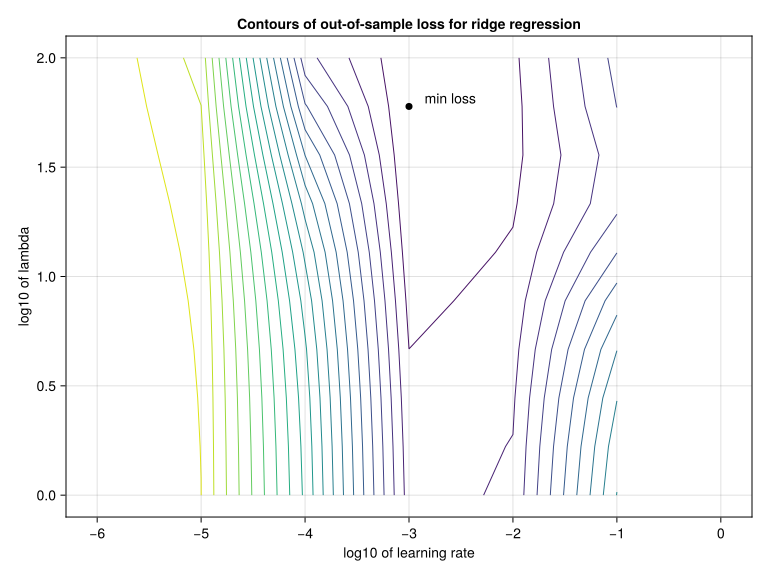
We see that the loss is generally more sensitive to the learning rate. For smaller learning rates, the poorer performance may be attributable to incomplete training, because epochs is fixed to 50 iterations, a defect we will address later.
Note
The dynamics of overfitting, capacity and regularization is sometimes referred to as the bias-variance tradeoff (Wikipedia 2025):
- The bias error comes from erroneous assumptions in the learning algorithm. High bias can cause an algorithm to miss the relevant relations between features and target outputs (underfitting). This can be caused by over-regularizing, e.g. too high of a Lagrangian multiplier in the LASSO and Ridge losses.
- The variance is an error from sensitivity to small fluctuations in the training set. High variance may result from an algorithm modeling the random noise in the training data (overfitting). This can happen in the absence of regularization.
4.3 Neural networks from scratch (optional)
In this section, we take a tangent in the workflow to build neural networks step by step, since they are the most discussed class of models in ML. That’s mainly due to their flexibility in complexity and architecture, enabling them to solve an endless variety of problems. As mentioned in the previous section, neural networks can be so simple as to equate to linear regression. But they can also have billions of parameters, distributed across many layers that are connected in very creative ways and apply very specific transformations to data.
The starting point to understanding neural networks is the threshold logic unit (TLU). When receiving a vector of inputs \(x\) it performs the dot product with the TLU’s weights \(w\). For 3 dimensions, this would look like \(x^T w\), resulting in a scalar, of course.
first_subject_inputs = collect(inputs[1, :]) # Sample subject, containing 10 features
input_size = length(first_subject_inputs) # 11
weights = rand(input_size) # Weights of TLU

# Compare manual and automatic dot products
dot_product_manual = sum(first_subject_inputs .* weights)
dot_product_function = dot(first_subject_inputs, weights) # first_subject_inputs' * weights
all(dot_product_manual .≈ dot_product_function) # Check resultstrueThen, the TLU applies an activation function to the result of the dot product. Originally, this was a step function, such as the Heaviside step function, which is 0 if its input is negative; and 1 otherwise. However, over the years, many alternative activation functions have been proposed. In the following code are some common activation functions, including their plots below.
input_range = LinRange(-3, 3, 100)

# Apply activations pointwise
relu_output = relu.(input_range)
σ_output = σ.(input_range) # sigmoid
tan_output = tanh.(input_range)
heaviside(x) = x < 0 ? 0 : 1
heavyside_output = heaviside.(input_range)
activation_outputs = Dict(
"ReLU" => relu.(input_range),
"Sigmoid" => σ.(input_range),
"Hyperbolic tangent" => tanh.(input_range),
"Heaviside" => heaviside.(input_range),
)
fig = Figure()
yticks = range(-10, 10, 10)
for ((actName, vals), indices) in zip(activation_outputs, CartesianIndices((2, 2)))
ax = Axis(
fig[indices.I...];
xlabel = "x",
ylabel = "Activation",
title = actName,
ytickformat = "{:.2f}",
)
lines!(ax, input_range, vals)
end
fig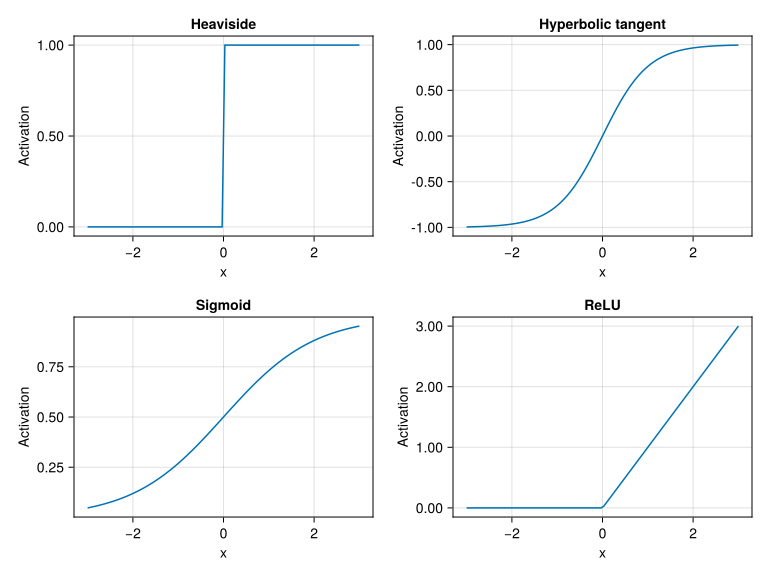
The lower case sigma σ function used here is defined in Flux.NNlib.σ. It is the sigmoid, an activation function with output in [0, 1] and defined by \(\sigma (x) = \frac{1}{1 + e^{-x}}\). Additionally, relu is the ReLU (Rectified Linear Unit) function, defined as \(ReLU(x) = max(x, 0)\).
To represent a TLU, the following code block defines a type TLU with two fields: a vector weights, and a function activation. Afterwards, its behavior on an array is defined. It calculates the dot product between the inputs and the weights, then applies the activation function. An example of instantiation and usage are also included.
# Type
struct TLU{T<:Real,F}
    weights::Vector{T}
    activation::F
end
# Operation definition
(t::TLU)(x) = t.activation(dot(t.weights, x))
tlu = TLU(rand(input_size), σ) # Instantiate
tlu(rand(input_size)) # Use on random input
0.9676595419495284
Note
Julia has a very rich type system. In TLU{T<:Real, F}, the fields of the new type TLU will have types T<:Real and F. Here, T and F are parametric types, assuming the types of the inputs provided to the TLU object initialization. However, T<:Real constrains T to be a subtype of Real, i.e. float, integer, rational or irrational. And as for the fields, weights is constrained to be a vector with elements of type T; and activation, to have type F.
After the type description, (t::TLU)(x) defines what happens when we call a TLU object as a function on an input x. Notice that the operations (dot(t.weights, x) |> t.activation) are able to use the input x and the fields (t.weights and t.activation) of the object.
Then, TLU(rand(input_size), σ) creates an instance of the TLU type with the field weights containing rand(input_size); and activation, σ (sigmoid - plotted above).
The next building block for neural networks is the perceptron, a combination of multiple TLUs. Each unit individually processes the input through its usual operations as explained above. Also, a bias term associated with the layer is added to the results from the TLUs. Below, a type for the perceptron is defined with two fields: layer, a vector of TLUs; and the bias term to be added to the results. Then, the operation of a Perceptron acting on an array is defined. Lastly, examples of instantiation and usage are also included.
# Type
struct Perceptron{T<:Real}
    layer::AbstractVector{<:TLU}
    bias::T
end
# Operation definition
(p::Perceptron)(x) = map(l -> l(x) .+ p.bias, p.layer)
# Vector of TLUs for layer
units = [TLU(rand(input_size), σ) for _ = 1:10]
per = Perceptron(units, 20) # Instantiation with TLUs and bias
per(rand(input_size)) # Usage on random input
10-element Vector{Float64}:
20.92342999568594
20.944248018343263
20.80311323381826
20.6641935266871
20.85404520744062
20.908252096581556
20.904262035717686
20.829801846391128
20.928566007910838
20.86294577890475The next level of abstraction is the multilayer perceptron (MLP). As the name implies, it combines multiple perceptrons in sequence. Therefore, now the type only has one field: a vector of perceptrons called layer. Its operation on an array is set by a full function definition this time, since it’s a bit more involved. Basically, the first layer is applied to the input, following the previous perceptron definition. Then, if there’s only one layer, the result is returned. Otherwise, execution continues with a for loop that applies the remaining layers sequentially, passing one’s output to the next. Once the last layer is applied, the result is returned.
struct MLP
    layers::AbstractVector{<:Perceptron}
end
function (mlp::MLP)(x)
    out = mlp.layers[1](x)
    length(mlp.layers) == 1 && (return out)
    for l in mlp.layers[2:end]
        out = l(out)
    end
    return out
end
As an example that ties all the previous concepts together, the following code includes the detailed construction of an MLP. The plot below shows the 10 values in the vector resulting from rand(input_size) |> mlp |> softmax.
out1 = 6
out2 = 4
mlp_output_dim = 10
mlp = MLP([
    # TLUs in first layer need to have 'input_size' weights each, so
    # the dimension of their weight vector matches that of
    # the inputs for the dot products
    Perceptron([TLU(rand(input_size), relu) for _ = 1:out1], 1),

    # Size of weight vectors of TLUs in layer n has to match
    # number of TLUs in layer (n - 1), here out1
    Perceptron([TLU(rand(out1), relu) for _ = 1:out2], 1),

    # Unlike the previous layers, the number of TLUs in the last
    # one isn't arbitrary, as it defines the size of the MLP's output
    Perceptron([TLU(rand(out2), identity) for _ = 1:mlp_output_dim], 1),
])barplot(rand(input_size) |> mlp |> Flux.softmax)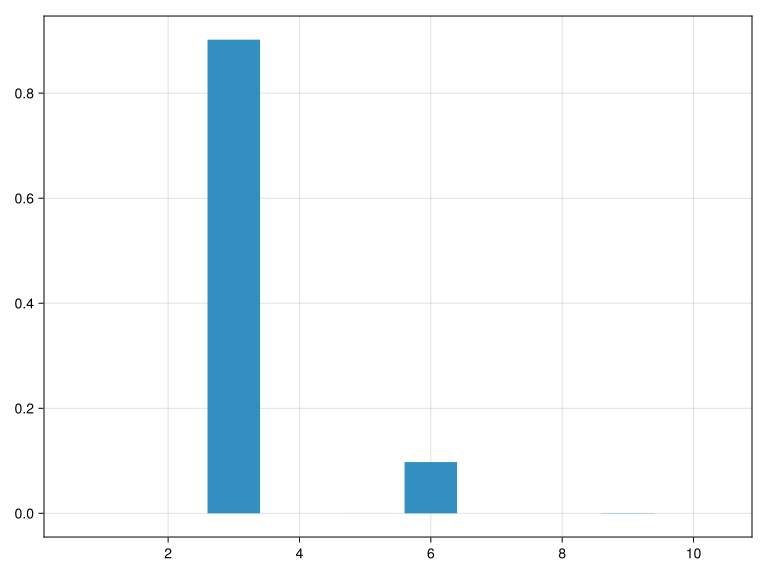
Softmax is the function defined by Equation 4. It transforms a collection of values into a probability distribution, since the new values are nonnegative and add up to 1. The values that result from applying softmax to the output of the neural network in the example can be interpreted as the classification probabilities among mlp_output_dim = 10 categories.
\[ (softmax)_i = \frac{e^{x_i}}{\sum_i e^{x_i}} \tag{4}\]
4.4 Applying neural networks
Going back to our workflow, let’s check what models MLJ.jl provides for our data. As mentioned in the beginning, we are solving a multitarget regression task, hence why most models include “multitarget”, “multitask” and “regressor” in the name.
models(matching(inputs, outputs)) .|> println;(name = DeterministicConstantRegressor, package_name = MLJModels, ... )
(name = MultiTaskElasticNetCVRegressor, package_name = MLJScikitLearnInterface, ... )
(name = MultiTaskElasticNetRegressor, package_name = MLJScikitLearnInterface, ... )
(name = MultiTaskLassoCVRegressor, package_name = MLJScikitLearnInterface, ... )
(name = MultiTaskLassoRegressor, package_name = MLJScikitLearnInterface, ... )
(name = MultitargetKNNRegressor, package_name = NearestNeighborModels, ... )
(name = MultitargetLinearRegressor, package_name = MultivariateStats, ... )
(name = MultitargetNeuralNetworkRegressor, package_name = MLJFlux, ... )
(name = MultitargetRidgeRegressor, package_name = MultivariateStats, ... )
(name = MultitargetSRRegressor, package_name = SymbolicRegression, ... )We do not see many models here. That’s because multitarget regression is a very specific task. To avoid being limited by the number of models, this task could have been broken down to smaller parallel tasks around each PK parameter (Cl, Vc, Ka), or even mixing in tree-based models for the categorical covariates.
The next code block defines the neural network’s architecture through a “builder” and Flux.Chain. That is, what types of layers we are going to use, how many of them, and what’s the data flow inside the model. For now, we keep it simple, using a sequence of Dense layers. Note that L2 regularization is used (alpha=0), as in ridge regression.
builder = @builder begin
    init_rng = StableRNG(SEED)
    Chain(
        Dense(n_in, 4, relu; init = glorot_uniform(init_rng)),
        Dense(4, n_out, identity; init = glorot_uniform(init_rng)),
    )
end
neural_network = with_standardization(
    MultitargetNeuralNetworkRegressor(;
        builder,
        batch_size = 32,
        alpha = 0,
        epochs = 100,
        rng = StableRNG(SEED),
        optimiser_changes_trigger_retraining = true,
    ),
)
Note
Flux.jl is one of the main deep learning packages in Julia, providing architecture definitions, training procedures, activation functions, GPU support (through CUDA.jl for NVIDIA cards), loss functions, optimizers, etc. An alternative is Lux.jl.
Mathematically, Dense layers equate to the linear algebra operations in (Section 4.1), i.e. matrix multiplication and addition, plus application of a non-linear activation function. The parameters included in the Dense layer definitions are the sizes of the input and output; the specified activation function is applied pointwise. The output size of one layer matches the input size of the next, since data goes in sequence from one layer to the next.
Note that MLJ will automatically interpolate the correct input and output dimension n_in and n_out using the data and will get rng from the neural_network hyper-parameter rng (set here to SEED). For our data n_in will be 10 (the number of covariates after one-hot encoding) and n_out will be 3, since we are predicting the vector of EBEs for clearance, volume and absorption constant.
Also notice that we have increased the epochs value we used in the single layer LASSO and ridge models, as adding layers generally increases the number of epochs needed for convergence. A more principled approach to controlling epochs is given in the next section.
Now is a good opportunity to discuss batching: certain ML models are able to process multiple inputs at once. Not much optimization tends to be done on this hyperparameter, with common values being powers of 2 between 32 and 512. This can be useful for speeding up and parallelizing model training and inference (using a trained model). It’s specially the case when working with neural networks, since they can be parallelized in the GPU (graphics processing unit), a hardware component for efficiently handling arrays in parallel. In fact, when handling large datasets, they won’t fit in memory anymore, making batching a necessity. Lastly, working with batches is also useful to add a bit of randomness to the inputs of the neural network, indirectly helping with regularization.
Let’s estimate the neural network’s model performance, for comparison with the linear models:
comparisons = vcat(
    comparisons,
    compare(
        [
            "neural network (untuned)" => neural_network,
            "neural network" => tuned(neural_network),
        ],
        inputs,
        outputs,
    ),
)
sort!(comparisons, :midpoint)
println(comparisons[:, 1:4]);
8×4 DataFrame Row │ name loss_lower loss_upper midpoint │ String Float64 Float64 Float64 ─────┼───────────────────────────────────────────────────────────── 1 │ ridge 0.0557354 0.0725974 0.0641664 2 │ LASSO 0.0561484 0.0737926 0.0649705 3 │ constant predictor 0.058995 0.0766205 0.0678078 4 │ neural network 0.0593857 0.0770887 0.0682372 5 │ LASSO (untuned) 0.0618515 0.0777719 0.0698117 6 │ ridge (untuned) 0.0620038 0.0779462 0.069975 7 │ linear regression 0.062251 0.0851204 0.0736857 8 │ neural network (untuned) 0.0662096 0.0868199 0.0765147
4.5 Early-stopping
With neural networks, there are two main ways to decide when training should stop. The simplest one is based on the number of epochs, i.e. how many times the model has processed the entire training/validation split. Once enough training epochs are done, a validation epoch is performed and training ends. The alternative is early-stopping: every few training epochs, a validation epoch is done to keep track of the validation loss. With this, some stopping criteria can be set up to dynamically end training when appropriate. When configured correctly, this method provides more flexibility, since a fixed number of epochs is arbitrary, and you instead let the model train for as long as it needs, without overfitting.
Before training the neural networks, as a high-level pseudocode, below are the basic steps taken to train ML models using gradient-based optimization with holdout set for validation in early-stopping:
- Setup initial components:
- Optimiser \(O\), loss function \(L\), data \(D\), hyperparameters, and model \(M\) with random initial parameters \(p\)
- Split dataset between training and validation
- Loop in the following steps:
- For a prespecified number of training epochs:
- Sample batch \(B = (x, y)_i\) of data points from the training split, including inputs \(x\) and respective targets/labels \(y\)
- Use model \(M\) to get predictions \(\hat{y} = M(x)\)
- Calculate gradient of loss function in relation to model parameters \(g = \nabla_{p} L(p, y, \hat{y})\)
- Apply gradient step with optimiser to update model parameters: \(p \leftarrow p + \eta \cdot O(g)\)
- Complete a validation epoch in a similar manner, but without gradient calculations and updates. Log average validation error across batches
- Check early-stopping conditions. If any were violated, stop training
Below, another neural network is created. Afterwards, some conditions are set. In MLJ.jl, early-stopping is based on the control cycles from IterationControl.jl. So it’s important to keep in mind that the conditions are tested at the end of a control cycle, which contains Steps(n) training epochs. Among these conditions, some work as stopping criteria. There’s NumberLimit for the usual total number of epochs, but also Patience, which is based on the trend of the validation loss across control cycles.
# Function to update learning rate
function shrink_learning_rate!(neural_network)
    core_model = neural_network.transformed_target_model_deterministic.model
    core_model.optimiser = Adam(core_model.optimiser.eta * 0.99)
    return neural_network
end
# stop conditions and learning rate scheduling:
controls = [
    Step(1), # Training epochs per control cycle
    NumberLimit(150), # Don't train for more than this many control cycles
    Patience(5), # Stop after n iterations of worsening in validation loss
    WithModelDo(f = shrink_learning_rate!),
    InvalidValue(), # Stop if loss is NaN, Inf, or -Inf
];
There’s also the option of learning rate scheduling: changing the learning rate as the optimization progresses (Géron 2019). In the previous code block, we reset the initial learning rate to 1 (neural_network_stopped_early.optimiser = Adam(1)). That’s higher than usual, but the scheduling will multiply it by 0.99 every control cycle (WithModelDo(f = shrink_learning_rate)). This type of dynamic control provides flexibility and tries to enjoy the benefits of both high and low learning rate values when appropriate.
Next, we also define a “callback”, a common term used to describe procedures that are executed sporadically throughout iterative processes, such as printing or plotting in real time. Specifically, WithLossDo logs the validation loss history for later plotting and post-processing. Then, as in the previous tutorial, we wrap the model in an IteratedModel and provide some settings.
# Callback
validation_losses = []
callbacks = [WithLossDo(loss -> push!(validation_losses, loss))]

# Wrap the network from before (untuned) with iteration controls:
neural_network_stopped_early = IteratedModel(
    deepcopy(neural_network), # untuned model
    # loss and stopping are based on out-of-sample:
    resampling = Holdout(fraction_train = 0.7);
    measures = multitarget_l2,
    controls = vcat(controls, callbacks),
)
DeterministicIteratedModel(
model = DeterministicPipeline(
standardizer = Standardizer(features = Symbol[], …),
transformed_target_model_deterministic = TransformedTargetModelDeterministic(model = MultitargetNeuralNetworkRegressor(builder = GenericBuilder(apply = #52), …), …),
cache = true),
controls = Any[Step(1), NumberLimit(150), Patience(5), WithModelDo{typeof(shrink_learning_rate!)}(shrink_learning_rate!, false, nothing), InvalidValue(), WithLossDo{var"#54#55"}(var"#54#55"(), false, nothing)],
resampling = Holdout(
fraction_train = 0.7,
shuffle = false,
rng = TaskLocalRNG()),
measure = MultitargetLPLoss(p = 2),
weights = nothing,
class_weights = nothing,
operation = nothing,
retrain = false,
check_measure = true,
iteration_parameter = nothing,
cache = true)Let’s train this model on all the data to see the callback in action:
mach = machine(neural_network_stopped_early, inputs, outputs) |> fit!
validation_losses[(end-5):end]
[ Info: Training machine(DeterministicIteratedModel(model = DeterministicPipeline(standardizer = Standardizer(features = Symbol[], …), …), …), …). [ Info: No iteration parameter specified. Using `iteration_parameter=:(transformed_target_model_deterministic.model.epochs)`. [ Info: final loss: 0.06876465322081267 [ Info: final training loss: 1.1780815167852958 [ Info: Stop triggered by EarlyStopping.Patience(5) stopping criterion. [ Info: Total of 110 iterations.
6-element Vector{Any}:
 0.06873772574440036
 0.06874092100434932
 0.06874477882496034
 0.06875377734028966
 0.06875851447905804
 0.06876465322081267
We cannot use tuned(iterated_neural_network) here, because the extra wrapping has pushed the hyper-parameters of interest one level deeper. So we’ll do this one by hand. Also, to reduce training times in this illustration, we will reduce the hyper-parameter ranges (which we have obtained separately by running with the original larger ranges):
deeply_nested_optimiser = :(model.transformed_target_model_deterministic.model.optimiser)
deeply_nested_lambda = :(model.transformed_target_model_deterministic.model.lambda)
tuned_neural_network_stopped_early = TunedModel(
    neural_network_stopped_early,
    resampling = CV(),
    tuning = Grid(goal = 12),
    range = [
        range(
            neural_network_stopped_early,
            deeply_nested_optimiser,
            values = optimizers[3:5],
        ),
        range(Float64, deeply_nested_lambda, lower = 1, upper = 10, scale = :log),
    ],
    measure = multitarget_l2,
)
comparisons = vcat(
comparisons,
compare(
[
"neural network stopped early (untuned)" => neural_network_stopped_early,
"neural network stopped early" => tuned_neural_network_stopped_early,
],
inputs,
outputs,
),
)
sort!(comparisons, :midpoint)
println(comparisons[:, 1:4]);10×4 DataFrame Row │ name loss_lower loss_upper midpoint │ String Float64 Float64 Float64 ─────┼────────────────────────────────────────────────────────────────────── 1 │ ridge 0.0557354 0.0725974 0.0641664 2 │ LASSO 0.0561484 0.0737926 0.0649705 3 │ constant predictor 0.058995 0.0766205 0.0678078 4 │ neural network stopped early 0.0588813 0.0770331 0.0679572 5 │ neural network 0.0593857 0.0770887 0.0682372 6 │ LASSO (untuned) 0.0618515 0.0777719 0.0698117 7 │ ridge (untuned) 0.0620038 0.0779462 0.069975 8 │ linear regression 0.062251 0.0851204 0.0736857 9 │ neural network (untuned) 0.0662096 0.0868199 0.0765147 10 │ neural network stopped early (un… 0.0775827 0.101663 0.089623
The model comparisons are plotted below.
model_names = comparisons.name
midpoints = comparisons.midpoint
radii = comparisons.loss_upper - comparisons.loss_lower / 2
nmodels = length(model_names)

fig = Figure()
axis = Axis(
    fig[1, 1],
    xticks = (1:nmodels, model_names),
    ylabel = "L2 loss estimate",
    xticklabelrotation = pi / 4,
    xticklabelalign = (:right, :top),
    xticklabelpad = 10,
)

# Plot the center points (optional, but good practice)
scatter!(
    axis,
    1:nmodels,
    midpoints;
    marker = :circle,
    markersize = 15,
    color = :blue,
    label = "midpoints",
)

# Plot the error bars
errorbars!(
    axis,
    1:nmodels,
    midpoints,
    radii,
    color = :black,
    linewidth = 2,
    whiskerwidth = 10, # Control the width of the small horizontal lines at the ends
)
fig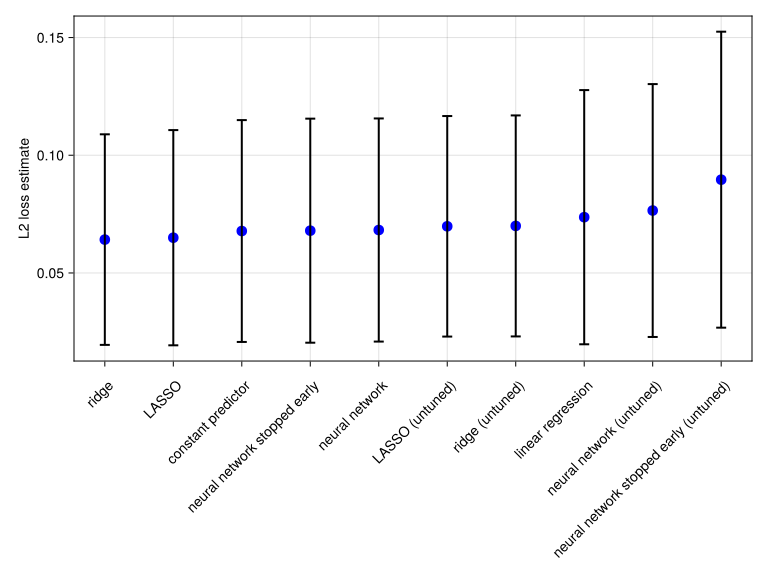
4.6 Performance comparisons
No model considered significantly outperforms the constant predictor, and so it seems that our covariates are poor predictors of the PK parameters, as perviously discussed. It may be that they have some predictive power, but a larger study is likely needed to establish this possibility.
For the record, here are details about the “best” model found in our analysis, the optimized ridge regressor:
comparisons[1, :model].transformed_target_model_deterministic.modelMultitargetNeuralNetworkRegressor(
builder = Linear(
σ = identity),
optimiser = Adam(eta=0.001, beta=(0.9, 0.999), epsilon=1.0e-8),
loss = Flux.Losses.mse,
epochs = 50,
batch_size = 1,
lambda = 59.948425031894104,
alpha = 0.0,
rng = StableRNGs.LehmerRNG(state=0x85de4872d33e6c908c9bb3e41e9b4ae5),
optimiser_changes_trigger_retraining = true,
acceleration = CPU1{Nothing}(nothing),
embedding_dims = Dict{Symbol, Real}())From the lambda value, we see there’s a significant amount of regularization. Generally, factors other than generalization performance can factor into the choice of models. Computational cost and ease of interpretation are other considerations.
5 Shapley values
One of the main drawbacks of neural networks is their “black-box nature”: we can’t reason on a high level of abstraction about what it’s doing to the inputs, or how and why it returned certain outputs. This means they lack interpretability (Molnar 2025). To fix this, the field of explainable AI (XAI) was developed to “[…] augment the training process, the learned representations, and the decisions with human-interpretable explanations” (Samek et al. 2021), especially for neural networks.
Among explainable AI methods, Shapley values (Shapley 1951) are a common way to interpret ML models. Originally, it was proposed in game theory to quantify the contribution of members in a cooperative game. In the context of neural networks, the team members are the inputs; and the performance in the “game” is tied to the model’s output. In the following code, ShapML.jl is used to calculate the contribution of each feature for each subject on the EBE of the clearance random effect.
# Train the optimized LASSO, ridge and neural network models on all data:
named_models = []
for (name, model) in zip(comparisons.name, comparisons.model)
    name in ["LASSO", "ridge", "neural network stopped early"] || continue
    push!(named_models, name => model)
end
named_machines = map(named_models) do (name, model)
    mach = machine(model, inputs, outputs)
    return name => fit!(mach, verbosity = 0)
end

predict_function(mach, data) = DataFrame(; prediction = MLJBase.predict(mach, data).cl)
shapley_given_model_name =
    map(named_machines) do (name, mach)
        name => ShapML.shap(;
            sample_size = 8000,
            explain = inputs,
            model = mach,
            predict_function,
            seed = SEED,
        )
    end |> LittleDict
LittleDict{String, DataFrame, Vector{String}, Vector{DataFrame}} with 3 entries:
"ridge" => 1360×6 DataFrame…
"LASSO" => 1360×6 DataFrame…
"neural network stopped early" => 1360×6 DataFrame…
In the ShapML.shap() call above, sample_size is set to 8000. In practice, having more samples (usually in the thousands) means higher accuracy in the stochastic estimation. Here’s an extract of some output of the shap function:
shapley = shapley_given_model_name["LASSO"]
show(shapley[[1, 2, 3, 1359, 1260], :]; allcols = true)
5×6 DataFrame Row │ index feature_name feature_value shap_effect shap_effect_sd intercept │ Int64 String Float32? Float64 Float64 Float64 ─────┼───────────────────────────────────────────────────────────────────────────── 1 │ 1 Smoke 0.0 1.13507e-5 1.62019e-5 -0.013562 2 │ 2 Smoke 0.0 1.13506e-5 1.62018e-5 -0.013562 3 │ 3 Smoke 1.0 -2.31233e-5 1.62016e-5 -0.013562 4 │ 135 Weight 91.0 0.000219689 0.000295484 -0.013562 5 │ 36 Weight 73.0 -0.000120587 0.000295484 -0.013562
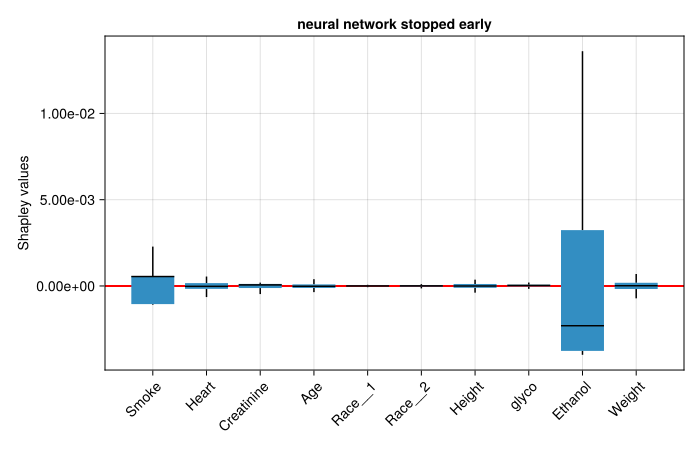
The three box plots below show the features for LASSO, ridge and neural network with early stopping, respectively. Blue box spans the interquartile (IQR) range with a midline marking the median. Error bar whiskers span 1.5 * IQR. Red horizontal line indicates y = 0.
Note that covariates with only a few distinct values in the training data have unusual median values. This is because of clustering of the Shapley values about a few modes. For this reason, we work with the mean rather than the median in the next section.
function shapley_boxplot(name, shapley)
    fig = Figure(; size = (700, 450))
    ax = Axis(
        fig[1, 1];
        title = string(name),
        ytickformat = "{:.2e}",
        xticks = (1:10, names(inputs)),
        ylabel = "Shapley values",
        xticklabelrotation = pi / 4,
        xticklabelalign = (:right, :top),
    )
    hlines!(ax, 0; color = :red, linewidth = 2)
    boxplot!(
        ax,
        repeat(1:10; inner = length(population)),
        shapley.shap_effect;
        show_outliers = false,
    )
    fig
end

shapley_boxplot("LASSO", shapley_given_model_name["LASSO"])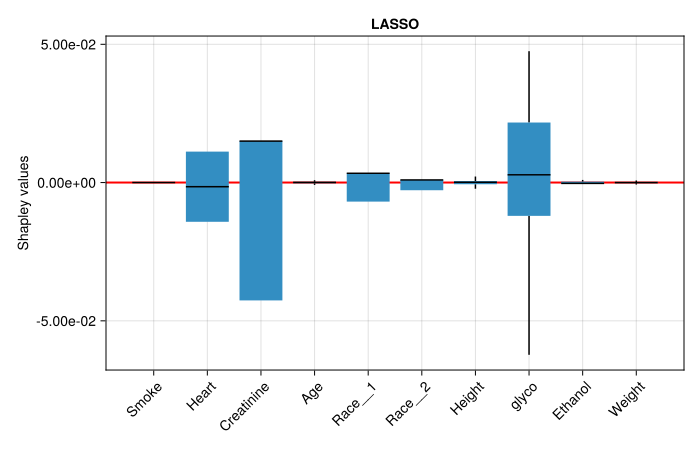
shapley_boxplot("ridge", shapley_given_model_name["ridge"])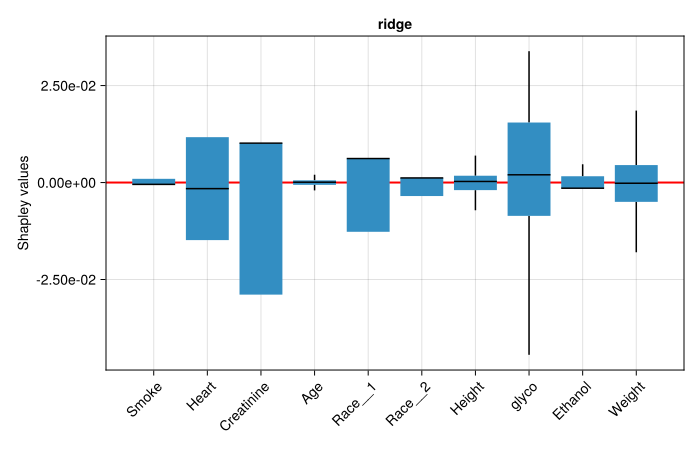
shapley_boxplot(
    "neural network stopped early",
    shapley_given_model_name["neural network stopped early"],
)
A simple interpretation is that the models considered features with positive mean Shapley values to increase the quinidine clearance rate; and the opposite for features with negative mean Shapley values. Although popular, Shapley values have drawbacks (Budhkar et al. 2025). Their theoretical computation is combinatorial, meaning it can easily get extremely costly. To avoid this in practice, some approximations are made, which frequently include the big assumptions of feature independence and linearity. Alternative interpretative machine learning techniques, such as the ones presented in (Budhkar et al. 2025), should also be considered.
6 Feature importance
In ML and data analysis, it’s very common to ask which variables are the best predictors of an outcome. As discussed in the previous section, Shapley values can help answering that. To compare how each of these models prioritized the inputs, the next code block first calculate the mean of Shapley values across subjects for each model. Then, this information is organized into a DataFrame.
input_names = names(inputs) # Covariate names

# Mean Shapley values across subjects
mean_shapley_given_model_name = LittleDict()
for (name, shapley) in shapley_given_model_name # Results from each model
    subdfs = collect(groupby(shapley, :feature_name; sort = false))
    mean_shapley_given_model_name[name] = getproperty.(subdfs, :shap_effect) .|> mean
end
mean_shapley_summary =
    hcat(DataFrame(Covariate = input_names), DataFrame(mean_shapley_given_model_name));
println(mean_shapley_summary);
10×4 DataFrame Row │ Covariate ridge LASSO neural network stopped early │ String Float64 Float64 Float64 ─────┼────────────────────────────────────────────────────────────────────── 1 │ Smoke 2.34163e-6 -5.62705e-8 -1.25581e-5 2 │ Heart -8.00122e-6 -7.65091e-6 -1.7524e-6 3 │ Creatinine -0.000174051 -0.000256734 -2.59608e-6 4 │ Age 3.83614e-6 1.63405e-6 1.05711e-7 5 │ Race__1 -5.68067e-5 -3.08309e-5 4.19411e-8 6 │ Race__2 -8.07499e-6 -6.44299e-6 1.75472e-6 7 │ Height 3.23055e-6 1.00681e-6 -1.36325e-6 8 │ glyco -0.000154124 -0.000216173 -9.34398e-7 9 │ Ethanol -5.3549e-5 -1.0693e-5 -0.000148841 10 │ Weight 9.45754e-5 3.81881e-6 -2.7145e-6
These values seem exceedingly small. Shapley values are computed on the same scale as the target, in this case the clearance rate exponent, which for comparison has these statistics:
@info "cl statistics" mean(outputs.cl) std(outputs.cl)┌ Info: cl statistics │ mean(outputs.cl) = -0.014575282544285851 └ std(outputs.cl) = 0.18909894480413864
We conclude that, in this case, rankings based on Shapley values likely have little meaning. This will be addressed later.
Proceeding for didactic purposes, we simplify the comparison by using mean_shapley_summary to rank the covariates using the absolute value of the Shapley means. We do this for each of the three models. Afterwards, DataFrames are printed with the covariate ranking for each model. A higher ranking means a greater absolute Shapley mean. The figure below plots the rankings for each model, where a higher rank means greater impact on the Quinidine clearance random effect.
# Absolute impact of covariates per model
covariate_rankings = map(2:4) do model_index
    # Temporary dataframe with covariate names and Shapley means for current model
    model_summary = deepcopy(mean_shapley_summary[:, [1, model_index]])
    model_summary[:, 2] = abs.(model_summary[:, 2]) # In place abs()
    # Sort from highest to lowest absolute mean shapley
    sort!(model_summary, 2; rev = true)
    # New row of each covariate indicates ranking
    return [findfirst(==(name), model_summary.Covariate) for name in input_names]
end
model_names = keys(mean_shapley_given_model_name)
for (model, rankings) in zip(model_names, covariate_rankings)
    println("$model ranking:\n", DataFrame(Covariate = input_names, Rank = rankings), "\n")
end
ridge ranking: 10×2 DataFrame Row │ Covariate Rank │ String Int64 ─────┼─────────────────── 1 │ Smoke 10 2 │ Heart 7 3 │ Creatinine 1 4 │ Age 8 5 │ Race__1 4 6 │ Race__2 6 7 │ Height 9 8 │ glyco 2 9 │ Ethanol 5 10 │ Weight 3 LASSO ranking: 10×2 DataFrame Row │ Covariate Rank │ String Int64 ─────┼─────────────────── 1 │ Smoke 10 2 │ Heart 5 3 │ Creatinine 1 4 │ Age 8 5 │ Race__1 3 6 │ Race__2 6 7 │ Height 9 8 │ glyco 2 9 │ Ethanol 4 10 │ Weight 7 neural network stopped early ranking: 10×2 DataFrame Row │ Covariate Rank │ String Int64 ─────┼─────────────────── 1 │ Smoke 2 2 │ Heart 6 3 │ Creatinine 4 4 │ Age 9 5 │ Race__1 10 6 │ Race__2 5 7 │ Height 7 8 │ glyco 8 9 │ Ethanol 1 10 │ Weight 3
fig = Figure(; size = (700, 620), fontsize = 16)
for (fig_column, model) in enumerate(model_names)
    ax = Axis(
        fig[1, fig_column];
        title = string(model),
        titlegap = 32,
        yreversed = true,
        limits = (-1, 1, 0.5, 10.5),
    )
    hidedecorations!(ax)
    hidespines!(ax)
    for (name, rank) in zip(input_names, covariate_rankings[fig_column])
        text!(ax, 0, rank; text = name, align = (:center, :center))
    end
end
ax = Axis(
    fig[1, 1:3];
    xticks = 0:10,
    limits = (0, 10, 0.5, 10.5),
    yticks = 1:10,
    yreversed = true,
)
hidespines!(ax);
hidedecorations!(ax);
for i = 1:2
    for (iter, (rankLeft, rankRight)) in
        enumerate(zip(covariate_rankings[i], covariate_rankings[i+1]))
        if i == 1
            lines!(
                ax,
                [2.2, 4.4],
                [rankLeft, rankRight];
                linewidth = 3,
                color = iter,
                colormap = :tab10,
                colorrange = (1, 10),
            )
        else
            lines!(
                ax,
                [5.6, 7.8],
                [rankLeft, rankRight];
                linewidth = 3,
                color = iter,
                colormap = :tab10,
                colorrange = (1, 10),
            )
        end
    end
end
fig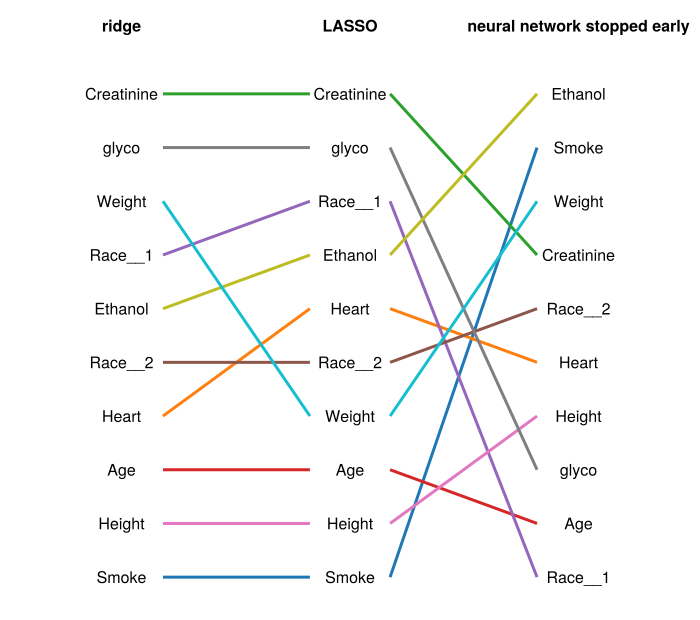
The data cannot independently identify the three PK parameters per subject. The EBEs we extract for the ML pipeline therefore reflect not three independent per‑subject parameters, but a near‑degenerate mixture of them. This is the structural reason our covariate identification on real data was disappointing. Long before we get to ML, the upstream NLME fit is telling us the data doesn’t carry enough per‑subject information about each parameter separately. The synthetic experiment that follows controls this confound by using denser sampling and a diagonal \(\Omega\) that matches the simulation’s true independent random effects.
7 Experimenting with synthetic data
Given the disappointing results above, we repeat our analyses with synthetic data. This data will be generated using the same patient covariate data in the clinical trial, with the same dosing profiles. However, we obtain corresponding PK observations by running a simulation, using a modification to our NLME model used to fit the clinical data above, but where CL, Vc and Ka depend on the covariates in way prescribed by us.
7.1 The population
Since our covariate dependence model will rely on the covariates being continuous quantities, to prepare a Pumas Population for simulation, we need to include the pre-processed versions of the covariates, what we have called inputs above. It will be convenient to construct the Population from the dataframe in the same way we did before, but the covariates are unprocessed. We will remedy this by adding a new column called x that will store the pre-processed covariate vectors. This procedure is complicated by the fact the dataframe has multiple rows for each subject. But we can use a left-join to handle this:
inputs_for_join = deepcopy(inputs) # temporary dataframe
inputs_for_join.x = collect.(collect.(eachrow(inputs)))
inputs_for_join.Subject = unique(df.Subject)
synth_df = leftjoin(df, inputs_for_join[:, [:Subject, :x]], on = :Subject)
show(first(select(synth_df, [:Subject, :x]), 3))
3×2 DataFrame Row │ Subject x │ Int64 Array…? ─────┼──────────────────────────────────────────── 1 │ 1 Float32[0.0, 2.0, 0.0, 60.0, 1.0… 2 │ 1 Float32[0.0, 2.0, 0.0, 60.0, 1.0… 3 │ 1 Float32[0.0, 2.0, 0.0, 60.0, 1.0…
And here is the modified version of the original population:
new_population = read_pumas(
    synth_df;
    id = :Subject,
    time = :time,
    amt = :dose,
    cmt = :cmt,
    evid = :evid,
    covariates = [:x],
    observations = [:conc],
)
Population
Subjects: 136
Covariates: x
Observations: conc7.2 The simulation
On a log scale, each PK parameter in the simulation model will be the sum of the following contributions:
- A population-wide constant (e.g.,
tvcl) - A subject-dependent random effect
- A linear combination of the normalized covariates + small non-linear distortion
The vectors of linear coefficients are called βcl, βvc, and βka in the simulation below. Normalization of covariates will be based on all observations. We start by defining a function, whiten(input), for computing the normalized representations of covariate inputs:
input_stats = describe(inputs, :mean, :std)
inputs_mean = input_stats.mean
inputs_std = input_stats.std
whiten(input) = (input - inputs_mean) ./ inputs_std
For the non-linear distortion, we’ll use the distort function below, which is plotted in the following figure.
nonlinearity = 0.1
distort(t) = t + nonlinearity * sin(2π / (1 + exp(7t)))
xvals = -1:0.01:1
fig = Figure()
axis = Axis(fig[1, 1], limits = ((-1, 1), (-1, 1)), xlabel = "t", ylabel = "distort(t)")
lines!(axis, xvals, distort.(xvals))
fig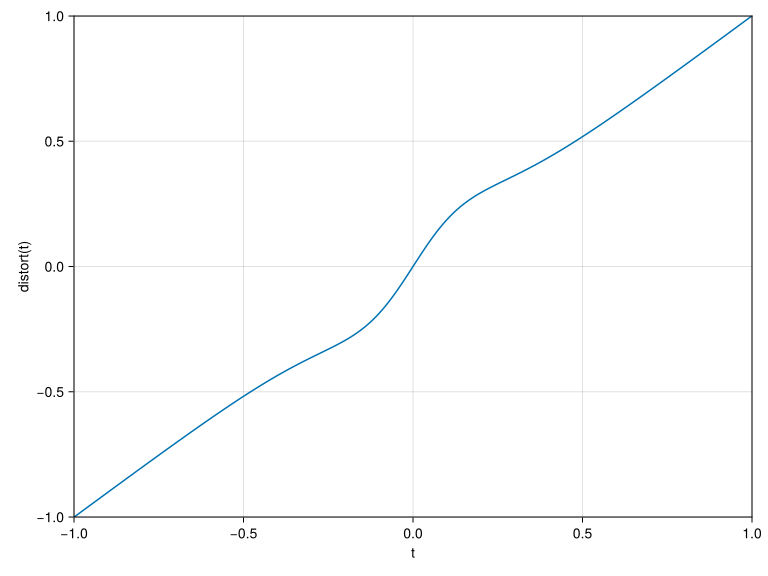
Here then is the simulation model:
ncovariates = size(inputs)[2]
simulation_model = @model begin
    @param begin
        tvcl ∈ RealDomain(; lower = 0)
        tvvc ∈ RealDomain(; lower = 0)
        tvka ∈ RealDomain(; lower = 0)
        βcl ∈ VectorDomain(ncovariates)
        βvc ∈ VectorDomain(ncovariates)
        βka ∈ VectorDomain(ncovariates)
        Ω ∈ PSDDomain(3)
        σ ∈ RealDomain(; lower = 0)
    end
    @covariates x
    @random η ~ MvNormal(Ω)
    @pre begin
        CL = tvcl * exp(η[1] + distort(βcl' * whiten(x)))
        Vc = tvvc * exp(η[2] + distort(βvc' * whiten(x)))
        Ka = tvka * exp(η[3] + distort(βka' * whiten(x)))
    end
    @dynamics Depots1Central1
    @derived conc ~ @. Normal(Central / Vc, σ)
end
To finish the specification, we need to choose values for the population-wide parameters appearing under @param. The first three and last two we’ll grab from the Pumas NLME model we fitted to the clinical data, except we will scale down the the variance parameters, to reduce noise. The β parameters are new, and we choose them so that each PK parameter depends on its own distinct set of three covariates:
CLdepends onSmoke,Heart, andCreatinine(the nonzero entries ofβcl).Vcdepends onAge,Race_1, andRace_2(the nonzero entries ofβvc).Kadepends onHeight,glyco, andEthanol(the nonzero entries ofβka).
denoising = 30.0
old_params = coef(fitted_pumas_model)
denoised_params = (
    tvcl = old_params.tvcl,
    tvvc = old_params.tvvc,
    tvka = old_params.tvka,
    Ω = old_params.Ω / denoising,
    σ = old_params.σ / denoising,
)
βcl = [0.9, 0.9, 0.5, 0, 0, 0, 0, 0, 0, 0]
βvc = [0, 0, 0, 0.9, 0.6, 0.5, 0, 0, 0, 0]
βka = [0, 0, 0, 0, 0, 0, 0.9, 0.6, 0.5, 0]
simulation_params = merge(denoised_params, (; βcl, βvc, βka))
for key in keys(simulation_params)
    println("$key=$(getproperty(simulation_params, key))")
end
tvcl=9.555618782983991
tvvc=35.46672485436152
tvka=0.42799480784871746
Ω=[0.0032246640544725106 -0.003321834541389621 -0.005698218493997156; -0.003321834541389621 0.006151851782417005 0.0048234825743640715; -0.005698218493997156 0.0048234825743640715 0.010873592691793315]
σ=0.03729683715948383
βcl=[0.9, 0.9, 0.5, 0.0, 0.0, 0.0, 0.0, 0.0, 0.0, 0.0]
βvc=[0.0, 0.0, 0.0, 0.9, 0.6, 0.5, 0.0, 0.0, 0.0, 0.0]
βka=[0.0, 0.0, 0.0, 0.0, 0.0, 0.0, 0.9, 0.6, 0.5, 0.0]And now we simulate:
last_time = quantile(synth_df.time, 0.6)
obstimes =
    vcat(
        range(0.0, 5.0; length = 13), # absorption phase, dense
        range(5.0, 30.0; length = 13), # peak / early elimination
        range(30.0, last_time; length = 4), # terminal phase
    ) |> unique
simulated_population =
    Subject.(
        simobs(
            simulation_model,
            new_population,
            simulation_params;
            rng = StableRNG(SEED),
            obstimes,
        ),
    )
Next we repeat our previous analysis using the synthetic data in place of the clinical data, pretending that we do not know the underlying dependence of PK parameters on the covariates.
7.3 Fitting a covariate-free NLME model to the simulated data:
Define new covariate-free NLME model with diagonal \(\Omega\).
pumas_model_diagonal = @model begin
    @param begin
        tvcl ∈ RealDomain(; lower = 0)
        tvvc ∈ RealDomain(; lower = 0)
        tvka ∈ RealDomain(; lower = 0)
        Ω ∈ PDiagDomain(3)
        σ ∈ RealDomain(; lower = 0)
    end
    @random η ~ MvNormal(Ω)
    @pre begin
        CL = tvcl * exp(η[1])
        Vc = tvvc * exp(η[2])
        Ka = tvka * exp(η[3])
    end
    @dynamics Depots1Central1
    @derived conc ~ @. Normal(Central / Vc, σ)
end
diagonal_params = (;
    tvcl = ℯ^2.5, # 12.18
    tvvc = ℯ^5.4, # 221
    tvka = ℯ^-0.21, # 0.81
    Ω = Diagonal([1.5, 1.5, 1.5]),
    σ = 0.0123,
)
simulations_fit = fit(
pumas_model_diagonal,
simulated_population,
diagonal_params,
FOCE();
optim_options = (show_trace = false,),
)[ Info: Checking the initial parameter values. [ Info: The initial negative log likelihood and its gradient are finite. Check passed.
FittedPumasModel

Dynamical system type:                 Closed form

Number of subjects:                            136

Observation records:         Active        Missing
    conc:                      3808              0
    Total:                     3808              0

Number of parameters:      Constant      Optimized
                                  0              7

Likelihood approximation:                     FOCE
Likelihood optimizer:                         BFGS

Termination Reason:                      NoXChange
Log-likelihood value:                    5332.8621

-----------------
       Estimate
-----------------
tvcl    9.6718
tvvc   63.119
tvka    0.76481
Ω₁,₁    1.8053
Ω₂,₂    1.418
Ω₃,₃    1.6147
σ       0.037202
-----------------
And extract the empirical Bayes estimates of the PK random effects, which constitute our new simulation_outputs:
simulation_ebe = only.(empirical_bayes(simulations_fit, simulated_population))
ebe_matrix = permutedims(reduce(hcat, simulation_ebe)) # Reshape into 136x3 matrix
simulation_outputs = DataFrame(ebe_matrix, [:cl, :vc, :ka]) # Wrap in DataFrame
describe(simulation_outputs)[:, Not(7)] |> println;
3×6 DataFrame Row │ variable mean min median max nmissing │ Symbol Float64 Float64 Float64 Float64 Int64 ─────┼───────────────────────────────────────────────────────────────── 1 │ cl -0.000624563 -2.39712 0.129799 3.39446 0 2 │ vc 0.0469835 -3.56309 0.013283 3.69511 0 3 │ ka 0.0405322 -2.8988 -0.0533435 2.6471 0
To check if covariate information was correctly embedded in the data, a correlation test is performed. High values indicate there’ll be a link to be learned by the ML models, connecting covariates and EBEs through the synthetic data.
cors = [
    cor(map(x -> dot(βcl, whiten(x)), inputs_for_join.x), simulation_outputs.cl),
    cor(map(x -> dot(βvc, whiten(x)), inputs_for_join.x), simulation_outputs.vc),
    cor(map(x -> dot(βka, whiten(x)), inputs_for_join.x), simulation_outputs.ka),
    cor(map(x -> dot(βcl, whiten(x)), inputs_for_join.x), simulation_outputs.vc),
    cor(map(x -> dot(βcl, whiten(x)), inputs_for_join.x), simulation_outputs.ka),
    cor(map(x -> dot(βvc, whiten(x)), inputs_for_join.x), simulation_outputs.cl),
]
println("EBE-covariate correlations:")
for (param_name, correlation) in zip(["cl", "vc", "ka"], cors[1:3])
    println("  $param_name: ", round(correlation; digits = 6))
end
println("EBE-covariate cross-correlations:")
for (param_name, correlation) in zip(["cl-vc", "cl-ka", "vc-cl"], cors[4:6])
    println("  $param_name: ", round(correlation; digits = 6))
end
EBE-covariate correlations:
cl: 0.99773
vc: 0.484663
ka: 0.60595
EBE-covariate cross-correlations:
cl-vc: 0.517754
cl-ka: 0.512079
vc-cl: -0.0653377.4 Learning curves for LASSO
Here’s our out-of-sample epochs learning curve for the LASSO model:
_, _, epochs, losses = learning_curve(
    lasso,
    inputs,
    simulation_outputs;
    range = range(lasso, nested_epochs, lower = 1, upper = 100),
    measure = multitarget_l2,
    verbosity = 0,
);
begin
fig = Figure()
axis = Axis(
fig[1, 1],
title = "Varying epochs in LASSO regression (synthetic data)",
xlabel = "Epochs",
ylabel = "l2 loss",
)
scatter!(axis, epochs, losses)
end
fig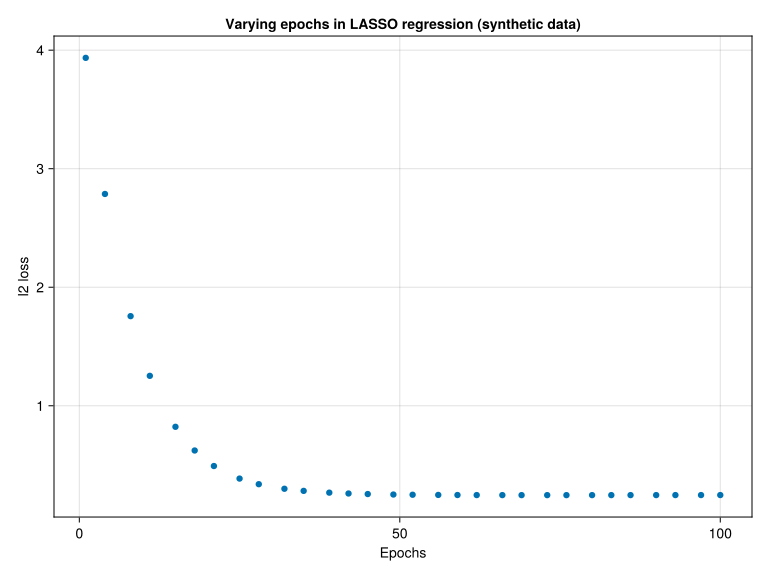
Here’s the in-sample epochs learning curve:
_, _, epochs, losses = learning_curve(
    lasso,
    inputs,
    simulation_outputs;
    range = range(lasso, nested_epochs, lower = 1, upper = 100),
    measure = multitarget_l2,
    resampling = InSample(),
    verbosity = 0,
);
begin
fig = Figure()
axis = Axis(
fig[1, 1],
title = "Varying epochs in LASSO regression (in-sample loss, synthetic data)",
xlabel = "Epochs",
ylabel = "l2 loss",
)
scatter!(axis, epochs, losses)
end
fig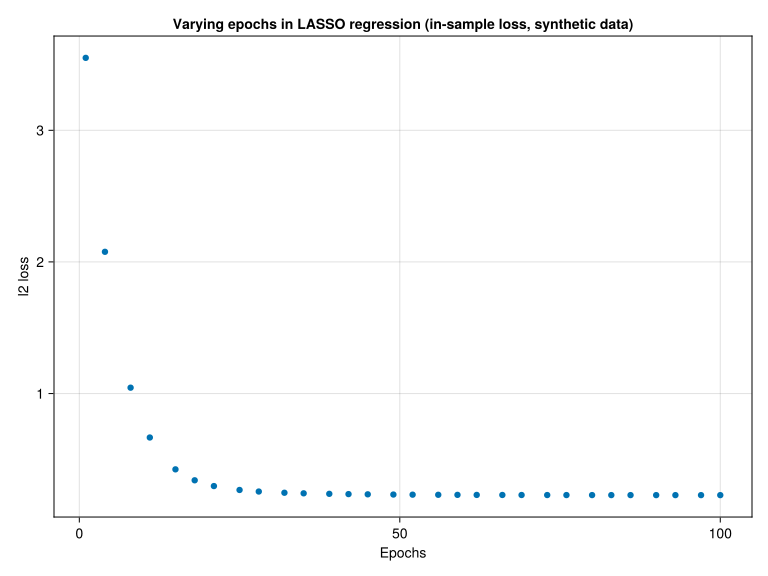
As in the case of real data, it looks like 70 iterations is sufficient (for the default learning rate). Turning to the regularization parameter lambda:
nested_lambda = :(transformed_target_model_deterministic.model.lambda)
_, _, lambdas, losses = learning_curve(
    lasso,
    inputs,
    simulation_outputs;
    range = range(lasso, nested_lambda, lower = 0.01, upper = 10, scale = :log10),
    measure = multitarget_l2,
);
begin
fig = Figure()
axis = Axis(
fig[1, 1],
title = "Varying `lambda` in LASSO (synthetic data)",
xlabel = "lambda",
xscale = log10,
ylabel = "l2 loss",
)
scatter!(axis, lambdas, losses)
end
fig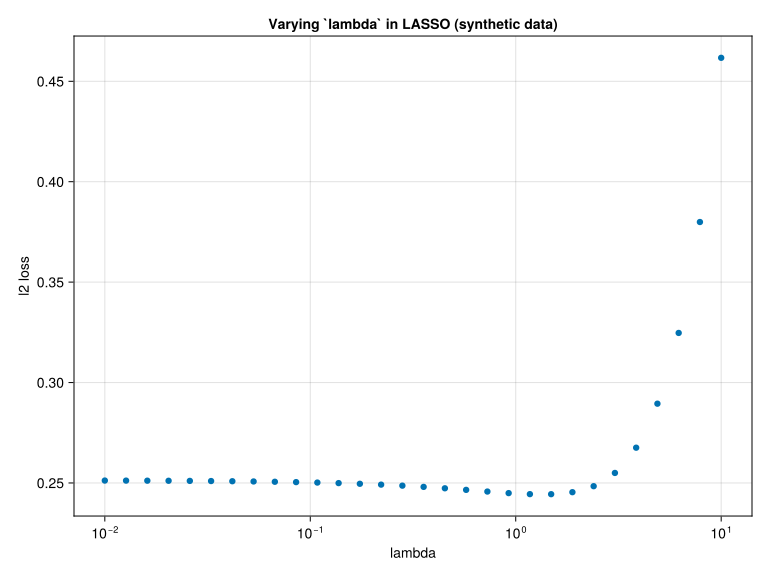
We’ll assume that we aren’t going to need lambda > 10 or lambda < 0.01.
7.5 The tuned models
Since we will want to modify the lambda range for optimization, we need to redefine our tuning wrapper tuned(model), and the special case tuned_neural_network_stopped_early. The only difference between the following code blocks and the ones used for the clinical data is the change to the lambda range.
optimizers = [Adam(10^i) for i = -6.0:0.0] # same as before
tuned(model) = TunedModel(
    model,
    resampling = CV(),
    tuning = Grid(),
    range = [
        range(model, nested_optimiser, values = optimizers),
        range(model, nested_lambda, lower = 0.01, upper = 10, scale = :log),
    ],
    measure = multitarget_l2,
)

tuned_neural_network_stopped_early = TunedModel(
    neural_network_stopped_early,
    resampling = CV(),
    tuning = Grid(goal = 12),
    range = [
        range(
            neural_network_stopped_early,
            deeply_nested_optimiser,
            values = optimizers[3:5],
        ),
        range(Float64, deeply_nested_lambda, lower = 0.01, upper = 10, scale = :log),
    ],
    measure = multitarget_l2,
)
DeterministicTunedModel(
model = DeterministicIteratedModel(
model = DeterministicPipeline(standardizer = Standardizer(features = Symbol[], …), …),
controls = Any[Step(1), NumberLimit(150), Patience(5), WithModelDo{typeof(shrink_learning_rate!)}(shrink_learning_rate!, false, nothing), InvalidValue(), WithLossDo{var"#54#55"}(var"#54#55"(), false, nothing)],
resampling = Holdout(fraction_train = 0.7, …),
measure = MultitargetLPLoss(p = 2),
weights = nothing,
class_weights = nothing,
operation = nothing,
retrain = false,
check_measure = true,
iteration_parameter = nothing,
cache = true),
tuning = Grid(
goal = 12,
resolution = 10,
shuffle = true,
rng = TaskLocalRNG()),
resampling = CV(
nfolds = 6,
shuffle = false,
rng = TaskLocalRNG()),
measure = MultitargetLPLoss(p = 2),
weights = nothing,
class_weights = nothing,
operation = nothing,
range = ParamRange[NominalRange(model.transformed_target_model_deterministic.model.optimiser = Optimisers.Adam(eta=0.0001, beta=(0.9, 0.999), epsilon=1.0e-8), Optimisers.Adam(eta=0.001, beta=(0.9, 0.999), epsilon=1.0e-8), Optimisers.Adam(eta=0.010000000000000002, beta=(0.9, 0.999), epsilon=1.0e-8)), NumericRange(0.01 ≤ model.transformed_target_model_deterministic.model.lambda ≤ 10.0; origin=5.005, unit=4.995; on log scale)],
selection_heuristic = NaiveSelection(nothing),
train_best = true,
repeats = 1,
n = nothing,
acceleration = CPU1{Nothing}(nothing),
acceleration_resampling = CPU1{Nothing}(nothing),
check_measure = true,
cache = true,
compact_history = true,
logger = nothing)7.6 Model comparisons
We are now ready to compare the performance of our models on the synthetic data:
comparisons = compare(
    [
        "constant predictor" => DeterministicConstantRegressor(),
        "linear regression" => linear_regressor,
        "LASSO (untuned)" => lasso,
        "LASSO" => tuned(lasso),
        "ridge (untuned)" => ridge,
        "ridge" => tuned(ridge),
        "neural network (untuned)" => neural_network,
        "neural network" => tuned(neural_network),
        "neural network stopped early (untuned)" => neural_network_stopped_early,
        "neural network stopped early" => tuned_neural_network_stopped_early,
    ],
    inputs,
    simulation_outputs,
)
println(comparisons[:, 1:4]);
10×4 DataFrame Row │ name loss_lower loss_upper midpoint │ String Float64 Float64 Float64 ─────┼───────────────────────────────────────────────────────────────────── 1 │ neural network 0.0623725 0.158778 0.110575 2 │ linear regression 0.265355 0.356037 0.310696 3 │ LASSO (untuned) 0.289677 0.387242 0.338459 4 │ ridge (untuned) 0.290015 0.387905 0.33896 5 │ ridge 0.300932 0.386969 0.343951 6 │ LASSO 0.300465 0.387453 0.343959 7 │ neural network stopped early 0.810245 1.1617 0.98597 8 │ constant predictor 1.45934 1.62509 1.54221 9 │ neural network (untuned) 1.54552 1.75166 1.64859 10 │ neural network stopped early (un… 2.04227 2.44531 2.24379
These results are plotted below.
model_names = comparisons.name
midpoints = comparisons.midpoint
radii = comparisons.loss_upper - comparisons.loss_lower / 2
nmodels = length(model_names)

fig = Figure()
axis = Axis(
    fig[1, 1],
    xticks = (1:nmodels, model_names),
    ylabel = "L2 loss estimate",
    xticklabelrotation = pi / 4,
    xticklabelalign = (:right, :top),
    xticklabelpad = 10,
)

# Plot the center points (optional, but good practice)
scatter!(
    axis,
    1:nmodels,
    midpoints;
    marker = :circle,
    markersize = 15,
    color = :blue,
    label = "midpoints",
)

# Plot the error bars
errorbars!(
    axis,
    1:nmodels,
    midpoints,
    radii,
    color = :black,
    linewidth = 2,
    whiskerwidth = 10, # Control the width of the small horizontal lines at the ends
)
fig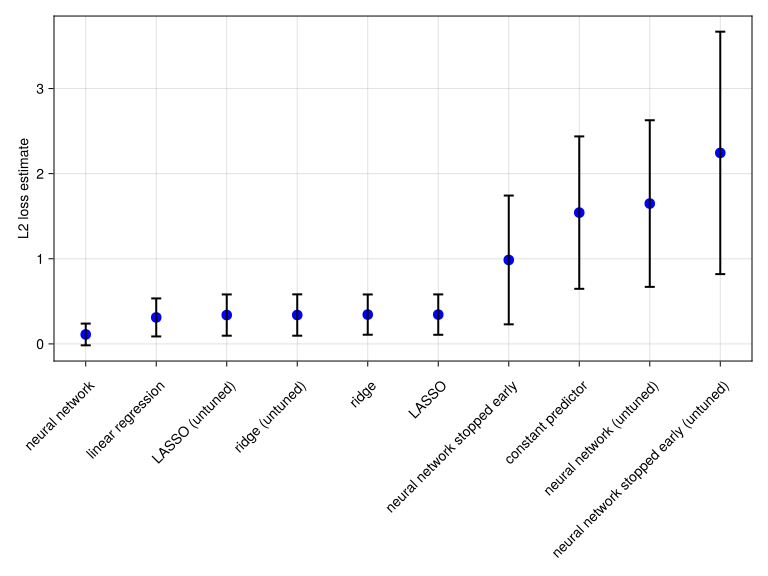
7.7 Shapley values
We proceed as before to compute Shapley values, but consider neural network without early stopping, as this time this is the better performer:
named_models = []
for (name, model) in zip(comparisons.name, comparisons.model)
    name in ["LASSO", "ridge", "neural network"] || continue
    push!(named_models, name => model)
end
named_machines = map(named_models) do (name, model)
    mach = machine(model, inputs, simulation_outputs)
    return name => fit!(mach, verbosity = 0)
end
predict_function(mach, data) = DataFrame(; prediction = MLJBase.predict(mach, data).cl)
shapley_given_model_name =
    map(named_machines) do (name, mach)
        name => ShapML.shap(;
            sample_size = 8000,
            explain = inputs,
            model = mach,
            predict_function,
            seed = SEED,
            parallel = :both,
        )
    end |> LittleDict
LittleDict{String, DataFrame, Vector{String}, Vector{DataFrame}} with 3 entries:
"neural network" => 1360×6 DataFrame…
"ridge" => 1360×6 DataFrame…
"LASSO" => 1360×6 DataFrame…
Plotting the results:
shapley_boxplot("LASSO", shapley_given_model_name["LASSO"])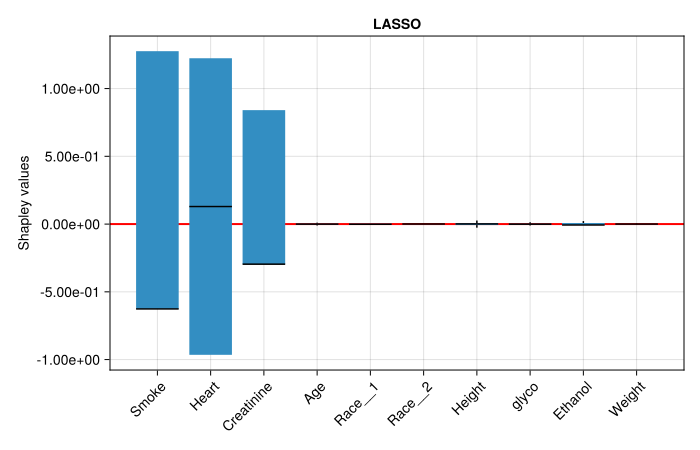
shapley_boxplot("ridge", shapley_given_model_name["ridge"])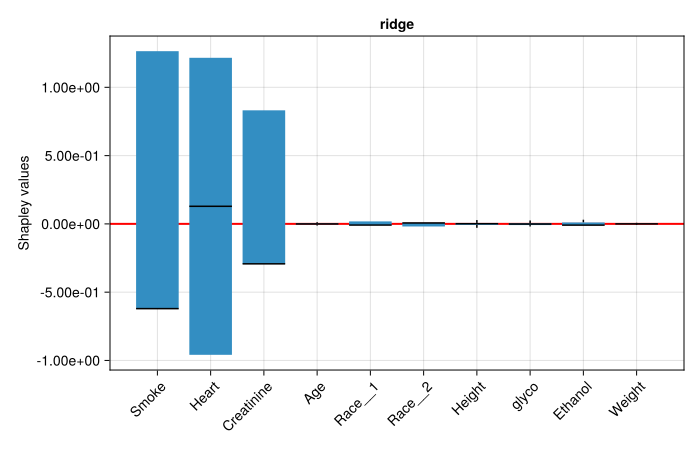
shapley_boxplot("neural network", shapley_given_model_name["neural network"])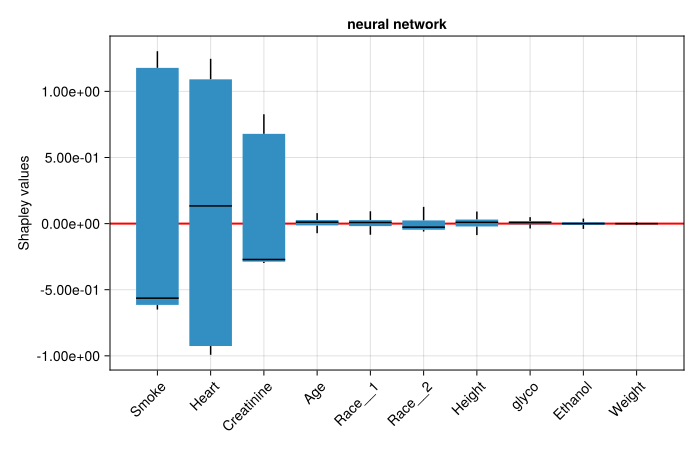
7.8 Feature importances
Finally, we derive Shapley-based feature importances and corresponding rankings. First, we compute the mean values:
input_names = names(inputs) # Covariate names

# Mean Shapley values across subjects
mean_shapley_given_model_name = LittleDict()
for (name, shapley) in shapley_given_model_name # Results from each model
    subdfs = collect(groupby(shapley, :feature_name; sort = false))
    mean_shapley_given_model_name[name] =
        getproperty.(subdfs, :shap_effect) .|> (v -> mean(abs.(v)))
end
mean_shapley_summary =
    hcat(DataFrame(Covariate = input_names), DataFrame(mean_shapley_given_model_name));
println(mean_shapley_summary);
10×4 DataFrame Row │ Covariate neural network ridge LASSO │ String Float64 Float64 Float64 ─────┼───────────────────────────────────────────────────── 1 │ Smoke 0.784752 0.833871 0.841175 2 │ Heart 0.762453 0.790422 0.795215 3 │ Creatinine 0.404816 0.435246 0.440021 4 │ Age 0.0427855 0.00415244 0.00344537 5 │ Race__1 0.0311176 0.0118822 0.00200931 6 │ Race__2 0.0491927 0.00978424 0.000719797 7 │ Height 0.0430793 0.0078691 0.00735875 8 │ glyco 0.0257255 0.00825265 0.00433689 9 │ Ethanol 0.0160981 0.0119998 0.00893304 10 │ Weight 0.004085 0.00255907 0.00118626
Because we take the mean absolute Shapley value, these are non-negative importance magnitudes. Note that the three covariates we prescribed in the simulation model, βcl = [0.9, 0.9, 0.5, 0, 0, 0, 0, 0, 0, 0] (Smoke, Heart, Creatinine), dominate all other covariates by an order of magnitude across all three models, and their relative magnitudes broadly track the prescribed coefficients. Turning to feature rankings:
covariate_rankings = map(2:4) do model_index
    # Temporary dataframe with covariate names and Shapley means for current model
    model_summary = deepcopy(mean_shapley_summary[:, [1, model_index]])
    # Sort from highest to lowest absolute mean shapley
    sort!(model_summary, 2; rev = true)
    # New row of each covariate indicates ranking
    return [findfirst(==(name), model_summary.Covariate) for name in input_names]
end
model_names = keys(mean_shapley_given_model_name)
for (model, rankings) in zip(model_names, covariate_rankings)
    println("$model ranking:\n", DataFrame(Covariate = input_names, Rank = rankings), "\n")
end
neural network ranking: 10×2 DataFrame Row │ Covariate Rank │ String Int64 ─────┼─────────────────── 1 │ Smoke 1 2 │ Heart 2 3 │ Creatinine 3 4 │ Age 6 5 │ Race__1 7 6 │ Race__2 4 7 │ Height 5 8 │ glyco 8 9 │ Ethanol 9 10 │ Weight 10 ridge ranking: 10×2 DataFrame Row │ Covariate Rank │ String Int64 ─────┼─────────────────── 1 │ Smoke 1 2 │ Heart 2 3 │ Creatinine 3 4 │ Age 9 5 │ Race__1 5 6 │ Race__2 6 7 │ Height 8 8 │ glyco 7 9 │ Ethanol 4 10 │ Weight 10 LASSO ranking: 10×2 DataFrame Row │ Covariate Rank │ String Int64 ─────┼─────────────────── 1 │ Smoke 1 2 │ Heart 2 3 │ Creatinine 3 4 │ Age 7 5 │ Race__1 8 6 │ Race__2 10 7 │ Height 5 8 │ glyco 6 9 │ Ethanol 4 10 │ Weight 9
Here’s the corresponding visualization:
fig = Figure(; size = (700, 620), fontsize = 16)
for (fig_column, model) in enumerate(model_names)
    ax = Axis(
        fig[1, fig_column];
        title = string(model),
        titlegap = 32,
        yreversed = true,
        limits = (-1, 1, 0.5, 10.5),
    )
    hidedecorations!(ax)
    hidespines!(ax)
    for (name, rank) in zip(input_names, covariate_rankings[fig_column])
        text!(ax, 0, rank; text = name, align = (:center, :center))
    end
end
ax = Axis(
    fig[1, 1:3];
    xticks = 0:10,
    limits = (0, 10, 0.5, 10.5),
    yticks = 1:10,
    yreversed = true,
)
hidespines!(ax);
hidedecorations!(ax);
for i = 1:2
    for (iter, (rankLeft, rankRight)) in
        enumerate(zip(covariate_rankings[i], covariate_rankings[i+1]))
        if i == 1
            lines!(
                ax,
                [2.2, 4.4],
                [rankLeft, rankRight];
                linewidth = 3,
                color = iter,
                colormap = :tab10,
                colorrange = (1, 10),
            )
        else
            lines!(
                ax,
                [5.6, 7.8],
                [rankLeft, rankRight];
                linewidth = 3,
                color = iter,
                colormap = :tab10,
                colorrange = (1, 10),
            )
        end
    end
end
fig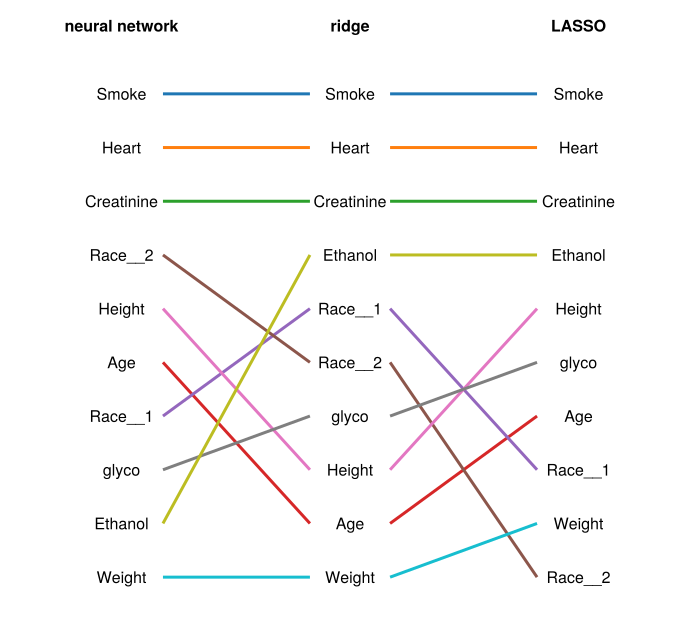
8 References
Budhkar, Aishwarya, Qianqian Song, Jing Su, and Xuhong Zhang. 2025. “Demystifying the Black Box: A Survey on Explainable Artificial Intelligence (XAI) in Bioinformatics.” Computational and Structural Biotechnology Journal 27: 346–59. https://doi.org/https://doi.org/10.1016/j.csbj.2024.12.027.
FDA. 2025. “Considerations for the Use of Artificial Intelligence to Support Regulatory Decision-Making for Drug and Biological Products.” 2025. https://www.fda.gov/regulatory-information/search-fda-guidance-documents/considerations-use-artificial-intelligence-support-regulatory-decision-making-drug-and-biological.
Géron, Aurélien. 2019. Hands-on Machine Learning with Scikit-Learn, Keras, and TensorFlow. O’Reilly.
Ian Goodfellow, Aaron Courville, Yoshua Bengio. 2016. “Deep Learning.” 2016. https://www.deeplearningbook.org/.
Kingma, Diederik P., and Jimmy Ba. 2017. “Adam: A Method for Stochastic Optimization.” https://arxiv.org/abs/1412.6980.
Molnar, Christoph. 2025. Interpretable Machine Learning: A Guide for Making Black Box Models Explainable. 3rd ed. https://christophm.github.io/interpretable-ml-book.
Pinheiro, José C., and Douglas M. Bates. 2000. Mixed-Effects Models in s and s-PLUS. Springer.
Samek, Wojciech, Grégoire Montavon, Sebastian Lapuschkin, Christopher J. Anders, and Klaus-Robert Müller. 2021. “Explaining Deep Neural Networks and Beyond: A Review of Methods and Applications.” Proceedings of the IEEE 109 (3): 247–78. https://doi.org/10.1109/JPROC.2021.3060483.
Shapley, Lloyd S. 1951. Notes on the n-Person Game &Mdash; II: The Value of an n-Person Game. Santa Monica, CA: RAND Corporation. https://doi.org/10.7249/RM0670.
Verme, Catherine N., Thomas M. Ludden, William A. Clementi, and Steven C. Harris. 1992. “Pharmacokinetics of Quinidine in Male Patients: A Population Analysis.” Clinical Pharmacokinetics 22 (6): 468–80. https://doi.org/10.2165/00003088-199222060-00005.
Wikipedia. 2025. “Bias–Variance Tradeoff.” 2025. https://en.wikipedia.org/wiki/Bias%E2%80%93variance_tradeoff.