using Dates
using Pumas
using PumasUtilities
using CairoMakie
using DataFramesMeta
using CSV
using PharmaDatasets
Covariate Models
Caution
Some functions in this tutorial are only available after you load the PumasUtilities package.
1 Covariate Model Building
In this tutorial we’ll cover a workflow around covariate model building. You’ll learn how to:
- include covariates in your model
- parse data with covariates
- understand the difference between constant and time-varying covariates
- handle continuous and categorical covariates
- deal with missing data in your covariates
- deal with categorical covariates
1.1 nlme_sample Dataset
For this tutorial we’ll use the nlme_sample dataset from PharmaDatasets.jl:
pkfile = dataset("nlme_sample", String)
pkdata = CSV.read(pkfile, DataFrame; missingstring = ["NA", ""])
first(pkdata, 5)
5×15 DataFrame
| Row | ID | TIME | DV | AMT | EVID | CMT | RATE | WT | AGE | SEX | CRCL | GROUP | ROUTE | DURATION | OCC |
|---|---|---|---|---|---|---|---|---|---|---|---|---|---|---|---|
| Int64 | Float64 | Float64? | Int64? | Int64 | Int64? | Int64 | Int64 | Int64 | String1 | Int64 | String7 | Float64 | Int64? | Int64 | |
| 1 | 1 | 0.0 | missing | 1000 | 1 | 1 | 500 | 90 | 47 | M | 75 | 1000 mg | Inf | 2 | 1 |
| 2 | 1 | 0.001 | 0.0667231 | missing | 0 | missing | 0 | 90 | 47 | M | 75 | 1000 mg | Inf | missing | 1 |
| 3 | 1 | 1.0 | 112.817 | missing | 0 | missing | 0 | 90 | 47 | M | 75 | 1000 mg | Inf | missing | 1 |
| 4 | 1 | 2.0 | 224.087 | missing | 0 | missing | 0 | 90 | 47 | M | 75 | 1000 mg | Inf | missing | 1 |
| 5 | 1 | 4.0 | 220.047 | missing | 0 | missing | 0 | 90 | 47 | M | 75 | 1000 mg | Inf | missing | 1 |
Note
The nlme_sample dataset has different missing values as the standard datasets in the PharmaDatasets.jl. That’s why we are first getting a String representation of the dataset as a CSV file as pkfile variable. Then, we use it to customize the missingstring keyword argument inside CSV.read function in order to have a working DataFrame for the nlme_sample dataset.
If you want to know more about data wrangling and how to read and write data in different formats, please check out the Data Wrangling Tutorials at tutorials.pumas.ai.
As you can see, the nlme_sample dataset has the standard PK dataset columns such as :ID, :TIME, :DV, :AMT, :EVID and :CMT. The dataset also contains the following list of covariates:
:WT: subject weight in kilograms:SEX: subject sex, either"F"or"M":CRCL: subject creatinine clearance:GROUP: subject dosing group, either"500 mg","750 mg", or"1000 mg"
And we’ll learn how to include them in our Pumas modeling workflows.
describe(pkdata, :mean, :std, :nunique, :first, :last, :eltype)15×7 DataFrame
| Row | variable | mean | std | nunique | first | last | eltype |
|---|---|---|---|---|---|---|---|
| Symbol | Union… | Union… | Union… | Any | Any | Type | |
| 1 | ID | 15.5 | 8.661 | 1 | 30 | Int64 | |
| 2 | TIME | 82.6527 | 63.2187 | 0.0 | 168.0 | Float64 | |
| 3 | DV | 157.315 | 110.393 | missing | missing | Union{Missing, Float64} | |
| 4 | AMT | 750.0 | 204.551 | 1000 | 500 | Union{Missing, Int64} | |
| 5 | EVID | 0.307692 | 0.461835 | 1 | 1 | Int64 | |
| 6 | CMT | 1.0 | 0.0 | 1 | 1 | Union{Missing, Int64} | |
| 7 | RATE | 115.385 | 182.218 | 500 | 250 | Int64 | |
| 8 | WT | 81.6 | 11.6051 | 90 | 96 | Int64 | |
| 9 | AGE | 40.0333 | 11.6479 | 47 | 56 | Int64 | |
| 10 | SEX | 2 | M | F | String1 | ||
| 11 | CRCL | 72.5667 | 26.6212 | 75 | 90 | Int64 | |
| 12 | GROUP | 3 | 1000 mg | 500 mg | String7 | ||
| 13 | ROUTE | Inf | NaN | Inf | Inf | Float64 | |
| 14 | DURATION | 2.0 | 0.0 | 2 | 2 | Union{Missing, Int64} | |
| 15 | OCC | 4.15385 | 2.62836 | 1 | 8 | Int64 |
Tip
As you can see, all these covariates are constant. That means, they do not vary over time. We’ll also cover time-varying covariates later in this tutorial.
1.2 Step 1 - Parse Data into a Population
The first step in our covariate model building workflow is to parse data into a Population. This is accomplished with the read_pumas function. Here we are to use the covariates keyword argument to pass a vector of column names to be parsed as covariates:
pop = read_pumas(
    pkdata;
    id = :ID,
    time = :TIME,
    amt = :AMT,
    covariates = [:WT, :AGE, :SEX, :CRCL, :GROUP],
    observations = [:DV],
    cmt = :CMT,
    evid = :EVID,
    rate = :RATE,
)
Population
Subjects: 30
Covariates: WT, AGE, SEX, CRCL, GROUP
Observations: DVDue to Pumas’ dynamic workflow capabilities, we only need to define our Population once. That is, we tell read_pumas to parse all the covariates available, even if we will be using none or a subset of those in our models.
This is a feature that highly increases workflow efficiency in developing and fitting models.
1.3 Step 2 - Base Model
The second step of our covariate model building workflow is to develop a base model, i.e., a model without any covariate effects on its parameters. This represents the null model against which covariate models can be tested after checking if covariate inclusion is helpful in our model.
Let’s create a combined-error simple 2-compartment base model:
base_model = @model begin
    @param begin
        tvcl ∈ RealDomain(; lower = 0)
        tvvc ∈ RealDomain(; lower = 0)
        tvq ∈ RealDomain(; lower = 0)
        tvvp ∈ RealDomain(; lower = 0)
        Ω ∈ PDiagDomain(2)
        σ_add ∈ RealDomain(; lower = 0)
        σ_prop ∈ RealDomain(; lower = 0)
    end

    @random begin
        η ~ MvNormal(Ω)
    end

    @pre begin
        CL = tvcl * exp(η[1])
        Vc = tvvc * exp(η[2])
        Q = tvq
        Vp = tvvp
    end

    @dynamics Central1Periph1

    @derived begin
        cp := @. Central / Vc
        DV ~ @. Normal(cp, sqrt(cp^2 * σ_prop^2 + σ_add^2))
    end
end
PumasModel
Parameters: tvcl, tvvc, tvq, tvvp, Ω, σ_add, σ_prop
Random effects: η
Covariates:
Dynamical system variables: Central, Peripheral
Dynamical system type: Closed form
Derived: DV
Observed: DVAnd fit it accordingly:
iparams_base_model = (;
    tvvc = 5,
    tvcl = 0.02,
    tvq = 0.01,
    tvvp = 10,
    Ω = Diagonal([0.01, 0.01]),
    σ_add = 0.1,
    σ_prop = 0.1,
)
(tvvc = 5,
tvcl = 0.02,
tvq = 0.01,
tvvp = 10,
Ω = [0.01 0.0; 0.0 0.01],
σ_add = 0.1,
σ_prop = 0.1,)fit_base_model = fit(base_model, pop, iparams_base_model, FOCE())[ Info: Checking the initial parameter values.
[ Info: The initial negative log likelihood and its gradient are finite. Check passed.
Iter Function value Gradient norm
0 8.300164e+03 4.360770e+03
* time: 0.024745941162109375
1 3.110315e+03 9.706222e+02
* time: 0.5815410614013672
2 2.831659e+03 7.817006e+02
* time: 0.641200065612793
3 2.405281e+03 2.923696e+02
* time: 0.6637990474700928
4 2.370406e+03 3.032286e+02
* time: 0.6806039810180664
5 2.313631e+03 3.126188e+02
* time: 0.7224650382995605
6 2.263986e+03 2.946697e+02
* time: 0.7383389472961426
7 2.160182e+03 1.917599e+02
* time: 0.7598869800567627
8 2.112467e+03 1.588288e+02
* time: 0.7992169857025146
9 2.090339e+03 1.108334e+02
* time: 0.8137860298156738
10 2.078171e+03 8.108027e+01
* time: 0.8298430442810059
11 2.074517e+03 7.813928e+01
* time: 0.8440930843353271
12 2.066270e+03 7.044632e+01
* time: 0.866645097732544
13 2.049660e+03 1.062584e+02
* time: 0.8803939819335938
14 2.021965e+03 1.130570e+02
* time: 0.8944540023803711
15 1.994936e+03 7.825801e+01
* time: 0.90854811668396
16 1.979337e+03 5.318263e+01
* time: 0.9314141273498535
17 1.972141e+03 6.807046e+01
* time: 0.9457981586456299
18 1.967973e+03 7.896361e+01
* time: 0.9595611095428467
19 1.962237e+03 8.343757e+01
* time: 0.9733519554138184
20 1.952791e+03 5.565304e+01
* time: 0.9875180721282959
21 1.935857e+03 3.923284e+01
* time: 1.010789155960083
22 1.926254e+03 5.749643e+01
* time: 1.0253260135650635
23 1.922144e+03 4.306225e+01
* time: 1.0388519763946533
24 1.911566e+03 4.810496e+01
* time: 1.0530591011047363
25 1.906464e+03 4.324267e+01
* time: 1.076035976409912
26 1.905339e+03 1.207954e+01
* time: 1.0895609855651855
27 1.905092e+03 1.093479e+01
* time: 1.1022980213165283
28 1.904957e+03 1.057034e+01
* time: 1.1149611473083496
29 1.904875e+03 1.060882e+01
* time: 1.1364490985870361
30 1.904459e+03 1.031525e+01
* time: 1.1499390602111816
31 1.903886e+03 1.041179e+01
* time: 1.1632039546966553
32 1.903313e+03 1.135672e+01
* time: 1.17671799659729
33 1.903057e+03 1.075683e+01
* time: 1.1983511447906494
34 1.902950e+03 1.091295e+01
* time: 1.2114460468292236
35 1.902887e+03 1.042409e+01
* time: 1.2240309715270996
36 1.902640e+03 9.213043e+00
* time: 1.2372620105743408
37 1.902364e+03 9.519321e+00
* time: 1.2529370784759521
38 1.902156e+03 5.590984e+00
* time: 1.2796740531921387
39 1.902094e+03 1.811898e+00
* time: 1.2926890850067139
40 1.902086e+03 1.644722e+00
* time: 1.3052780628204346
41 1.902084e+03 1.653520e+00
* time: 1.3175690174102783
42 1.902074e+03 1.720184e+00
* time: 1.3392319679260254
43 1.902055e+03 2.619061e+00
* time: 1.3523859977722168
44 1.902015e+03 3.519729e+00
* time: 1.3649561405181885
45 1.901962e+03 3.403372e+00
* time: 1.3774700164794922
46 1.901924e+03 1.945644e+00
* time: 1.390186071395874
47 1.901914e+03 6.273342e-01
* time: 1.4120111465454102
48 1.901913e+03 5.374557e-01
* time: 1.4246320724487305
49 1.901913e+03 5.710007e-01
* time: 1.4366569519042969
50 1.901913e+03 6.091390e-01
* time: 1.448599100112915
51 1.901912e+03 6.692417e-01
* time: 1.4689910411834717
52 1.901909e+03 7.579620e-01
* time: 1.4817209243774414
53 1.901903e+03 8.798211e-01
* time: 1.4940409660339355
54 1.901889e+03 1.002981e+00
* time: 1.506385087966919
55 1.901864e+03 1.495512e+00
* time: 1.5186610221862793
56 1.901837e+03 1.664621e+00
* time: 1.5394079685211182
57 1.901819e+03 8.601119e-01
* time: 1.551591157913208
58 1.901815e+03 4.525470e-02
* time: 1.5636439323425293
59 1.901815e+03 1.294280e-02
* time: 1.575340986251831
60 1.901815e+03 2.876567e-03
* time: 1.5867650508880615
61 1.901815e+03 2.876567e-03
* time: 1.619168996810913
62 1.901815e+03 2.876567e-03
* time: 1.6378400325775146FittedPumasModel
Successful minimization: true
Likelihood approximation: FOCE
Likelihood Optimizer: BFGS
Dynamical system type: Closed form
Log-likelihood value: -1901.815
Number of subjects: 30
Number of parameters: Fixed Optimized
0 8
Observation records: Active Missing
DV: 540 0
Total: 540 0
---------------------
Estimate
---------------------
tvcl 0.1542
tvvc 4.5856
tvq 0.042341
tvvp 3.7082
Ω₁,₁ 0.26467
Ω₂,₂ 0.10627
σ_add 0.032183
σ_prop 0.061005
---------------------1.4 Step 3 - Covariate Model
The third step of our covariate model building workflow is to actually develop one or more covariate models. Let’s develop three covariate models:
- allometric scaling based on weight
- clearance effect based on creatinine clearance
- separated error model based on sex
To include covariates in a Pumas model we need to first include them in the @covariates block. Then, we are free to use them inside the @pre block
Here’s our covariate model with allometric scaling based on weight:
Tip
When building covariate models, unlike in NONMEM, it is highly recommended to derive covariates or perform any required transformations or scaling as a data wrangling step and pass the derived/transformed into read_pumas as a covariate. In this particular case, it is easy to create two columns in the original data as:
@rtransform! pkdata :ASWT_CL = (:WT / 70)^0.75
@rtransform! pkdata :ASWT_Vc = (:WT / 70)
Then, you bring these covariates into read_pumas and use them directly on CL and Vc. This will avoid computations of your transformations during the model fit.
covariate_model_wt = @model begin
    @param begin
        tvcl ∈ RealDomain(; lower = 0)
        tvvc ∈ RealDomain(; lower = 0)
        tvq ∈ RealDomain(; lower = 0)
        tvvp ∈ RealDomain(; lower = 0)
        Ω ∈ PDiagDomain(2)
        σ_add ∈ RealDomain(; lower = 0)
        σ_prop ∈ RealDomain(; lower = 0)
    end

    @random begin
        η ~ MvNormal(Ω)
    end

    @covariates begin
        WT
    end

    @pre begin
        CL = tvcl * (WT / 70)^0.75 * exp(η[1])
        Vc = tvvc * (WT / 70) * exp(η[2])
        Q = tvq
        Vp = tvvp
    end

    @dynamics Central1Periph1

    @derived begin
        cp := @. Central / Vc
        DV ~ @. Normal(cp, sqrt(cp^2 * σ_prop^2 + σ_add^2))
    end
end
PumasModel
Parameters: tvcl, tvvc, tvq, tvvp, Ω, σ_add, σ_prop
Random effects: η
Covariates: WT
Dynamical system variables: Central, Peripheral
Dynamical system type: Closed form
Derived: DV
Observed: DVOnce we included the WT covariate in the @covariates block we can use the WT values inside the @pre block. For both clearance (CL) and volume of the central compartment (Vc), we are allometric scaling by the WT value by the mean weight 70 and, in the case of CL using an allometric exponent with value 0.75.
Let’s fit our covariate_model_wt. Notice that we have not added any new parameters inside the @param block, thus, we can use the same iparams_base_model initial parameters values’ list:
fit_covariate_model_wt = fit(covariate_model_wt, pop, iparams_base_model, FOCE())[ Info: Checking the initial parameter values.
[ Info: The initial negative log likelihood and its gradient are finite. Check passed.
Iter Function value Gradient norm
0 7.695401e+03 4.898919e+03
* time: 8.106231689453125e-5
1 2.846050e+03 1.128657e+03
* time: 0.07514405250549316
2 2.472982e+03 7.008264e+02
* time: 0.09342694282531738
3 2.180690e+03 2.312704e+02
* time: 0.11056995391845703
4 2.125801e+03 1.862929e+02
* time: 0.12648296356201172
5 2.103173e+03 1.320946e+02
* time: 0.1637580394744873
6 2.091136e+03 1.103035e+02
* time: 0.17856097221374512
7 2.081443e+03 1.091133e+02
* time: 0.19229698181152344
8 2.071793e+03 7.197675e+01
* time: 0.2063760757446289
9 2.062706e+03 7.623310e+01
* time: 0.24311590194702148
10 2.057515e+03 6.885476e+01
* time: 0.2576479911804199
11 2.051133e+03 6.368504e+01
* time: 0.2714660167694092
12 2.038626e+03 7.730243e+01
* time: 0.2851119041442871
13 2.019352e+03 1.136864e+02
* time: 0.3076660633087158
14 1.997136e+03 1.005748e+02
* time: 0.32245898246765137
15 1.983023e+03 6.831478e+01
* time: 0.3374290466308594
16 1.977700e+03 5.649783e+01
* time: 0.35182905197143555
17 1.974583e+03 6.357642e+01
* time: 0.3656730651855469
18 1.967292e+03 7.658974e+01
* time: 0.39064908027648926
19 1.951045e+03 6.130573e+01
* time: 0.4073450565338135
20 1.935868e+03 4.845839e+01
* time: 0.4221789836883545
21 1.929356e+03 6.325782e+01
* time: 0.436845064163208
22 1.925187e+03 3.142245e+01
* time: 0.46057701110839844
23 1.923733e+03 4.623400e+01
* time: 0.47467589378356934
24 1.918498e+03 5.347738e+01
* time: 0.4890410900115967
25 1.912383e+03 5.849125e+01
* time: 0.5042119026184082
26 1.905510e+03 3.254038e+01
* time: 0.5288488864898682
27 1.903629e+03 2.905618e+01
* time: 0.5427720546722412
28 1.902833e+03 2.907696e+01
* time: 0.556859016418457
29 1.902447e+03 2.746037e+01
* time: 0.5697240829467773
30 1.899399e+03 1.930949e+01
* time: 0.5928249359130859
31 1.898705e+03 1.186361e+01
* time: 0.6067390441894531
32 1.898505e+03 1.050402e+01
* time: 0.620452880859375
33 1.898474e+03 1.042186e+01
* time: 0.6330440044403076
34 1.897992e+03 1.238729e+01
* time: 0.646338939666748
35 1.897498e+03 1.729368e+01
* time: 0.6684679985046387
36 1.896954e+03 1.472554e+01
* time: 0.6816699504852295
37 1.896744e+03 5.852825e+00
* time: 0.6948530673980713
38 1.896705e+03 1.171353e+00
* time: 0.707179069519043
39 1.896704e+03 1.216117e+00
* time: 0.7290658950805664
40 1.896703e+03 1.230336e+00
* time: 0.7422950267791748
41 1.896698e+03 1.250715e+00
* time: 0.7552978992462158
42 1.896688e+03 1.449552e+00
* time: 0.7683079242706299
43 1.896666e+03 2.533300e+00
* time: 0.7813200950622559
44 1.896631e+03 3.075537e+00
* time: 0.80342698097229
45 1.896599e+03 2.139797e+00
* time: 0.816493034362793
46 1.896587e+03 6.636030e-01
* time: 0.8295800685882568
47 1.896585e+03 6.303517e-01
* time: 0.8422338962554932
48 1.896585e+03 5.995265e-01
* time: 0.8637950420379639
49 1.896584e+03 5.844159e-01
* time: 0.8772380352020264
50 1.896583e+03 6.083858e-01
* time: 0.8914449214935303
51 1.896579e+03 8.145327e-01
* time: 0.9042689800262451
52 1.896570e+03 1.293490e+00
* time: 0.9170749187469482
53 1.896549e+03 1.877705e+00
* time: 0.9405689239501953
54 1.896513e+03 2.217392e+00
* time: 0.9535470008850098
55 1.896482e+03 1.658148e+00
* time: 0.9662349224090576
56 1.896466e+03 5.207218e-01
* time: 0.9790220260620117
57 1.896463e+03 1.177468e-01
* time: 1.0001990795135498
58 1.896463e+03 1.678937e-02
* time: 1.0123960971832275
59 1.896463e+03 2.666636e-03
* time: 1.023637056350708
60 1.896463e+03 2.666636e-03
* time: 1.0482239723205566
61 1.896463e+03 2.666636e-03
* time: 1.079591989517212FittedPumasModel
Successful minimization: true
Likelihood approximation: FOCE
Likelihood Optimizer: BFGS
Dynamical system type: Closed form
Log-likelihood value: -1896.4632
Number of subjects: 30
Number of parameters: Fixed Optimized
0 8
Observation records: Active Missing
DV: 540 0
Total: 540 0
---------------------
Estimate
---------------------
tvcl 0.13915
tvvc 3.9754
tvq 0.041988
tvvp 3.5722
Ω₁,₁ 0.23874
Ω₂,₂ 0.081371
σ_add 0.032174
σ_prop 0.061012
---------------------We can definitely see that, despite not increasing the parameters of the model, our loglikelihood is higher (implying lower objective function value). Furthermore, our additive and combined error values remain almost the same while our Ωs decreased for CL and Vc. This implies that the WT covariate is definitely assisting in a better model fit by capturing the variability in CL and Vc. We’ll compare models in the next step.
Let’s now try to incorporate into this model creatinine clearance (CRCL) effect on clearance (CL):
Tip
Like the tip above, you can derive covariates or perform any required transformations or scaling as a data wrangling step and pass the derived/transformed into read_pumas as a covariate. In this particular case, it is easy to create three more columns in the original data as:
@rtransform! pkdata :CRCL_CL = :CRCL / 100
@rtransform! pkdata :ASWT_CL = (:WT / 70)^0.75
@rtransform! pkdata :ASWT_Vc = (:WT / 70)
Then, you bring these covariates into read_pumas and use them directly on renCL, CL and Vc. This will avoid computations of your transformations during the model fit.
covariate_model_wt_crcl = @model begin
    @param begin
        tvvc ∈ RealDomain(; lower = 0)
        tvq ∈ RealDomain(; lower = 0)
        tvvp ∈ RealDomain(; lower = 0)
        tvcl_hep ∈ RealDomain(; lower = 0)
        tvcl_ren ∈ RealDomain(; lower = 0)
        Ω ∈ PDiagDomain(2)
        σ_add ∈ RealDomain(; lower = 0)
        σ_prop ∈ RealDomain(; lower = 0)
        dCRCL ∈ RealDomain()
    end

    @random begin
        η ~ MvNormal(Ω)
    end

    @covariates begin
        WT
        CRCL
    end

    @pre begin
        hepCL = tvcl_hep * (WT / 70)^0.75
        renCL = tvcl_ren * (CRCL / 100)^dCRCL
        CL = (hepCL + renCL) * exp(η[1])
        Vc = tvvc * (WT / 70) * exp(η[2])
        Q = tvq
        Vp = tvvp
    end

    @dynamics Central1Periph1

    @derived begin
        cp := @. Central / Vc
        DV ~ @. Normal(cp, sqrt(cp^2 * σ_prop^2 + σ_add^2))
    end
end
PumasModel
Parameters: tvvc, tvq, tvvp, tvcl_hep, tvcl_ren, Ω, σ_add, σ_prop, dCRCL
Random effects: η
Covariates: WT, CRCL
Dynamical system variables: Central, Peripheral
Dynamical system type: Closed form
Derived: DV
Observed: DVIn the covariate_model_wt_crcl model we are keeping our allometric scaling on WT from before. But we are also adding a new covariate creatinine clearance (CRCL), dividing clearance (CL) into hepatic (hepCL) and renal clearance (renCL), along with a new parameter dCRCL.
dCRCL is the exponent of the power function for the effect of creatinine clearance on renal clearance. In some models this parameter is fixed, however we’ll allow the model to estimate it.
This is a good example on how to add covariate coefficients such as dCRCL in any Pumas covariate model. Now, let’s fit this model. Note that we need a new initial parameters values’ list since the previous one we used doesn’t include dCRCL, tvcl_hep or tvcl_ren:
iparams_covariate_model_wt_crcl = (;
    tvvc = 5,
    tvcl_hep = 0.01,
    tvcl_ren = 0.01,
    tvq = 0.01,
    tvvp = 10,
    Ω = Diagonal([0.01, 0.01]),
    σ_add = 0.1,
    σ_prop = 0.1,
    dCRCL = 0.9,
)
(tvvc = 5,
tvcl_hep = 0.01,
tvcl_ren = 0.01,
tvq = 0.01,
tvvp = 10,
Ω = [0.01 0.0; 0.0 0.01],
σ_add = 0.1,
σ_prop = 0.1,
dCRCL = 0.9,)fit_covariate_model_wt_crcl =
fit(covariate_model_wt_crcl, pop, iparams_covariate_model_wt_crcl, FOCE())[ Info: Checking the initial parameter values.
[ Info: The initial negative log likelihood and its gradient are finite. Check passed.
Iter Function value Gradient norm
0 8.554152e+03 5.650279e+03
* time: 6.699562072753906e-5
1 3.572050e+03 1.302046e+03
* time: 0.05849814414978027
2 3.266947e+03 5.384244e+02
* time: 0.08058595657348633
3 3.150635e+03 1.918079e+02
* time: 0.12383103370666504
4 3.108122e+03 1.277799e+02
* time: 0.14234304428100586
5 3.091358e+03 8.838080e+01
* time: 0.16016507148742676
6 3.082997e+03 8.321689e+01
* time: 0.1998450756072998
7 3.076379e+03 8.167702e+01
* time: 0.2181081771850586
8 3.067422e+03 1.177822e+02
* time: 0.2366170883178711
9 3.048580e+03 2.526969e+02
* time: 0.2567911148071289
10 2.993096e+03 6.325396e+02
* time: 0.29460811614990234
11 2.965744e+03 7.634718e+02
* time: 0.359760046005249
12 2.921212e+03 9.704020e+02
* time: 0.39200901985168457
13 2.553649e+03 6.642510e+02
* time: 0.4279751777648926
14 2.319495e+03 3.204711e+02
* time: 0.4664440155029297
15 2.183040e+03 2.174905e+02
* time: 0.5070490837097168
16 2.157621e+03 3.150983e+02
* time: 0.5257601737976074
17 2.132395e+03 2.847614e+02
* time: 0.5435760021209717
18 2.084799e+03 1.563370e+02
* time: 0.5696220397949219
19 2.071497e+03 1.006429e+02
* time: 0.5870981216430664
20 2.064983e+03 9.753313e+01
* time: 0.6043541431427002
21 2.048289e+03 9.230405e+01
* time: 0.6232659816741943
22 2.020938e+03 1.292359e+02
* time: 0.6505801677703857
23 1.983888e+03 2.284990e+02
* time: 0.6686041355133057
24 1.962132e+03 1.220188e+02
* time: 0.6862010955810547
25 1.945947e+03 1.035894e+02
* time: 0.7118949890136719
26 1.917782e+03 8.246698e+01
* time: 0.7294011116027832
27 1.905967e+03 5.408054e+01
* time: 0.7468850612640381
28 1.898569e+03 2.172222e+01
* time: 0.7643170356750488
29 1.897473e+03 1.689350e+01
* time: 0.7909760475158691
30 1.897019e+03 1.666689e+01
* time: 0.8074741363525391
31 1.896796e+03 1.699751e+01
* time: 0.8238639831542969
32 1.896559e+03 1.645900e+01
* time: 0.8495709896087646
33 1.896223e+03 1.415504e+01
* time: 0.8663439750671387
34 1.895773e+03 1.630081e+01
* time: 0.8829131126403809
35 1.895309e+03 1.723930e+01
* time: 0.8999030590057373
36 1.895004e+03 1.229983e+01
* time: 0.9264719486236572
37 1.894871e+03 5.385102e+00
* time: 0.9432339668273926
38 1.894827e+03 3.465463e+00
* time: 0.9594330787658691
39 1.894816e+03 3.387474e+00
* time: 0.984382152557373
40 1.894807e+03 3.295388e+00
* time: 1.0006980895996094
41 1.894786e+03 3.089194e+00
* time: 1.0168609619140625
42 1.894737e+03 2.928080e+00
* time: 1.0332801342010498
43 1.894624e+03 3.088723e+00
* time: 1.0591990947723389
44 1.894413e+03 3.493791e+00
* time: 1.0756299495697021
45 1.894127e+03 3.142865e+00
* time: 1.0917301177978516
46 1.893933e+03 2.145253e+00
* time: 1.1190531253814697
47 1.893888e+03 2.172800e+00
* time: 1.1355500221252441
48 1.893880e+03 2.180509e+00
* time: 1.1517231464385986
49 1.893876e+03 2.134257e+00
* time: 1.1675450801849365
50 1.893868e+03 2.032354e+00
* time: 1.1929819583892822
51 1.893846e+03 1.760874e+00
* time: 1.209352970123291
52 1.893796e+03 1.779016e+00
* time: 1.2258520126342773
53 1.893694e+03 2.018956e+00
* time: 1.242311954498291
54 1.893559e+03 2.366854e+00
* time: 1.2682230472564697
55 1.893474e+03 3.690142e+00
* time: 1.284952163696289
56 1.893446e+03 3.675109e+00
* time: 1.3012840747833252
57 1.893439e+03 3.426419e+00
* time: 1.3266639709472656
58 1.893429e+03 3.183164e+00
* time: 1.3430249691009521
59 1.893398e+03 2.695171e+00
* time: 1.3593130111694336
60 1.893328e+03 2.753548e+00
* time: 1.375669002532959
61 1.893169e+03 3.589748e+00
* time: 1.402062177658081
62 1.892920e+03 3.680718e+00
* time: 1.4187500476837158
63 1.892667e+03 2.568107e+00
* time: 1.4352669715881348
64 1.892514e+03 1.087910e+00
* time: 1.460968017578125
65 1.892493e+03 3.287296e-01
* time: 1.4776170253753662
66 1.892492e+03 2.967465e-01
* time: 1.4938440322875977
67 1.892492e+03 3.020682e-01
* time: 1.5096240043640137
68 1.892491e+03 3.034704e-01
* time: 1.5343689918518066
69 1.892491e+03 3.091846e-01
* time: 1.5501480102539062
70 1.892491e+03 3.224170e-01
* time: 1.5658659934997559
71 1.892490e+03 6.494197e-01
* time: 1.5818281173706055
72 1.892488e+03 1.115188e+00
* time: 1.6073851585388184
73 1.892483e+03 1.838833e+00
* time: 1.6246941089630127
74 1.892472e+03 2.765371e+00
* time: 1.6410491466522217
75 1.892452e+03 3.463807e+00
* time: 1.66640305519104
76 1.892431e+03 2.805270e+00
* time: 1.6831560134887695
77 1.892411e+03 5.758916e-01
* time: 1.6999170780181885
78 1.892410e+03 1.434041e-01
* time: 1.716184139251709
79 1.892409e+03 1.639246e-01
* time: 1.7420690059661865
80 1.892409e+03 1.145856e-01
* time: 1.7580540180206299
81 1.892409e+03 3.966861e-02
* time: 1.773730993270874
82 1.892409e+03 3.550808e-02
* time: 1.7889511585235596
83 1.892409e+03 3.456241e-02
* time: 1.8136229515075684
84 1.892409e+03 3.114018e-02
* time: 1.828758955001831
85 1.892409e+03 4.080806e-02
* time: 1.8437390327453613
86 1.892409e+03 6.722726e-02
* time: 1.8680109977722168
87 1.892409e+03 1.006791e-01
* time: 1.8838651180267334
88 1.892409e+03 1.303988e-01
* time: 1.8993761539459229
89 1.892409e+03 1.228919e-01
* time: 1.9148471355438232
90 1.892409e+03 6.433813e-02
* time: 1.9393620491027832
91 1.892409e+03 1.314164e-02
* time: 1.9550721645355225
92 1.892409e+03 4.929931e-04
* time: 1.9701101779937744FittedPumasModel
Successful minimization: true
Likelihood approximation: FOCE
Likelihood Optimizer: BFGS
Dynamical system type: Closed form
Log-likelihood value: -1892.409
Number of subjects: 30
Number of parameters: Fixed Optimized
0 10
Observation records: Active Missing
DV: 540 0
Total: 540 0
-----------------------
Estimate
-----------------------
tvvc 3.9757
tvq 0.042177
tvvp 3.6434
tvcl_hep 0.058572
tvcl_ren 0.1337
Ω₁,₁ 0.18299
Ω₂,₂ 0.081353
σ_add 0.032174
σ_prop 0.06101
dCRCL 1.1331
-----------------------As before, our loglikelihood is higher (implying lower objective function value). Furthermore, our additive and combined error values remain almost the same while our Ω on CL, Ω₁,₁, decreased. This implies that the CRCL covariate with an estimated exponent dCRCL is definitely assisting in a better model fit.
Finally let’s include a separated CL model based on sex as a third covariate model:
covariate_model_wt_crcl_sex = @model begin
    @param begin
        tvvc ∈ RealDomain(; lower = 0)
        tvq ∈ RealDomain(; lower = 0)
        tvvp ∈ RealDomain(; lower = 0)
        tvcl_hep_M ∈ RealDomain(; lower = 0)
        tvcl_hep_F ∈ RealDomain(; lower = 0)
        tvcl_ren_M ∈ RealDomain(; lower = 0)
        tvcl_ren_F ∈ RealDomain(; lower = 0)
        Ω ∈ PDiagDomain(2)
        σ_add ∈ RealDomain(; lower = 0)
        σ_prop ∈ RealDomain(; lower = 0)
        dCRCL_M ∈ RealDomain()
        dCRCL_F ∈ RealDomain()
    end

    @random begin
        η ~ MvNormal(Ω)
    end

    @covariates begin
        WT
        CRCL
        SEX
    end

    @pre begin
        tvcl_hep = ifelse(SEX == "M", tvcl_hep_M, tvcl_hep_F)
        tvcl_ren = ifelse(SEX == "M", tvcl_ren_M, tvcl_ren_F)
        dCRCL = ifelse(SEX == "M", dCRCL_M, dCRCL_F)
        hepCL = tvcl_hep * (WT / 70)^0.75
        renCL = tvcl_ren * (CRCL / 100)^dCRCL
        CL = (hepCL + renCL) * exp(η[1])
        Vc = tvvc * (WT / 70) * exp(η[2])
        Q = tvq
        Vp = tvvp
    end

    @dynamics Central1Periph1

    @derived begin
        cp := @. Central / Vc
        DV ~ @. Normal(cp, sqrt(cp^2 * σ_prop^2 + σ_add^2))
    end
end
PumasModel
Parameters: tvvc, tvq, tvvp, tvcl_hep_M, tvcl_hep_F, tvcl_ren_M, tvcl_ren_F, Ω, σ_add, σ_prop, dCRCL_M, dCRCL_F
Random effects: η
Covariates: WT, CRCL, SEX
Dynamical system variables: Central, Peripheral
Dynamical system type: Closed form
Derived: DV
Observed: DVIn the covariate_model_wt_crcl_sex model we are keeping our allometric scaling on WT, the CRCL effect on renCL, and the breakdown of CL into hepCL and renCL from before. However we are separating them with different values by sex. Hence, we have a new covariate SEX and six new parameters in the @param block by expanding tvcl_hep, tvcl_ren, and dCRCL into male (suffix M) and female (suffix F).
This is a good example on how to add create binary values based on covariate values such as SEX inside the @pre block with the ifelse function. Now, let’s fit this model. Note that we need a new initial parameters values’ list since the previous one we used had a single tvcl_hep, tvcl_ren, and dCRCL:
iparams_covariate_model_wt_crcl_sex = (;
    tvvc = 5,
    tvcl_hep_M = 0.01,
    tvcl_hep_F = 0.01,
    tvcl_ren_M = 0.01,
    tvcl_ren_F = 0.01,
    tvq = 0.01,
    tvvp = 10,
    Ω = Diagonal([0.01, 0.01]),
    σ_add = 0.1,
    σ_prop = 0.1,
    dCRCL_M = 0.9,
    dCRCL_F = 0.9,
)
(tvvc = 5,
tvcl_hep_M = 0.01,
tvcl_hep_F = 0.01,
tvcl_ren_M = 0.01,
tvcl_ren_F = 0.01,
tvq = 0.01,
tvvp = 10,
Ω = [0.01 0.0; 0.0 0.01],
σ_add = 0.1,
σ_prop = 0.1,
dCRCL_M = 0.9,
dCRCL_F = 0.9,)fit_covariate_model_wt_crcl_sex =
fit(covariate_model_wt_crcl_sex, pop, iparams_covariate_model_wt_crcl_sex, FOCE())[ Info: Checking the initial parameter values.
[ Info: The initial negative log likelihood and its gradient are finite. Check passed.
Iter Function value Gradient norm
0 8.554152e+03 5.650279e+03
* time: 7.200241088867188e-5
1 3.641387e+03 1.432080e+03
* time: 0.0626680850982666
2 3.290450e+03 5.274782e+02
* time: 0.084136962890625
3 3.185512e+03 2.173676e+02
* time: 0.12586307525634766
4 3.143009e+03 1.479653e+02
* time: 0.14514994621276855
5 3.128511e+03 8.980031e+01
* time: 0.16381597518920898
6 3.123188e+03 5.033125e+01
* time: 0.20325016975402832
7 3.120794e+03 4.279722e+01
* time: 0.2217259407043457
8 3.118627e+03 3.971051e+01
* time: 0.23965001106262207
9 3.115300e+03 8.456587e+01
* time: 0.26970815658569336
10 3.109353e+03 1.350354e+02
* time: 0.28863096237182617
11 3.095894e+03 1.998258e+02
* time: 0.3184080123901367
12 2.988214e+03 4.366433e+02
* time: 0.3457040786743164
13 2.896081e+03 5.505943e+02
* time: 0.4201469421386719
14 2.652467e+03 7.300323e+02
* time: 0.8188960552215576
15 2.560937e+03 6.973661e+02
* time: 0.917025089263916
16 2.254941e+03 2.740033e+02
* time: 0.9529581069946289
17 2.222509e+03 2.034303e+02
* time: 0.9742331504821777
18 2.171255e+03 2.449580e+02
* time: 1.0048720836639404
19 2.024532e+03 1.121511e+02
* time: 1.0250921249389648
20 1.993723e+03 1.042814e+02
* time: 1.0436389446258545
21 1.985113e+03 8.079014e+01
* time: 1.0726211071014404
22 1.976757e+03 7.054196e+01
* time: 1.0912590026855469
23 1.969970e+03 6.070322e+01
* time: 1.1093499660491943
24 1.961095e+03 6.810782e+01
* time: 1.137289047241211
25 1.947983e+03 8.116920e+01
* time: 1.1551940441131592
26 1.930371e+03 8.530051e+01
* time: 1.1837611198425293
27 1.910209e+03 6.993170e+01
* time: 1.2026760578155518
28 1.899107e+03 3.362640e+01
* time: 1.2219059467315674
29 1.898022e+03 2.642220e+01
* time: 1.249891996383667
30 1.897055e+03 1.213144e+01
* time: 1.2691631317138672
31 1.896596e+03 7.773239e+00
* time: 1.2869820594787598
32 1.896538e+03 7.997039e+00
* time: 1.3146851062774658
33 1.896451e+03 8.160909e+00
* time: 1.3328909873962402
34 1.896283e+03 8.237721e+00
* time: 1.3607540130615234
35 1.895903e+03 1.520219e+01
* time: 1.379641056060791
36 1.895272e+03 2.358916e+01
* time: 1.3984050750732422
37 1.894536e+03 2.461296e+01
* time: 1.4269371032714844
38 1.893995e+03 1.546128e+01
* time: 1.4447500705718994
39 1.893858e+03 6.976137e+00
* time: 1.4623031616210938
40 1.893833e+03 6.019466e+00
* time: 1.4892499446868896
41 1.893786e+03 3.827201e+00
* time: 1.5061399936676025
42 1.893714e+03 3.323412e+00
* time: 1.5233399868011475
43 1.893592e+03 3.215150e+00
* time: 1.5504059791564941
44 1.893435e+03 6.534965e+00
* time: 1.5677170753479004
45 1.893286e+03 7.424154e+00
* time: 1.5948460102081299
46 1.893190e+03 5.552627e+00
* time: 1.612673044204712
47 1.893139e+03 3.222316e+00
* time: 1.6300160884857178
48 1.893120e+03 3.015339e+00
* time: 1.6569960117340088
49 1.893107e+03 3.244809e+00
* time: 1.6744730472564697
50 1.893080e+03 6.163100e+00
* time: 1.691575050354004
51 1.893027e+03 9.824713e+00
* time: 1.7184679508209229
52 1.892912e+03 1.390100e+01
* time: 1.7359349727630615
53 1.892734e+03 1.510937e+01
* time: 1.7534170150756836
54 1.892561e+03 1.008563e+01
* time: 1.7823891639709473
55 1.892485e+03 3.730668e+00
* time: 1.8000521659851074
56 1.892471e+03 3.380261e+00
* time: 1.8169491291046143
57 1.892463e+03 3.167904e+00
* time: 1.8446450233459473
58 1.892441e+03 4.152065e+00
* time: 1.861875057220459
59 1.892391e+03 7.355996e+00
* time: 1.8894031047821045
60 1.892268e+03 1.195397e+01
* time: 1.9079201221466064
61 1.892026e+03 1.640783e+01
* time: 1.9259281158447266
62 1.891735e+03 1.593576e+01
* time: 1.9540770053863525
63 1.891569e+03 8.316423e+00
* time: 1.9727089405059814
64 1.891494e+03 3.948212e+00
* time: 1.9901909828186035
65 1.891481e+03 3.911593e+00
* time: 2.018152952194214
66 1.891457e+03 3.875559e+00
* time: 2.036255121231079
67 1.891405e+03 3.811247e+00
* time: 2.053879976272583
68 1.891262e+03 3.657045e+00
* time: 2.082288980484009
69 1.890930e+03 4.957405e+00
* time: 2.100492000579834
70 1.890317e+03 6.657726e+00
* time: 2.1185131072998047
71 1.889660e+03 6.086302e+00
* time: 2.147763967514038
72 1.889303e+03 2.270929e+00
* time: 2.166267156600952
73 1.889253e+03 7.695301e-01
* time: 2.194556951522827
74 1.889252e+03 7.382144e-01
* time: 2.214163064956665
75 1.889251e+03 7.187898e-01
* time: 2.2323479652404785
76 1.889251e+03 7.215047e-01
* time: 2.261975049972534
77 1.889250e+03 7.235155e-01
* time: 2.280003070831299
78 1.889249e+03 7.246818e-01
* time: 2.2973239421844482
79 1.889244e+03 7.257796e-01
* time: 2.32521915435791
80 1.889233e+03 7.198190e-01
* time: 2.3433990478515625
81 1.889204e+03 1.089029e+00
* time: 2.361422061920166
82 1.889142e+03 1.801601e+00
* time: 2.390397071838379
83 1.889043e+03 2.967917e+00
* time: 2.408890962600708
84 1.888889e+03 2.965856e+00
* time: 2.4263970851898193
85 1.888705e+03 5.933554e-01
* time: 2.455615997314453
86 1.888655e+03 9.577699e-01
* time: 2.4737069606781006
87 1.888582e+03 1.498494e+00
* time: 2.501660108566284
88 1.888533e+03 1.502750e+00
* time: 2.5201680660247803
89 1.888490e+03 1.184664e+00
* time: 2.5377161502838135
90 1.888480e+03 6.684513e-01
* time: 2.565186023712158
91 1.888476e+03 3.680030e-01
* time: 2.5836620330810547
92 1.888476e+03 4.720039e-01
* time: 2.60128116607666
93 1.888476e+03 4.768646e-01
* time: 2.628873109817505
94 1.888475e+03 4.736674e-01
* time: 2.646726131439209
95 1.888475e+03 4.552766e-01
* time: 2.664030075073242
96 1.888474e+03 5.193719e-01
* time: 2.6920900344848633
97 1.888473e+03 8.850088e-01
* time: 2.710235118865967
98 1.888468e+03 1.461597e+00
* time: 2.727614164352417
99 1.888458e+03 2.209123e+00
* time: 2.7561049461364746
100 1.888437e+03 2.961234e+00
* time: 2.775513172149658
101 1.888407e+03 2.978462e+00
* time: 2.7933151721954346
102 1.888384e+03 1.707197e+00
* time: 2.822216033935547
103 1.888381e+03 6.198730e-01
* time: 2.840574026107788
104 1.888380e+03 5.171201e-01
* time: 2.858633041381836
105 1.888378e+03 1.037261e-01
* time: 2.887470006942749
106 1.888378e+03 8.473257e-02
* time: 2.9049601554870605
107 1.888378e+03 8.364956e-02
* time: 2.931957960128784
108 1.888378e+03 8.080438e-02
* time: 2.9499709606170654
109 1.888378e+03 7.873896e-02
* time: 2.9668049812316895
110 1.888378e+03 7.798398e-02
* time: 2.992997169494629
111 1.888378e+03 7.788171e-02
* time: 3.0099260807037354
112 1.888378e+03 7.776461e-02
* time: 3.025869131088257
113 1.888378e+03 9.023533e-02
* time: 3.052248954772949
114 1.888378e+03 1.631356e-01
* time: 3.0694291591644287
115 1.888378e+03 2.768664e-01
* time: 3.08642315864563
116 1.888377e+03 4.462262e-01
* time: 3.113737106323242
117 1.888377e+03 6.643078e-01
* time: 3.13104510307312
118 1.888375e+03 8.433023e-01
* time: 3.148252010345459
119 1.888374e+03 7.596239e-01
* time: 3.1760270595550537
120 1.888373e+03 3.637667e-01
* time: 3.1942570209503174
121 1.888372e+03 8.304667e-02
* time: 3.21097993850708
122 1.888372e+03 2.084518e-02
* time: 3.2383651733398438
123 1.888372e+03 2.056414e-02
* time: 3.255216121673584
124 1.888372e+03 2.044078e-02
* time: 3.272400140762329
125 1.888372e+03 2.035197e-02
* time: 3.299025058746338
126 1.888372e+03 2.021268e-02
* time: 3.3154690265655518
127 1.888372e+03 1.998172e-02
* time: 3.331479072570801
128 1.888372e+03 3.162406e-02
* time: 3.358891010284424
129 1.888372e+03 5.510549e-02
* time: 3.3764679431915283
130 1.888372e+03 9.278088e-02
* time: 3.3932299613952637
131 1.888372e+03 1.529116e-01
* time: 3.4204890727996826
132 1.888372e+03 2.462349e-01
* time: 3.437148094177246
133 1.888372e+03 3.800236e-01
* time: 3.45412015914917
134 1.888371e+03 5.312831e-01
* time: 3.481909990310669
135 1.888369e+03 6.020265e-01
* time: 3.499582052230835
136 1.888367e+03 4.665657e-01
* time: 3.516541004180908
137 1.888366e+03 1.404905e-01
* time: 3.543363094329834
138 1.888365e+03 8.513244e-02
* time: 3.5604100227355957
139 1.888364e+03 1.244427e-01
* time: 3.5870590209960938
140 1.888364e+03 1.028331e-01
* time: 3.60444712638855
141 1.888364e+03 5.164076e-02
* time: 3.6213510036468506
142 1.888364e+03 5.147918e-02
* time: 3.6480419635772705
143 1.888364e+03 3.147222e-02
* time: 3.66530704498291
144 1.888364e+03 2.104481e-02
* time: 3.6819701194763184
145 1.888364e+03 6.543267e-03
* time: 3.708160161972046
146 1.888364e+03 2.537332e-03
* time: 3.7247719764709473
147 1.888364e+03 4.361311e-03
* time: 3.7407310009002686
148 1.888364e+03 3.035139e-03
* time: 3.767477035522461
149 1.888364e+03 5.966636e-04
* time: 3.7837071418762207FittedPumasModel
Successful minimization: true
Likelihood approximation: FOCE
Likelihood Optimizer: BFGS
Dynamical system type: Closed form
Log-likelihood value: -1888.3638
Number of subjects: 30
Number of parameters: Fixed Optimized
0 13
Observation records: Active Missing
DV: 540 0
Total: 540 0
--------------------------
Estimate
--------------------------
tvvc 3.976
tvq 0.04239
tvvp 3.7249
tvcl_hep_M 1.7174e-7
tvcl_hep_F 0.13348
tvcl_ren_M 0.19378
tvcl_ren_F 0.042211
Ω₁,₁ 0.14046
Ω₂,₂ 0.081349
σ_add 0.032171
σ_prop 0.061007
dCRCL_M 0.94821
dCRCL_F 1.9405
--------------------------As before, our loglikelihood is higher (implying lower objective function value). This is expected since we also added six new parameters to the model.
1.5 Step 4 - Model Comparison
Now that we’ve fitted all of our models we need to compare them and choose one for our final model.
We begin by analyzing the model metrics. This can be done with the metrics_table function:
metrics_table(fit_base_model)17×2 DataFrame
| Row | Metric | Value |
|---|---|---|
| String | Any | |
| 1 | Successful | true |
| 2 | Estimation Time | 1.638 |
| 3 | Subjects | 30 |
| 4 | Fixed Parameters | 0 |
| 5 | Optimized Parameters | 8 |
| 6 | DV Active Observations | 540 |
| 7 | DV Missing Observations | 0 |
| 8 | Total Active Observations | 540 |
| 9 | Total Missing Observations | 0 |
| 10 | Likelihood Approximation | Pumas.FOCE{Optim.NewtonTrustRegion{Float64}, Optim.Options{Float64, Nothing}} |
| 11 | LogLikelihood (LL) | -1901.82 |
| 12 | -2LL | 3803.63 |
| 13 | AIC | 3819.63 |
| 14 | BIC | 3853.96 |
| 15 | (η-shrinkage) η₁ | -0.015 |
| 16 | (η-shrinkage) η₂ | -0.013 |
| 17 | (ϵ-shrinkage) DV | 0.056 |
metrics_table(fit_covariate_model_wt)17×2 DataFrame
| Row | Metric | Value |
|---|---|---|
| String | Any | |
| 1 | Successful | true |
| 2 | Estimation Time | 1.08 |
| 3 | Subjects | 30 |
| 4 | Fixed Parameters | 0 |
| 5 | Optimized Parameters | 8 |
| 6 | DV Active Observations | 540 |
| 7 | DV Missing Observations | 0 |
| 8 | Total Active Observations | 540 |
| 9 | Total Missing Observations | 0 |
| 10 | Likelihood Approximation | Pumas.FOCE{Optim.NewtonTrustRegion{Float64}, Optim.Options{Float64, Nothing}} |
| 11 | LogLikelihood (LL) | -1896.46 |
| 12 | -2LL | 3792.93 |
| 13 | AIC | 3808.93 |
| 14 | BIC | 3843.26 |
| 15 | (η-shrinkage) η₁ | -0.014 |
| 16 | (η-shrinkage) η₂ | -0.012 |
| 17 | (ϵ-shrinkage) DV | 0.056 |
metrics_table(fit_covariate_model_wt_crcl)17×2 DataFrame
| Row | Metric | Value |
|---|---|---|
| String | Any | |
| 1 | Successful | true |
| 2 | Estimation Time | 1.97 |
| 3 | Subjects | 30 |
| 4 | Fixed Parameters | 0 |
| 5 | Optimized Parameters | 10 |
| 6 | DV Active Observations | 540 |
| 7 | DV Missing Observations | 0 |
| 8 | Total Active Observations | 540 |
| 9 | Total Missing Observations | 0 |
| 10 | Likelihood Approximation | Pumas.FOCE{Optim.NewtonTrustRegion{Float64}, Optim.Options{Float64, Nothing}} |
| 11 | LogLikelihood (LL) | -1892.41 |
| 12 | -2LL | 3784.82 |
| 13 | AIC | 3804.82 |
| 14 | BIC | 3847.73 |
| 15 | (η-shrinkage) η₁ | -0.014 |
| 16 | (η-shrinkage) η₂ | -0.012 |
| 17 | (ϵ-shrinkage) DV | 0.056 |
metrics_table(fit_covariate_model_wt_crcl_sex)17×2 DataFrame
| Row | Metric | Value |
|---|---|---|
| String | Any | |
| 1 | Successful | true |
| 2 | Estimation Time | 3.784 |
| 3 | Subjects | 30 |
| 4 | Fixed Parameters | 0 |
| 5 | Optimized Parameters | 13 |
| 6 | DV Active Observations | 540 |
| 7 | DV Missing Observations | 0 |
| 8 | Total Active Observations | 540 |
| 9 | Total Missing Observations | 0 |
| 10 | Likelihood Approximation | Pumas.FOCE{Optim.NewtonTrustRegion{Float64}, Optim.Options{Float64, Nothing}} |
| 11 | LogLikelihood (LL) | -1888.36 |
| 12 | -2LL | 3776.73 |
| 13 | AIC | 3802.73 |
| 14 | BIC | 3858.52 |
| 15 | (η-shrinkage) η₁ | -0.013 |
| 16 | (η-shrinkage) η₂ | -0.012 |
| 17 | (ϵ-shrinkage) DV | 0.056 |
metrics_table outputs all of the model metrics we might be interested with respect to a certain model. That includes metadata such as estimation time, number of subjects, how many parameters were optimized and fixed, and number of observations. It also includes common model metrics like AIC, BIC, objective function value with constant (-2 loglikelihood), and so on.
We can also do an innerjoin (check our Data Wrangling Tutorials) to get all metrics into a single DataFrame:
all_metrics = innerjoin(
    metrics_table(fit_base_model),
    metrics_table(fit_covariate_model_wt),
    metrics_table(fit_covariate_model_wt_crcl),
    metrics_table(fit_covariate_model_wt_crcl_sex);
    on = :Metric,
    makeunique = true,
);
rename!(
    all_metrics,
    :Value => :Base_Model,
    :Value_1 => :Covariate_Model_WT,
    :Value_2 => :Covariate_Model_WT_CRCL,
    :Value_3 => :Covariate_Model_WT_CRCL_SEX,
)
17×5 DataFrame
| Row | Metric | Base_Model | Covariate_Model_WT | Covariate_Model_WT_CRCL | Covariate_Model_WT_CRCL_SEX |
|---|---|---|---|---|---|
| String | Any | Any | Any | Any | |
| 1 | Successful | true | true | true | true |
| 2 | Estimation Time | 1.638 | 1.08 | 1.97 | 3.784 |
| 3 | Subjects | 30 | 30 | 30 | 30 |
| 4 | Fixed Parameters | 0 | 0 | 0 | 0 |
| 5 | Optimized Parameters | 8 | 8 | 10 | 13 |
| 6 | DV Active Observations | 540 | 540 | 540 | 540 |
| 7 | DV Missing Observations | 0 | 0 | 0 | 0 |
| 8 | Total Active Observations | 540 | 540 | 540 | 540 |
| 9 | Total Missing Observations | 0 | 0 | 0 | 0 |
| 10 | Likelihood Approximation | Pumas.FOCE{Optim.NewtonTrustRegion{Float64}, Optim.Options{Float64, Nothing}} | Pumas.FOCE{Optim.NewtonTrustRegion{Float64}, Optim.Options{Float64, Nothing}} | Pumas.FOCE{Optim.NewtonTrustRegion{Float64}, Optim.Options{Float64, Nothing}} | Pumas.FOCE{Optim.NewtonTrustRegion{Float64}, Optim.Options{Float64, Nothing}} |
| 11 | LogLikelihood (LL) | -1901.82 | -1896.46 | -1892.41 | -1888.36 |
| 12 | -2LL | 3803.63 | 3792.93 | 3784.82 | 3776.73 |
| 13 | AIC | 3819.63 | 3808.93 | 3804.82 | 3802.73 |
| 14 | BIC | 3853.96 | 3843.26 | 3847.73 | 3858.52 |
| 15 | (η-shrinkage) η₁ | -0.015 | -0.014 | -0.014 | -0.013 |
| 16 | (η-shrinkage) η₂ | -0.013 | -0.012 | -0.012 | -0.012 |
| 17 | (ϵ-shrinkage) DV | 0.056 | 0.056 | 0.056 | 0.056 |
We can also use specific functions to retrieve those. For example, in order to get a model’s AIC you can use the aic function:
aic(fit_base_model)3819.629984952819aic(fit_covariate_model_wt)3808.9264607805967aic(fit_covariate_model_wt_crcl)3804.8179473717055aic(fit_covariate_model_wt_crcl_sex)3802.7275243739778We should favor lower values of AIC, hence, the covariate model with weight, creatinine clerance, and different sex effects on clearance should be preferred, i.e. covariate_model_wt_crcl_sex.
1.5.1 Goodness of Fit Plots
Additionally, we should inspect the goodness of fit of the model. This is done with the plotting function goodness_of_fit, which should be given a result from a inspect function. So, let’s first call inspect on our covariate_model_wt_crcl_sex candidate for best model:
inspect_covariate_model_wt_crcl_sex = inspect(fit_covariate_model_wt_crcl_sex)[ Info: Calculating predictions.
[ Info: Calculating weighted residuals.
[ Info: Calculating empirical bayes.
[ Info: Evaluating individual parameters.
[ Info: Evaluating dose control parameters.
[ Info: Done.FittedPumasModelInspection
Fitting was successful: true
Likehood approximation used for weighted residuals : Pumas.FOCE{Optim.NewtonTrustRegion{Float64}, Optim.Options{Float64, Nothing}}(Optim.NewtonTrustRegion{Float64}(1.0, 100.0, 1.4901161193847656e-8, 0.1, 0.25, 0.75, false), Optim.Options(x_abstol = 0.0, x_reltol = 0.0, f_abstol = 0.0, f_reltol = 0.0, g_abstol = 1.0e-5, g_reltol = 1.0e-8, outer_x_abstol = 0.0, outer_x_reltol = 0.0, outer_f_abstol = 0.0, outer_f_reltol = 0.0, outer_g_abstol = 1.0e-8, outer_g_reltol = 1.0e-8, f_calls_limit = 0, g_calls_limit = 0, h_calls_limit = 0, allow_f_increases = false, allow_outer_f_increases = true, successive_f_tol = 1, iterations = 1000, outer_iterations = 1000, store_trace = false, trace_simplex = false, show_trace = false, extended_trace = false, show_every = 1, time_limit = NaN, )
)And now we pass inspect_covariate_model_wt_crcl_sex to the goodness_of_fit plotting function:
goodness_of_fit(inspect_covariate_model_wt_crcl_sex)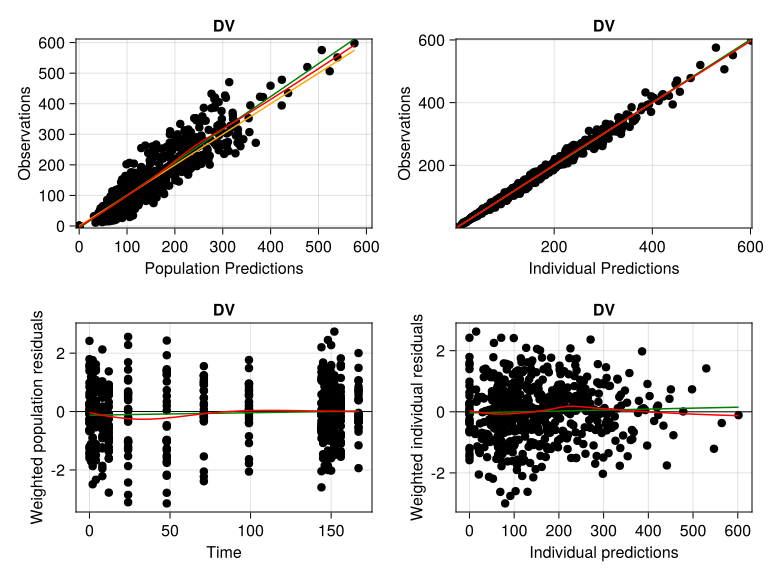
The idea is that the population predictions (preds) capture the general tendency of the observations while the individual predictions (ipreds) should coincide much more closely with the observations. That is exactly what we are observing in the top row subplots in our goodness of fit plot.
Regarding the bottom row, on the left we have the weighted population residuals (wres) against time, and on the right we have the weighted individual residuals (iwres) against ipreds. Here we should not see any perceived pattern, which indicates that the error model in the model has a mean 0 and constant variance. Like before, this seems to be what we are observing in our goodness of fit plot.
Hence, our covariate model with allometric scaling and different sex creatinine clearance effectw on clearance is a good candidate for our final model.
1.6 Time-Varying Covariates
Pumas can handle time-varying covariates. This happens automatically if, when parsing a dataset, read_pumas detects that covariate values change over time.
1.6.1 painord Dataset
Here’s an example with an ordinal regression using the painord dataset from PharmaDatasets.jl. :painord is our observations measuring the perceived pain in a scale from 0 to 3, which we need to have the range shifted by 1 (1 to 4). Additionally, we’ll use the concentration in plasma, :conc as a covariate. Of course, :conc varies with time, thus, it is a time-varying covariate:
painord = dataset("pumas/pain_remed")
first(painord, 5)
5×8 DataFrame
| Row | id | arm | dose | time | conc | painord | dv | remed |
|---|---|---|---|---|---|---|---|---|
| Int64 | Int64 | Int64 | Float64 | Float64 | Int64 | Int64 | Int64 | |
| 1 | 1 | 2 | 20 | 0.0 | 0.0 | 3 | 0 | 0 |
| 2 | 1 | 2 | 20 | 0.5 | 1.15578 | 1 | 1 | 0 |
| 3 | 1 | 2 | 20 | 1.0 | 1.37211 | 0 | 1 | 0 |
| 4 | 1 | 2 | 20 | 1.5 | 1.30058 | 0 | 1 | 0 |
| 5 | 1 | 2 | 20 | 2.0 | 1.19195 | 1 | 1 | 0 |
@rtransform! painord :painord = :painord + 1;
describe(painord, :mean, :std, :first, :last, :eltype)
8×6 DataFrame
| Row | variable | mean | std | first | last | eltype |
|---|---|---|---|---|---|---|
| Symbol | Float64 | Float64 | Real | Real | DataType | |
| 1 | id | 80.5 | 46.1992 | 1 | 160 | Int64 |
| 2 | arm | 1.5 | 1.11833 | 2 | 0 | Int64 |
| 3 | dose | 26.25 | 31.9017 | 20 | 0 | Int64 |
| 4 | time | 3.375 | 2.5183 | 0.0 | 8.0 | Float64 |
| 5 | conc | 0.93018 | 1.49902 | 0.0 | 0.0 | Float64 |
| 6 | painord | 2.50208 | 0.863839 | 4 | 4 | Int64 |
| 7 | dv | 0.508333 | 0.500061 | 0 | 0 | Int64 |
| 8 | remed | 0.059375 | 0.236387 | 0 | 0 | Int64 |
unique(painord.dose)4-element Vector{Int64}:
20
80
0
5As we can see we have 160 subjects were given either 0, 5, 20, or 80 units of a certain painkiller drug.
:conc is the drug concentration in plasma and :painord is the perceived pain in a scale from 1 to 4.
First, we’ll parse the painord dataset into a Population. Note that we’ll be using event_data=false since we do not have any dosing rows:
pop_ord =
    read_pumas(painord; observations = [:painord], covariates = [:conc], event_data = false)
Note
We won’t be going into the details of the ordinal regression model in this tutorial. We highly encourage you to take a look at the Ordinal Regression Pumas Tutorial for an in-depth explanation.
We’ll build an ordinal regression model declaring :conc as a covariate. In the @derived block we’ll state the the likelihood of :painord follows a Categorical distribution:
ordinal_model = @model begin
    @param begin
        b₁ ∈ RealDomain(; init = 0)
        b₂ ∈ RealDomain(; init = 1)
        b₃ ∈ RealDomain(; init = 1)
        slope ∈ RealDomain(; init = 0)
    end

    @covariates conc # time-varying

    @pre begin
        effect = slope * conc

        # Logit of cumulative probabilities
        lge₁ = b₁ + effect
        lge₂ = lge₁ - b₂
        lge₃ = lge₂ - b₃

        # Probabilities of >=1 and >=2 and >=3
        pge₁ = logistic(lge₁)
        pge₂ = logistic(lge₂)
        pge₃ = logistic(lge₃)

        # Probabilities of Y=1,2,3,4
        p₁ = 1.0 - pge₁
        p₂ = pge₁ - pge₂
        p₃ = pge₂ - pge₃
        p₄ = pge₃
    end

    @derived begin
        painord ~ @. Categorical(p₁, p₂, p₃, p₄)
    end
end
PumasModel
Parameters: b₁, b₂, b₃, slope
Random effects:
Covariates: conc
Dynamical system variables:
Dynamical system type: No dynamical model
Derived: painord
Observed: painordFinally we’ll fit our model using NaivePooled estimation method since it does not have any random-effects, i.e. no @random block:
ordinal_fit = fit(ordinal_model, pop_ord, init_params(ordinal_model), NaivePooled())[ Info: Checking the initial parameter values.
[ Info: The initial negative log likelihood and its gradient are finite. Check passed.
Iter Function value Gradient norm
0 3.103008e+03 7.031210e+02
* time: 7.796287536621094e-5
1 2.994747e+03 1.083462e+03
* time: 0.08284807205200195
2 2.406265e+03 1.884408e+02
* time: 0.08770990371704102
3 2.344175e+03 7.741610e+01
* time: 0.09326601028442383
4 2.323153e+03 2.907642e+01
* time: 0.09937691688537598
5 2.318222e+03 2.273295e+01
* time: 0.10541796684265137
6 2.316833e+03 1.390527e+01
* time: 0.11154794692993164
7 2.316425e+03 4.490883e+00
* time: 0.1178739070892334
8 2.316362e+03 9.374519e-01
* time: 0.12433195114135742
9 2.316356e+03 1.928785e-01
* time: 0.1309518814086914
10 2.316355e+03 3.119615e-02
* time: 0.13750600814819336
11 2.316355e+03 6.215513e-03
* time: 0.18999099731445312
12 2.316355e+03 8.313206e-04
* time: 0.19475603103637695FittedPumasModel
Successful minimization: true
Likelihood approximation: NaivePooled
Likelihood Optimizer: BFGS
Dynamical system type: No dynamical model
Log-likelihood value: -2316.3554
Number of subjects: 160
Number of parameters: Fixed Optimized
0 4
Observation records: Active Missing
painord: 1920 0
Total: 1920 0
-------------------
Estimate
-------------------
b₁ 2.5112
b₂ 2.1951
b₃ 1.9643
slope -0.38871
-------------------As expected, the ordinal model fit estimates a negative effect of :conc on :painord measured by the slope parameter.
1.7 Missing Data in Covariates
The way how Pumas handles missing values inside covariates depends if the covariate is constant or time-varying. For both cases Pumas will interpolate the available values to fill in the missing values. If, for any subject, all of the covariate’s values are missing, Pumas will throw an error while parsing the data with read_pumas.
For both missing constant and time-varying covariates, Pumas, by default, does piece-wise constant interpolation with “next observation carried backward” (NOCB, NONMEM default). Of course for constant covariates the interpolated values over the missing values will be constant values. This can be adjusted with the covariates_direction keyword argument of read_pumas. The default value :right is NOCB and :left is “last observation carried forward” (LOCF, Monolix default).
Hence, for LOCF, you can use the following:
pop = read_pumas(pkdata; covariates_direction = :left)along with any other required keyword arguments for column mapping.
Note
The same behavior for covariates_direction applies to time-varying covariates during the interpolation in the ODE solver. They will also be piece-wise constant interpolated following either NOCB or LOCF depending on the covariates_direction value.
1.8 Categorical Covariates
In some situations, you’ll find yourself with categorical covariates with multiple levels, instead of binary or continuous covariates. Categorical covariates are covariates that can take on a finite number of distinct values.
Pumas can easily address categorical covariates. In the @pre block you can use a nested if ... elseif ... else statement to handle the different categories.
For example:
@pre begin
    CL = if RACE == 1
        tvcl * (WT / 70)^dwtdcl * exp(η[1]) * drace1dcl
    elseif RACE == 2
        tvcl * (WT / 70)^dwtdcl * exp(η[1]) * drace2dcl
    elseif RACE == 3
        tvcl * (WT / 70)^dwtdcl * exp(η[1]) * drace3dcl
    end
end
Here we are conditioning the clearance (CL) on the RACE covariate by modulating which population-level parameter will be used for the clearance calculation: drace1dcl, drace2dcl, and drace3dcl.
There’s nothing wrong with the code above, but it can be a bit cumbersome to write and read. In order to make it more readable and maintainable, you can use the following example:
@pre begin
    raceoncl = race1cl^(race == 1) * race2cl^(race == 2) * race3cl^(race == 3)
    CL = tvcl * raceoncl
end
Here we are using the ^ operator to raise each race value to the power of the race1cl, race2cl, and race3cl values. If any of the race values is not equal to the race value, the result will be 1, otherwise it will be the respective race1cl, race2cl, or race3cl value.
1.9 Conclusion
This tutorial shows how to build covariate model in Pumas in a workflow approach. The main purpose was to inform how to:
- parse covariate data into a
Population - add covariate information into a model
We also went over what are the differences between constant and time-varying covariates and how does Pumas deal with missing data inside covariates.