using Dates
using Pumas
using PumasUtilities
using CairoMakie
using DataFramesMeta
using PharmaDatasets
Fitting models with Pumas
Caution
Some functions in this tutorial are only available after you load the PumasUtilities package.
1 Fitting a PK model
In this tutorial we will go through the steps required to fit a model in Pumas.
We’ll show two models:
- proportional error model
- additive error model
Additionally, we’ll learn how to compare both models and make a decision on which model is more appropriate for the data.
1.1 Pumas’ workflow
- Define a model. It can be a
PumasModelor aPumasEMModel. - Define a
SubjectandPopulation. - Fit your model.
- Perform inference on the model’s population-level parameters (also known as fixed effects).
- Predict from a fitted model using the empirical Bayes estimate or Simulate random observations from a fitted model using the sampling distribution (also known as likelihood).
- Model diagnostics and visual predictive checks.
Note
Pumas modeling is a highly iterative process. Eventually you’ll probably go back and forth in the stages of workflow. This is natural and expected in Pumas’ modeling. Just remember to have good code organization and version control for all of the workflow iterations.
Tip
Objects of PumasModel are created with the @model macro and they represent NLME models, i.e. models that we fit with iterative maximum likelihood estimates with first order (conditional) dynamics FO/FOCE/LaplaceI.
PumasEMModel are created with the @emmodel macro and they represent SAEM models, i.e. models that we fit using stochastic aproximation of the expectation-maximization estimation method.
1.1.1 Defining a model in Pumas
To define a model in Pumas, you can use either the macros or the function interfaces. We will cover the macros interface in this lesson.
To define a model using the macro interface, you start with a begin .. end block of code with @model:
my_model = @model begin endPumasModel
Parameters:
Random effects:
Covariates:
Dynamical system variables:
Dynamical system type: No dynamical model
Derived:
Observed: This creates an empty model. Now we need to populate it with model components. These are additional macros that we can include inside the @model definition. We won’t be covering all the possible macros that we can use in this lesson, but here is the full list:
@param, fixed effects specifications.@random, random effects specifications.@covariates, covariate names.@pre, pre-processing variables for the dynamic system and statistical specification.@dosecontrol, specification of any dose control parameters present in the model.@vars, shorthand notation.@init, initial conditions for the dynamic system.@dynamics, dynamics of the model.@derived, statistical modeling of dependent variables.@observed, model information to be stored in the model solution.
Note
The model components are marked by special macros. A macro in Julia behaves somewhat like a function and is marked with a @ character. These model components should be placed inside the @model macro.
1.1.1.1 Model parameters with @param
Ok, let’s start with our model_proportional using the macro @model interface.
First, we’ll define our parameters with the @param macro:
@param begin
    ParameterName ∈ Domain(...)
    ...
end
Tip
To use the “in” (∈) operator in Julia, you can either replace ∈ for in or type \in <TAB> for the Unicode character.
By using the begin ... end block we can specify one parameter per line.
Regarding the Domain(...), Pumas has several types of domains for you to specify in your @param block. Here is a list:
RealDomainfor scalar parametersVectorDomainfor vectorsPDiagDomainfor positive definite matrices with diagonal structurePSDDomainfor general positive semi-definite matrices
Tip
PDiagDomain and PSDDomain are generally used for between-subject variability (BSV) covariance matrices.
By using PDiagDomain we are implying that the BSV are independent, i.e. they are not allowed to have covariance, since the off-diagonal elements are turned off by default.
Whereas, by using PSDDomain we are implying that the BSV are not independent, i.e. they are allowed to have covariance, since we have a full covariance matrix instead of a diagonal one.
Tip
If you don’t specify any arguments inside the domain constructor it will either error (for some domains that have required arguments) or will use the defaults. In the case of the RealDomain() without arguments it just uses the following arguments:
RealDomain(; lower = -∞, upper = ∞, init = 0)@param begin
tvcl ∈ RealDomain(; lower = 0) # typical clearance
tvvc ∈ RealDomain(; lower = 0) # typical central volume of distribution
Ω ∈ PDiagDomain(2) # between-subject variability
σ ∈ RealDomain(; lower = 0) # residual variability
end
Note
We will be using the convention to name population-specific parameters (also commonly referred to as typical values) as tv*.
For example, typical clearance will be named as tvcl.
1.1.1.2 Subject parameters with @random
Second, we’ll define our subject-specific parameters (commonly known as our etas, η, or random effects) with the @random macro:
@random begin
    η ~ MvNormal(Ω) # multi-variate Normal with mean 0 and covariance matrix Ω
end
Here we are using the random assignment with the tilde notation, as in η ~ Distribution(...). This means that the parameter η is distributed as some distribution Distribution with certain parameters.
In our case, η comes from a multivariate normal distribution (MvNormal) with a single positional argument Ω which itself is a positive diagonal covariance matrix. This way of instantiating a multivariate normal distribution implies that the mean vector is a vector filled with 0s. Hence, our η is a vector of the same length as Ω’s dimensionality, i.e. vector of length 2.
Tip
You can use any distribution in the @random block. For a full list of distributions, check the Pumas @random documentation.
You don’t need to be constrained to normal or multivariate normal. Don’t forget to check the Beyond Gaussian Random Effects tutorial.
1.1.1.3 Pre-processing variables with @pre
We can specify all the necessary variable and statistical pre-processing with the @pre macro.
Note
The @pre block is traditionally used to specify the inputs of the Ordinary Differential Equations (ODE) system used for non-linear mixed-effects PK/PD models (NLME).
We can also use @pre to specify variable transformations.
Here, we are defining all the individual PK parameters, i.e. the typical values with the added ηs:
@pre begin
    CL = tvcl * exp(η[1])
    Vc = tvvc * exp(η[2])
end
Note
We will be using the convention to name subject-specific PK parameters (also commonly referred to as individual coefficients or icoefs) with uppercase.
For example, the subject-specific clearance parameter will be named as CL.
1.1.1.4 Model dynamics with @dynamics
The next block is the @dynamics blocks. Here we specify all of the model’s dynamics, i.e. the ordinary differential equation (ODE) system:
@dynamics begin
    Central' = -CL / Vc * Central
end
We specify one ODE per line inside the @dynamics block. The syntax is:
Compartment' = transformation * CompartmentThis means that the rate of change, i.e. the derivative, of the compartment Compartment is equal to a transformation of the current values of the compartment Compartment. It is very similar to the textbook/paper math notation that you see in most pharmacometrics resources.
We can name our compartments whatever we want. In our example, we are naming the central compartment simply as Central.
Tip
You can also use aliases for the most common compartment models as a shortcut. Check the Pumas documentation on the predefined ODEs.
For example, the Central1 alias corresponds to the following @dynamics block:
Central' = -(CL / Vc) * CentralIf you are using the aliases, don’t forget to adjust the variables’ naming in the @pre block accordingly.
Note
Under the hood Pumas performs some checks on your ODE system specified in the @dynamics block.
First, Pumas will check if the ODE is linear, and, if possible, will replace your ODE system by a simple matrix exponentiation operation, which is faster than the analytical closed form solution.
Second, Pumas will check if the ODE system is a stiff ODE system, and adjust the numerical solver accordingly.
This means that you don’t need to think about numerical details of your ODE system. Just focus on the dynamics and let Pumas take care of the rest.
1.1.1.5 Statistical modeling of dependent variables with @derived
Our final block, @derived, is used to specify all the assumed distributions of observed variables that are derived from the blocks above. This is where we include our dependent variable/observation: dv and any other intermediate values that we need to calculate:
@derived begin
    cp = @. 1_000 * Central / Vc # Change of units
    dv ~ @. Normal(cp, cp * σ)
end
Note that dv is being declared as following a Normal distribution with the same tilde notation ~ as we used in the @random block. It means (much like the mathematical model notation) that dv follows a Normal distribution. Since dv is a vector of values, we need to broadcast, i.e. vectorize, the operation with the dot . operator:
dv ~ Normal.(μ, σ)where μ and σ are the parameters that parametrizes the distribution, and in this case are the mean and standard deviation respectively. We can use the @. macro which tells Julia to apply the . in every operator and function call after it:
dv ~ @. Normal(μ, σ)
Note
We are using the @. macro which tells Julia to vectorize (add the “dot syntax”) to all operations and function calls to the right of it.
Additionally, we are also calculating an intermediate variable cp which represents the concentration in plasma.
Here we are using a deterministic assignment with the equal sign =. This means that the calculation of cp is deterministically equal to the values of the Central compartment divided by the individual volume of the Central compartment PK parameter, Vc, scaled by a thousands units. Hence, the multiplication by a 1_000.
Tip
In this block we can use all variables defined in the previous blocks, in our example the @param, @dynamics and @pre blocks.
1.1.1.6 Creating two different Pumas models
We now proceed by creating two different Pumas models. Both of them are 1-compartment IV models, but with different error models.
Note
The additive error model has a parameter σ inside the @derived block that, contrary to the proportional error model, is not multiplied by the mean cp:
dv ~ @. Normal(cp, σ)model_proportional = @model begin
@param begin
# here we define the parameters of the model
tvcl ∈ RealDomain(; lower = 0) # typical clearance
tvvc ∈ RealDomain(; lower = 0) # typical central volume of distribution
Ω ∈ PDiagDomain(2) # between-subject variability
σ ∈ RealDomain(; lower = 0) # residual variability
end
@random begin
# here we define random effects
η ~ MvNormal(Ω) # multi-variate Normal with mean 0 and covariance matrix Ω
end
@pre begin
# pre computations and other statistical transformations
CL = tvcl * exp(η[1])
Vc = tvvc * exp(η[2])
end
# here we define compartments and dynamics
@dynamics begin
Central' = -CL / Vc * Central
end
@derived begin
# here is where we calculate concentration and add residual error
# tilde (~) means "distributed as"
cp = @. 1_000 * Central / Vc # Change of units
dv ~ @. Normal(cp, cp * σ)
end
endPumasModel
Parameters: tvcl, tvvc, Ω, σ
Random effects: η
Covariates:
Dynamical system variables: Central
Dynamical system type: Matrix exponential
Derived: cp, dv
Observed: cp, dvmodel_additive = @model begin
@param begin
# here we define the parameters of the model
tvcl ∈ RealDomain(; lower = 0) # typical clearance
tvvc ∈ RealDomain(; lower = 0) # typical central volume of distribution
Ω ∈ PDiagDomain(2) # between-subject variability
σ ∈ RealDomain(; lower = 0) # residual variability
end
@random begin
# here we define random effects
η ~ MvNormal(Ω) # multi-variate Normal with mean 0 and covariance matrix Ω
end
@pre begin
# pre computations and other statistical transformations
CL = tvcl * exp(η[1])
Vc = tvvc * exp(η[2])
end
# here we define compartments and dynamics
@dynamics begin
Central' = -CL / Vc * Central
end
@derived begin
# here is where we calculate concentration and add residual error
# tilde (~) means "distributed as"
cp = @. 1_000 * Central / Vc # Change of units
dv ~ @. Normal(cp, σ)
end
endPumasModel
Parameters: tvcl, tvvc, Ω, σ
Random effects: η
Covariates:
Dynamical system variables: Central
Dynamical system type: Matrix exponential
Derived: cp, dv
Observed: cp, dv1.1.2 Define a Subject and Population
Once we have our model defined we have to specify a Subject or a Population.
In Pumas, subjects are represented by the Subject type and collections of subjects are represented as vectors of Subjects are defined as Population.
Subjects can be constructed with the Subject constructor, for example:
Subject(; id = 1)Subject
ID: 1We just constructed a Subject that has ID equal to 1 and no extra information.
Since a Population is just a vector of Subjects, we can use a simple map function over the a list of IDs:
pop1 = map(i -> Subject(; id = i), 1:10)Population
Subjects: 10
Observations: Or we can construct the vector of Subjects manually:
pop2 = [Subject(; id = 1), Subject(; id = 2)]Population
Subjects: 2
Observations: pop1 isa Populationtruepop2 isa PopulationtrueAs you can see a Vector of Subjects will always be a Population.
1.1.2.1 Reading Subjects directly from a DataFrame
Of course we don’t want to create Subjects and Populations manually. We generally have the data represented in some sort of tabular data format, e.g. CSV or Excel files.
Tip
Don’t forget to check the Data Wrangling - Reading and Writing Data tutorial.
We can parse a DataFrame into a Population (or Subject in the case of a single subject data) with the read_pumas function.
The read_pumas function accepts as first argument a DataFrame followed by the following keyword arguments:
observations: dependent variables specified by a vector of column names, i.e.[:DV].covariates: covariates specified by a vector of column names.id: specifies the unique Subject ID column of theDataFrame.time: specifies the time column of theDataFrame.amt: specifies the amount column of theDataFrame.evid: specifies the event unique ID (EVID) column of theDataFrame.
Tip
The read_pumas function has more keywords arguments and options than described above. Don’t forget to check the Pumas documentation on read_pumas.
1.1.2.2 The iv_sd_3 dataset
In our example, we’ll be using the iv_sd_3 (intravenous single dose 3) dataset from the PharmaDatasets package. This package has several pharma-related datasets ready to be used in the most common pharmacometrics workflows, such as in our example, PK model fitting.
pkdata = dataset("iv_sd_3")
first(pkdata, 5)
5×9 DataFrame
| Row | id | time | cp | dv | amt | evid | cmt | rate | dosegrp |
|---|---|---|---|---|---|---|---|---|---|
| Int64 | Float64 | Float64? | Float64? | Float64? | Int64 | Int64 | Float64 | Int64 | |
| 1 | 1 | 0.0 | missing | missing | 10.0 | 1 | 1 | 0.0 | 10 |
| 2 | 1 | 0.25 | 239.642 | 233.091 | missing | 0 | 1 | 0.0 | 10 |
| 3 | 1 | 0.5 | 235.243 | 270.886 | missing | 0 | 1 | 0.0 | 10 |
| 4 | 1 | 0.75 | 230.925 | 309.181 | missing | 0 | 1 | 0.0 | 10 |
| 5 | 1 | 1.0 | 226.687 | 269.433 | missing | 0 | 1 | 0.0 | 10 |
Let’s see how many different EVIDs rows we have per subject:
@by pkdata :id begin
    :EVID_0 = count(==(0), :evid)
    :EVID_1 = count(==(1), :evid)
end
last(pkdata, 5)
5×9 DataFrame
| Row | id | time | cp | dv | amt | evid | cmt | rate | dosegrp |
|---|---|---|---|---|---|---|---|---|---|
| Int64 | Float64 | Float64? | Float64? | Float64? | Int64 | Int64 | Float64 | Int64 | |
| 1 | 120 | 24.0 | 366.994 | 449.561 | missing | 0 | 1 | 0.0 | 120 |
| 2 | 120 | 36.0 | 147.526 | 129.685 | missing | 0 | 1 | 0.0 | 120 |
| 3 | 120 | 48.0 | 59.3031 | 67.6517 | missing | 0 | 1 | 0.0 | 120 |
| 4 | 120 | 60.0 | 23.8389 | 22.5353 | missing | 0 | 1 | 0.0 | 120 |
| 5 | 120 | 71.9 | 9.65593 | 14.4299 | missing | 0 | 1 | 0.0 | 120 |
Tip
We won’t be covering data wrangling here. Please check the Pumas Data Wrangling tutorials.
As you can see, we have 120 subjects each with one dosing row (evid == 1)and 15 measurement rows (evid == 0).
Each one of the subjets is being given a dose of 10 units intravenous at time 0.
Additionally we have a :dv column with the observations for the measurement rows.
Let’s parse the pkdata DataFrame into a Population with the read_pumas function:
pop = read_pumas(
    pkdata;
    observations = [:dv],
    id = :id,
    time = :time,
    amt = :amt,
    evid = :evid,
)
Population
Subjects: 120
Observations: dv1.1.3 Fit your model
Now we are ready to fit our model! We already have a model specified, model_proportional and model_additive, along with a Population: pop. We can proceed with model fitting.
Model fiting in Pumas has the purpose of estimating parameters and is done by calling the fit function with the following positional arguments:
- Pumas model.
- a
Population. - a named tuple of the initial parameter values.
- an inference algorithm.
1.1.3.1 Initial Parameter Values
We already covered model and Population, now let’s talk about initial parameter values. It is the 3rd positional argument inside fit.
You can specify you initial parameters as a named tuple. For instance, if you want to have a certain parameter, tvcl, as having an initial value as 1, you can do so by passing it inside a named tuple in the 3rd positional argument of fit:
fit(model, population, (; tvcl = 1.0))
Tip
You can also use the helper function init_params which will recover all the initial parameters we specified inside the model’s @param block.
Let’s define a named tuple with the initial parameters values and name it iparams:
iparams = (; tvcl = 1, tvvc = 10, Ω = Diagonal([0.09, 0.09]), σ = 0.3)(tvcl = 1,
tvvc = 10,
Ω = [0.09 0.0; 0.0 0.09],
σ = 0.3,)
Note
For Ω, since it lies in the PDiagDomain, we are using a diagonal matrix (created with Diagonal by passing a vector where the components are the diagonal entries) as the initial value.
1.1.3.2 Inference Algorithms
Finally, our last (4th) positional argument is the choice of inference algorithm.
Pumas has the following available inference algorithms:
Marginal Likelihood Estimation:
NaivePooled(): first order approximation without random-effects.FO(): first-order approximation.FOCE(): first-order conditional estimation with automatic interaction detection.LaplaceI(): second-order Laplace approximation.
Bayesian with Markov Chain Monte Carlo (MCMC):
BayesMCMC(): MCMC using No-U-Turn Sampler (NUTS).
Note
We can also use a Maximum A Posteriori (MAP) estimation procedure for any marginal likelihood estimation algorithm. You just need to call the MAP() constructor with the desired marginal likelihood algorithm inside, for instance:
fit(model, population, init_params(model), MAP(FOCE()))Ok, we are ready to fit our model. Let’s use the FOCE:
fit_proportional = fit(model_proportional, pop, iparams, FOCE())[ Info: Checking the initial parameter values.
[ Info: The initial negative log likelihood and its gradient are finite. Check passed.
Iter Function value Gradient norm
0 1.287102e+04 2.175890e+03
* time: 0.027844905853271484
1 9.966790e+03 7.267813e+02
* time: 0.6010549068450928
2 9.530310e+03 5.388719e+02
* time: 0.648658037185669
3 9.441794e+03 1.704334e+02
* time: 0.7159180641174316
4 9.413161e+03 7.105680e+01
* time: 0.7596778869628906
5 9.408707e+03 4.180099e+01
* time: 0.8186728954315186
6 9.404627e+03 3.771692e+01
* time: 0.8616259098052979
7 9.402418e+03 3.621230e+01
* time: 0.9110009670257568
8 9.400119e+03 3.839299e+01
* time: 0.9527878761291504
9 9.396350e+03 7.333659e+01
* time: 1.0020840167999268
10 9.389051e+03 1.097953e+02
* time: 1.0432960987091064
11 9.379940e+03 9.319034e+01
* time: 1.0917909145355225
12 9.376311e+03 2.014382e+01
* time: 1.1331310272216797
13 9.375988e+03 1.192272e+01
* time: 1.1811459064483643
14 9.375925e+03 4.549414e+00
* time: 1.2214360237121582
15 9.375900e+03 4.852128e+00
* time: 1.266369104385376
16 9.375861e+03 4.819367e+00
* time: 1.3049750328063965
17 9.375777e+03 4.366774e+00
* time: 1.351196050643921
18 9.375687e+03 4.860785e+00
* time: 1.3897159099578857
19 9.375637e+03 2.345193e+00
* time: 1.4352080821990967
20 9.375629e+03 4.676144e-01
* time: 1.4724760055541992
21 9.375628e+03 2.889481e-02
* time: 1.5174229145050049
22 9.375628e+03 1.919920e-03
* time: 1.551379919052124
23 9.375628e+03 1.919876e-03
* time: 1.613231897354126
24 9.375628e+03 1.919876e-03
* time: 1.6933410167694092
25 9.375628e+03 1.919876e-03
* time: 1.7735340595245361FittedPumasModel
Successful minimization: true
Likelihood approximation: FOCE
Likelihood Optimizer: BFGS
Dynamical system type: Matrix exponential
Log-likelihood value: -9375.6282
Number of subjects: 120
Number of parameters: Fixed Optimized
0 5
Observation records: Active Missing
dv: 1799 0
Total: 1799 0
-------------------
Estimate
-------------------
tvcl 3.8588
tvvc 70.902
Ω₁,₁ 0.092946
Ω₂,₂ 0.086108
σ 0.20577
-------------------fit_additive = fit(model_additive, pop, iparams, FOCE())[ Info: Checking the initial parameter values.
[ Info: The initial negative log likelihood and its gradient are finite. Check passed.
Iter Function value Gradient norm
0 1.588465e+08 3.176814e+08
* time: 7.009506225585938e-5
1 2.150338e+07 4.299216e+07
* time: 0.0635061264038086
2 1.572596e+07 3.143684e+07
* time: 0.10039591789245605
3 6.715321e+06 1.341423e+07
* time: 0.15968799591064453
4 3.566781e+06 7.116167e+06
* time: 0.19690608978271484
5 1.747391e+06 3.476277e+06
* time: 0.23496294021606445
6 8.864643e+05 1.753370e+06
* time: 0.29218006134033203
7 4.469860e+05 8.733525e+05
* time: 0.33063602447509766
8 2.293023e+05 4.369527e+05
* time: 0.37761998176574707
9 1.203634e+05 2.180736e+05
* time: 0.4156680107116699
10 6.619611e+04 1.087875e+05
* time: 0.46279191970825195
11 3.931783e+04 5.413982e+04
* time: 0.5015969276428223
12 2.608031e+04 2.684178e+04
* time: 0.549976110458374
13 1.964043e+04 1.321348e+04
* time: 0.5972681045532227
14 1.657783e+04 6.422866e+03
* time: 0.6695001125335693
15 1.517886e+04 3.049947e+03
* time: 0.7162559032440186
16 1.458532e+04 2.325300e+03
* time: 0.7724530696868896
17 1.436644e+04 2.248173e+03
* time: 0.8182809352874756
18 1.430480e+04 2.186338e+03
* time: 0.8768870830535889
19 1.429438e+04 2.151376e+03
* time: 0.9228870868682861
20 1.429364e+04 2.140132e+03
* time: 0.977802038192749
21 1.429360e+04 2.138375e+03
* time: 1.0210809707641602
22 1.429353e+04 2.136357e+03
* time: 1.0768821239471436
23 1.429332e+04 2.132626e+03
* time: 1.1228880882263184
24 1.429278e+04 2.126512e+03
* time: 1.1797709465026855
25 1.429138e+04 2.115703e+03
* time: 1.2273061275482178
26 1.428779e+04 2.096394e+03
* time: 1.2851500511169434
27 1.427867e+04 2.060545e+03
* time: 1.3331189155578613
28 1.425620e+04 1.992853e+03
* time: 1.3936269283294678
29 1.420359e+04 1.867123e+03
* time: 1.4462649822235107
30 1.409023e+04 1.653232e+03
* time: 1.5074760913848877
31 1.386154e+04 1.339477e+03
* time: 1.5701210498809814
32 1.337973e+04 1.047824e+03
* time: 1.6158359050750732
33 1.234246e+04 1.048616e+03
* time: 1.6706879138946533
34 1.184183e+04 1.347805e+03
* time: 1.7134311199188232
35 1.171224e+04 3.358814e+02
* time: 1.7628319263458252
36 1.166954e+04 2.657564e+02
* time: 1.8013300895690918
37 1.165889e+04 2.390139e+02
* time: 1.8486371040344238
38 1.165375e+04 2.184673e+02
* time: 1.8868670463562012
39 1.164756e+04 1.786822e+02
* time: 1.9262409210205078
40 1.164727e+04 1.704844e+02
* time: 1.9704179763793945
41 1.164727e+04 1.694788e+02
* time: 2.0054008960723877
42 1.164727e+04 1.694343e+02
* time: 2.046647071838379
43 1.164727e+04 1.689388e+02
* time: 2.0797510147094727
44 1.164727e+04 1.684041e+02
* time: 2.1147301197052
45 1.164726e+04 1.673538e+02
* time: 2.156140089035034
46 1.164723e+04 1.657327e+02
* time: 2.190448045730591
47 1.164717e+04 1.629735e+02
* time: 2.234100103378296
48 1.164701e+04 1.583893e+02
* time: 2.2701539993286133
49 1.164661e+04 1.505776e+02
* time: 2.318434000015259
50 1.164558e+04 1.372178e+02
* time: 2.3586409091949463
51 1.164307e+04 1.144960e+02
* time: 2.3993260860443115
52 1.163736e+04 7.750730e+01
* time: 2.4480459690093994
53 1.162580e+04 8.670705e+01
* time: 2.4885189533233643
54 1.160915e+04 8.563626e+01
* time: 2.5389530658721924
55 1.160265e+04 4.989346e+01
* time: 2.579646110534668
56 1.160079e+04 3.988891e+01
* time: 2.6271700859069824
57 1.160063e+04 3.984885e+01
* time: 2.6661479473114014
58 1.160063e+04 3.991742e+01
* time: 2.702728033065796
59 1.160063e+04 3.990645e+01
* time: 2.7454869747161865
60 1.160063e+04 3.990260e+01
* time: 2.7793500423431396
61 1.160063e+04 3.988869e+01
* time: 2.8239779472351074
62 1.160063e+04 3.987120e+01
* time: 2.8583710193634033
63 1.160063e+04 3.983975e+01
* time: 2.8944740295410156
64 1.160063e+04 3.979025e+01
* time: 2.9394450187683105
65 1.160062e+04 3.970760e+01
* time: 2.975409984588623
66 1.160061e+04 3.957098e+01
* time: 3.0213351249694824
67 1.160059e+04 3.934001e+01
* time: 3.057300090789795
68 1.160053e+04 4.129114e+01
* time: 3.0954489707946777
69 1.160037e+04 4.526013e+01
* time: 3.1432669162750244
70 1.159996e+04 5.171163e+01
* time: 3.182537078857422
71 1.159889e+04 6.224566e+01
* time: 3.2314960956573486
72 1.159610e+04 7.949592e+01
* time: 3.271996021270752
73 1.158885e+04 1.116231e+02
* time: 3.3207430839538574
74 1.157141e+04 1.826731e+02
* time: 3.3594770431518555
75 1.156713e+04 1.629541e+02
* time: 3.400092124938965
76 1.155819e+04 4.596250e+01
* time: 3.4481520652770996
77 1.155714e+04 1.462578e+01
* time: 3.4869179725646973
78 1.155702e+04 2.265616e+00
* time: 3.5336360931396484
79 1.155702e+04 2.295916e+00
* time: 3.5689449310302734
80 1.155702e+04 2.298653e+00
* time: 3.603976011276245
81 1.155702e+04 2.299166e+00
* time: 3.644357919692993
82 1.155702e+04 2.299179e+00
* time: 3.679063081741333
83 1.155702e+04 2.299201e+00
* time: 3.723099946975708
84 1.155702e+04 2.299203e+00
* time: 3.761446952819824
85 1.155702e+04 2.299207e+00
* time: 3.8006579875946045
86 1.155702e+04 2.299212e+00
* time: 3.847141981124878
87 1.155702e+04 2.299212e+00
* time: 3.928410053253174
88 1.155702e+04 2.299212e+00
* time: 4.005640983581543
89 1.155702e+04 2.299212e+00
* time: 4.0559821128845215
90 1.155702e+04 2.299988e+00
* time: 4.095627069473267
91 1.155702e+04 2.300088e+00
* time: 4.124696969985962
92 1.155702e+04 2.300104e+00
* time: 4.166748046875
93 1.155702e+04 2.300104e+00
* time: 4.2518110275268555
94 1.155702e+04 2.303390e+00
* time: 4.296855926513672
95 1.155702e+04 2.303434e+00
* time: 4.339602947235107
96 1.155702e+04 2.308098e+00
* time: 4.391101121902466
97 1.155702e+04 2.310726e+00
* time: 4.424662113189697
98 1.155702e+04 2.313249e+00
* time: 4.45809006690979
99 1.155702e+04 2.311824e+00
* time: 4.500188112258911
100 1.155702e+04 2.304763e+00
* time: 4.533380031585693
101 1.155702e+04 2.290790e+00
* time: 4.566862106323242
102 1.155702e+04 3.202617e+00
* time: 4.609296083450317
103 1.155702e+04 4.522074e+00
* time: 4.651335954666138
104 1.155701e+04 6.352953e+00
* time: 4.687828063964844
105 1.155700e+04 8.653178e+00
* time: 4.7320311069488525
106 1.155698e+04 1.061112e+01
* time: 4.767781972885132
107 1.155695e+04 9.973410e+00
* time: 4.812144994735718
108 1.155692e+04 5.500129e+00
* time: 4.854357957839966
109 1.155691e+04 1.227379e+00
* time: 4.889992952346802
110 1.155691e+04 3.462576e-02
* time: 4.933150053024292
111 1.155691e+04 2.413785e-02
* time: 4.966234922409058
112 1.155691e+04 2.413785e-02
* time: 5.0390729904174805
113 1.155691e+04 2.413785e-02
* time: 5.123723030090332
114 1.155691e+04 3.200280e-03
* time: 5.163245916366577
115 1.155691e+04 3.200280e-03
* time: 5.232752084732056
116 1.155691e+04 3.200280e-03
* time: 5.309689044952393
117 1.155691e+04 3.200280e-03
* time: 5.3723931312561035FittedPumasModel
Successful minimization: true
Likelihood approximation: FOCE
Likelihood Optimizer: BFGS
Dynamical system type: Matrix exponential
Log-likelihood value: -11556.912
Number of subjects: 120
Number of parameters: Fixed Optimized
0 5
Observation records: Active Missing
dv: 1799 0
Total: 1799 0
-------------------
Estimate
-------------------
tvcl 3.7551
tvvc 70.013
Ω₁,₁ 0.081122
Ω₂,₂ 0.082246
σ 133.36
-------------------We can see that after a model is fitted, it prints a result with a summary and a table of the parameter estimates.
We can also recover the estimates as a named tuple with coef:
coef(fit_proportional)(tvcl = 3.8587845749819447,
tvvc = 70.90170218767902,
Ω = [0.09294630525180136 0.0; 0.0 0.0861077902226362],
σ = 0.20576945082036124,)coef(fit_additive)(tvcl = 3.7551416421129415,
tvvc = 70.01252463599228,
Ω = [0.08112199423469915 0.0; 0.0 0.08224603511171875],
σ = 133.36178550299428,)Or as a DataFrame with coeftable:
coeftable(fit_proportional)5×2 DataFrame
| Row | parameter | estimate |
|---|---|---|
| String | Float64 | |
| 1 | tvcl | 3.85878 |
| 2 | tvvc | 70.9017 |
| 3 | Ω₁,₁ | 0.0929463 |
| 4 | Ω₂,₂ | 0.0861078 |
| 5 | σ | 0.205769 |
coeftable(fit_additive)5×2 DataFrame
| Row | parameter | estimate |
|---|---|---|
| String | Float64 | |
| 1 | tvcl | 3.75514 |
| 2 | tvvc | 70.0125 |
| 3 | Ω₁,₁ | 0.081122 |
| 4 | Ω₂,₂ | 0.082246 |
| 5 | σ | 133.362 |
Here you see the first signs that the additive error model is not a good model for this data. The σ estimate values are off the charts.
1.1.4 Perform inference on the model’s population-level parameters
Once the model is fitted, we can analyze our inference and estimates.
We use the standard errors (SE) along with the 95% confidence intervals with the infer function:
infer_proportional = infer(fit_proportional)[ Info: Calculating: variance-covariance matrix.
[ Info: Done.Asymptotic inference results using sandwich estimator
Successful minimization: true
Likelihood approximation: FOCE
Likelihood Optimizer: BFGS
Dynamical system type: Matrix exponential
Log-likelihood value: -9375.6282
Number of subjects: 120
Number of parameters: Fixed Optimized
0 5
Observation records: Active Missing
dv: 1799 0
Total: 1799 0
---------------------------------------------------------------
Estimate SE 95.0% C.I.
---------------------------------------------------------------
tvcl 3.8588 0.10912 [ 3.6449 ; 4.0727 ]
tvvc 70.902 1.9604 [67.059 ; 74.744 ]
Ω₁,₁ 0.092946 0.015833 [ 0.061914; 0.12398]
Ω₂,₂ 0.086108 0.010604 [ 0.065325; 0.10689]
σ 0.20577 0.0037734 [ 0.19837 ; 0.21317]
---------------------------------------------------------------infer_additive = infer(fit_additive)[ Info: Calculating: variance-covariance matrix.
[ Info: Done.Asymptotic inference results using sandwich estimator
Successful minimization: true
Likelihood approximation: FOCE
Likelihood Optimizer: BFGS
Dynamical system type: Matrix exponential
Log-likelihood value: -11556.912
Number of subjects: 120
Number of parameters: Fixed Optimized
0 5
Observation records: Active Missing
dv: 1799 0
Total: 1799 0
--------------------------------------------------------------
Estimate SE 95.0% C.I.
--------------------------------------------------------------
tvcl 3.7551 0.13754 [ 3.4856 ; 4.0247 ]
tvvc 70.013 2.1774 [ 65.745 ; 74.28 ]
Ω₁,₁ 0.081122 0.019287 [ 0.04332 ; 0.11892]
Ω₂,₂ 0.082246 0.01133 [ 0.060041; 0.10445]
σ 133.36 10.536 [112.71 ; 154.01 ]
--------------------------------------------------------------Also if you prefer other confidence interval band, you can choose with the keyword argument level inside infer.
Note
For instance, one common band for the confidence intervals is 90%:
infer(fit_additive; level = 0.90)
Caution
We won’t be covering step 5 (predictions and simulations) of the workflow in this tutorial. The focus here is the fitting procedure and model comparisons.
Tip
You can also use the function correlation_diagnostic to print a list of parameter pairs with high or low correlations. The rest of the pairs that were not printed have a medium correlation. You can control the threshold of high correlation with the keyword argument high_cor_threshold, which is 0.7 by default.
correlation_diagnostic(infer_proportional)Parameter pairs with high correlation (higher than 0.7): ("tvcl", "tvvc"), ("tvvc", "Ω₂,₂"), ("Ω₁,₁", "Ω₂,₂"), ("Ω₂,₂", "σ")
Parameter pairs with low correlation (less than 0.35): ("tvcl", "Ω₁,₁"), ("tvvc", "Ω₁,₁"), ("tvcl", "Ω₂,₂"), ("tvcl", "σ"), ("tvvc", "σ"), ("Ω₁,₁", "σ")correlation_diagnostic(infer_additive)Parameter pairs with high correlation (higher than 0.7): ("tvcl", "Ω₁,₁"), ("tvvc", "Ω₁,₁"), ("tvvc", "Ω₂,₂")
Parameter pairs with low correlation (less than 0.35): ("tvcl", "tvvc"), ("tvcl", "Ω₂,₂"), ("Ω₁,₁", "Ω₂,₂"), ("tvcl", "σ"), ("tvvc", "σ"), ("Ω₁,₁", "σ"), ("Ω₂,₂", "σ")1.1.5 Model diagnostics
Finally, our last step is to assess model diagnostics.
1.1.5.1 Assessing model diagnostics
To assess model diagnostics we can use the inspect function in our fitted Pumas models:
inspect_proportional = inspect(fit_proportional)[ Info: Calculating predictions.
[ Info: Calculating weighted residuals.
[ Info: Calculating empirical bayes.
[ Info: Evaluating individual parameters.
[ Info: Evaluating dose control parameters.
[ Info: Done.FittedPumasModelInspection
Fitting was successful: true
Likehood approximation used for weighted residuals : Pumas.FOCE{Optim.NewtonTrustRegion{Float64}, Optim.Options{Float64, Nothing}}(Optim.NewtonTrustRegion{Float64}(1.0, 100.0, 1.4901161193847656e-8, 0.1, 0.25, 0.75, false), Optim.Options(x_abstol = 0.0, x_reltol = 0.0, f_abstol = 0.0, f_reltol = 0.0, g_abstol = 1.0e-5, g_reltol = 1.0e-8, outer_x_abstol = 0.0, outer_x_reltol = 0.0, outer_f_abstol = 0.0, outer_f_reltol = 0.0, outer_g_abstol = 1.0e-8, outer_g_reltol = 1.0e-8, f_calls_limit = 0, g_calls_limit = 0, h_calls_limit = 0, allow_f_increases = false, allow_outer_f_increases = true, successive_f_tol = 1, iterations = 1000, outer_iterations = 1000, store_trace = false, trace_simplex = false, show_trace = false, extended_trace = false, show_every = 1, time_limit = NaN, )
)inspect_additive = inspect(fit_additive)[ Info: Calculating predictions.
[ Info: Calculating weighted residuals.
[ Info: Calculating empirical bayes.
[ Info: Evaluating individual parameters.
[ Info: Evaluating dose control parameters.
[ Info: Done.FittedPumasModelInspection
Fitting was successful: true
Likehood approximation used for weighted residuals : Pumas.FOCE{Optim.NewtonTrustRegion{Float64}, Optim.Options{Float64, Nothing}}(Optim.NewtonTrustRegion{Float64}(1.0, 100.0, 1.4901161193847656e-8, 0.1, 0.25, 0.75, false), Optim.Options(x_abstol = 0.0, x_reltol = 0.0, f_abstol = 0.0, f_reltol = 0.0, g_abstol = 1.0e-5, g_reltol = 1.0e-8, outer_x_abstol = 0.0, outer_x_reltol = 0.0, outer_f_abstol = 0.0, outer_f_reltol = 0.0, outer_g_abstol = 1.0e-8, outer_g_reltol = 1.0e-8, f_calls_limit = 0, g_calls_limit = 0, h_calls_limit = 0, allow_f_increases = false, allow_outer_f_increases = true, successive_f_tol = 1, iterations = 1000, outer_iterations = 1000, store_trace = false, trace_simplex = false, show_trace = false, extended_trace = false, show_every = 1, time_limit = NaN, )
)inspect will perform the following procedures:
- model predictions
- residuals
- empirical Bayes estimates
- individual coefficients
- dose control parameters
Additionally, we can get all of our model metrics, such as AIC, BIC, etc. with the metrics_table function:
metrics_table(fit_proportional)17×2 DataFrame
| Row | Metric | Value |
|---|---|---|
| String | Any | |
| 1 | Successful | true |
| 2 | Estimation Time | 1.774 |
| 3 | Subjects | 120 |
| 4 | Fixed Parameters | 0 |
| 5 | Optimized Parameters | 5 |
| 6 | dv Active Observations | 1799 |
| 7 | dv Missing Observations | 0 |
| 8 | Total Active Observations | 1799 |
| 9 | Total Missing Observations | 0 |
| 10 | Likelihood Approximation | Pumas.FOCE{Optim.NewtonTrustRegion{Float64}, Optim.Options{Float64, Nothing}} |
| 11 | LogLikelihood (LL) | -9375.63 |
| 12 | -2LL | 18751.3 |
| 13 | AIC | 18761.3 |
| 14 | BIC | 18788.7 |
| 15 | (η-shrinkage) η₁ | 0.013 |
| 16 | (η-shrinkage) η₂ | 0.024 |
| 17 | (ϵ-shrinkage) dv | 0.061 |
metrics_table(fit_additive)17×2 DataFrame
| Row | Metric | Value |
|---|---|---|
| String | Any | |
| 1 | Successful | true |
| 2 | Estimation Time | 5.373 |
| 3 | Subjects | 120 |
| 4 | Fixed Parameters | 0 |
| 5 | Optimized Parameters | 5 |
| 6 | dv Active Observations | 1799 |
| 7 | dv Missing Observations | 0 |
| 8 | Total Active Observations | 1799 |
| 9 | Total Missing Observations | 0 |
| 10 | Likelihood Approximation | Pumas.FOCE{Optim.NewtonTrustRegion{Float64}, Optim.Options{Float64, Nothing}} |
| 11 | LogLikelihood (LL) | -11556.9 |
| 12 | -2LL | 23113.8 |
| 13 | AIC | 23123.8 |
| 14 | BIC | 23151.3 |
| 15 | (η-shrinkage) η₁ | 0.282 |
| 16 | (η-shrinkage) η₂ | 0.137 |
| 17 | (ϵ-shrinkage) dv | 0.043 |
As you can the proportional error model has a lower AIC than the additive, hence it should be preferred.
But let’s take a look at visual diagnostics.
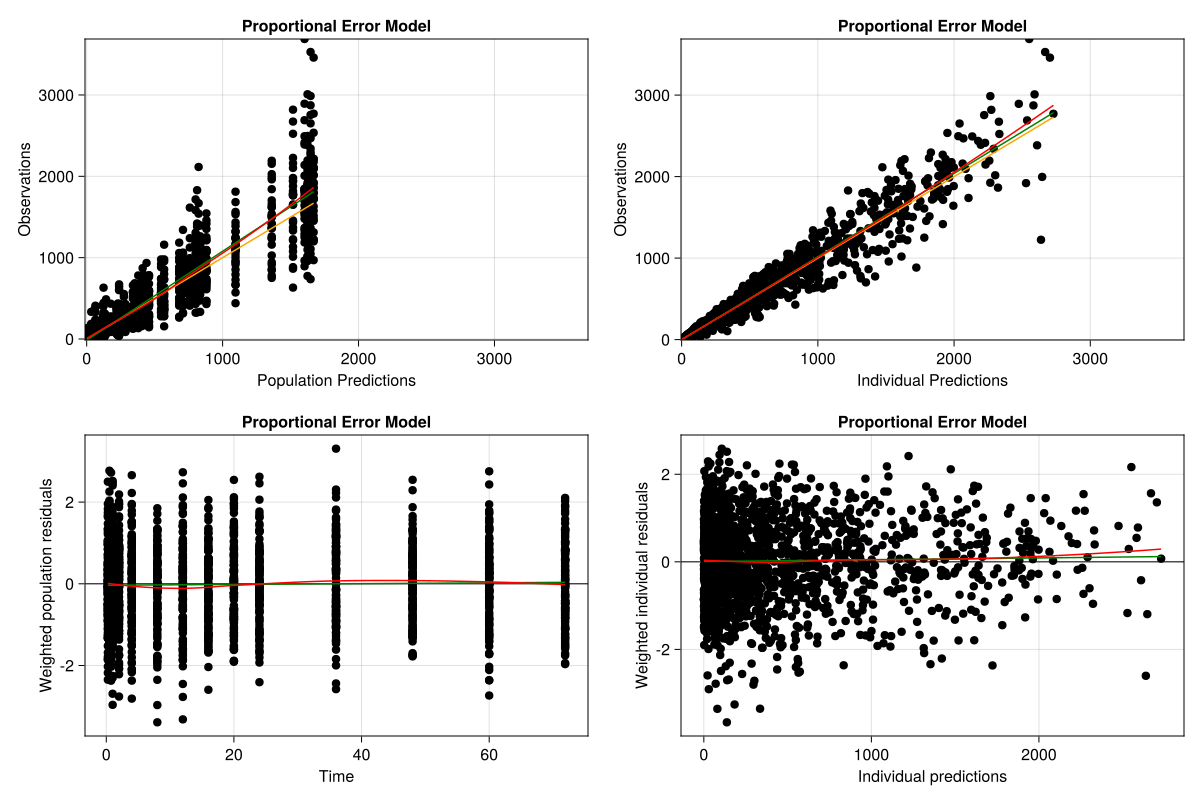
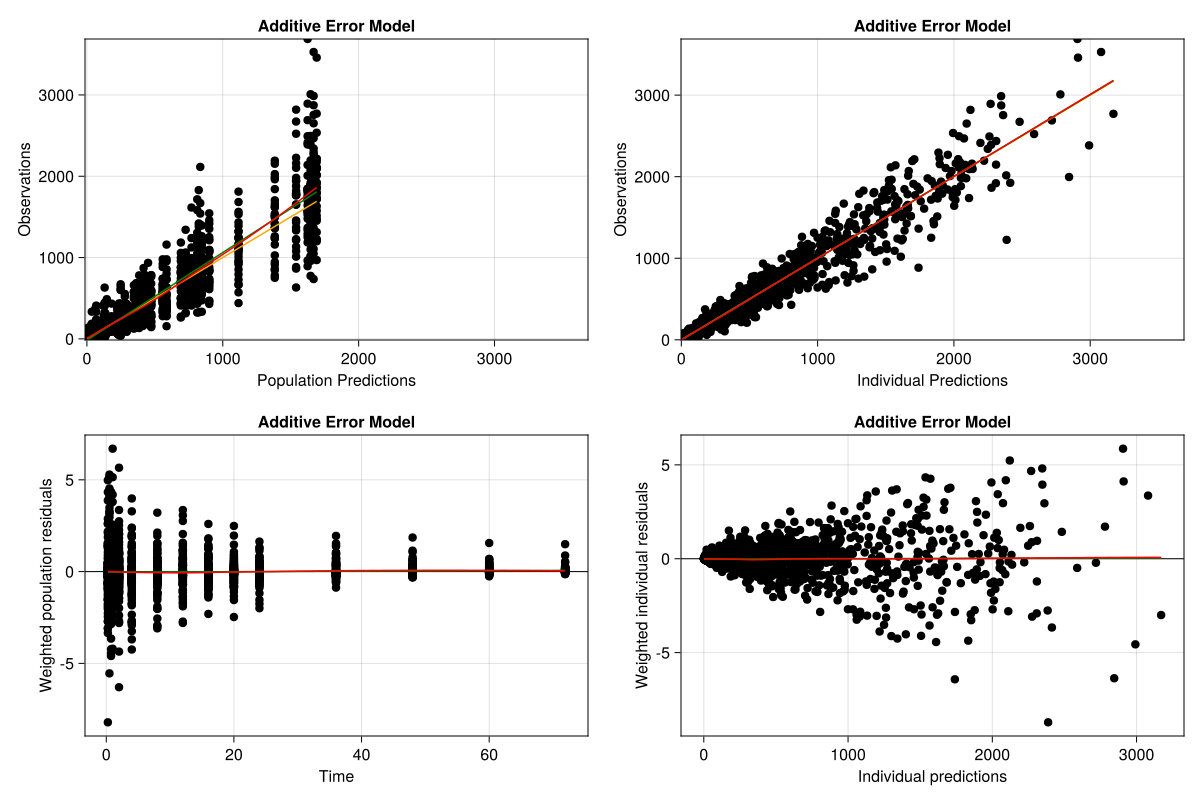
1.1.5.1.1 Goodness of Fit Plots
We can pass any result from inspect to the goodness_of_fit plotting function:
goodness_of_fit(
    inspect_proportional;
    figure = (; resolution = (1200, 800)),
    axis = (; title = "Proportional Error Model"),
)
goodness_of_fit(
    inspect_additive;
    figure = (; resolution = (1200, 800)),
    axis = (; title = "Additive Error Model"),
)
Tip
We are using some keyword arguments to customize the plot returned by the goodness_of_fit function.
Please check Pumas’ documentation on plot customization for more details.
The weighted residuals should be standard normally distributed throughout the time and the individual predictions domain.
We see that this is the case for the proportional error model, but certainly not for the additive error model. The additive error model weighted residuals’ variance increases with the individual predictions values.
This is another indicator that the additive error model is not able to capture the data generating process.
Tip
One might also plot a QQ plot to check for normality of the residuals.
1.1.5.2 Visual Predictive Checks (VPCs)
To conclude, we can inspect visual predictive checks with the vpc_plot() function. But first, we need to generate a VPC object with the vpc() function:
vpc_proportional = vpc(fit_proportional)[ Info: Continuous VPCVisual Predictive Check
Type of VPC: Continuous VPC
Simulated populations: 499
Subjects in data: 120
Stratification variable(s): None
Confidence level: 0.95
VPC lines: quantiles ([0.1, 0.5, 0.9])vpc_additive = vpc(fit_additive)[ Info: Continuous VPCVisual Predictive Check
Type of VPC: Continuous VPC
Simulated populations: 499
Subjects in data: 120
Stratification variable(s): None
Confidence level: 0.95
VPC lines: quantiles ([0.1, 0.5, 0.9])Now, we need to use the vpc_plot function into our newly created VPC object:
vpc_plot(vpc_proportional; axis = (; title = "Proportional Error Model"))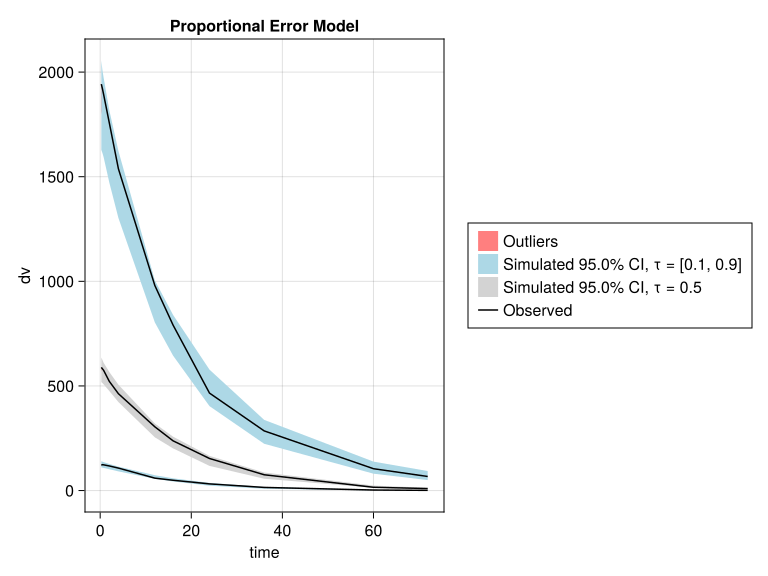
vpc_plot(vpc_additive; axis = (; title = "Additive Error Model"))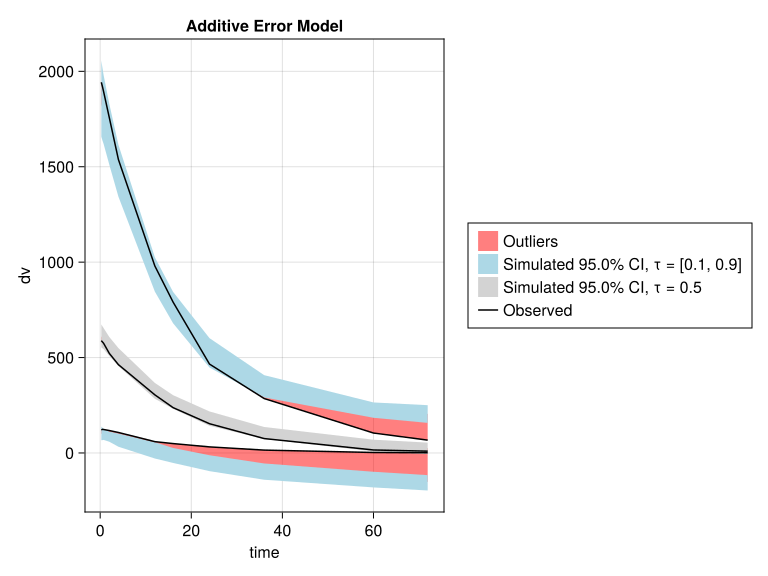
As you can see in the VPC plots above, the additive error model performs poorly in the visual predictive checks, and its quantiles even capture negative concentrations.
Hence, this is the final nail in the coffin of the additive error. Ultimately, we should prefer the proportional error model.
1.2 Conclusion
This tutorial showed how to use fit a PK model in Pumas and how to compare models.
Please try out fit on your own data and model, and reach out if further questions or problems come up.